Up next in 10

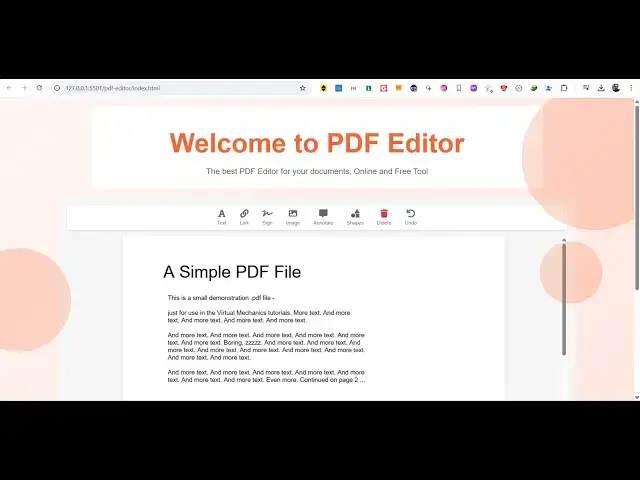
Build a Ultimate PDF Editor to Edit & Annotate PDF Using jsPDF,Html2Canvas & PDF-LIB in Browser
Mar 21, 2025

Buy the full source code of application here:
https://procodestore.com/index.php/product/build-a-ultimate-pdf-editor-to-edit-annotate-pdf-using-jspdfhtml2canvas-pdf-lib-in-browser/
Watch My Visual Studio Code IDE Setup Video For Fonts,Themes & Extensions
https://youtu.be/Bon8Pm1gbX8
Hi Join the official discord server to resolve doubts here:
https://discord.gg/cRnjhk6nzW
Visit my Online Free Media Tool Website
https://freemediatools.com/
Buy Premium Scripts and Apps Here:
https://procodestore.com/
Show More Show Less View Video Transcript
0:00
uh hello guys welcome to this video so
0:02
in this video I will show you a PDF
0:05
editor I developed in the browser and uh
0:09
it actually will be able to addit your
0:12
PDF files it's a static web application
0:14
that I developed in HTML CSS and
0:16
JavaScript so no server site code is
0:18
involved right here it's a canva clone
0:21
or Adobe Acrobat PDF editor you can see
0:23
we are running it locally and it's a
0:25
single page application so when you land
0:28
on this application you will see choose
0:30
PDF file button will be there so here as
0:33
you click the button you need to select
0:36
your PDF file so as soon as you select
0:38
the PDF file you will see the pages will
0:40
be rendered and now you'll be able to
0:43
annotate you will be able to edit the
0:45
PDF document directly in the browser
0:47
using all these controls if you see we
0:49
have the ability to add text link
0:52
digital signature image annotate
0:55
different kinds of shapes we can even
0:57
delete pages as well so undo operation
1:00
as well this is the first page and then
1:04
if you want to go to the next page we
1:05
also have the previous and the next
1:08
page so it's a PDF renderer and also we
1:11
can modify this so let's suppose I want
1:13
to add text we simply you'll be able to
1:17
add text right here so you can add any
1:21
text let's suppose this
1:27
location so here just you can control
1:31
the location here with your mouse here
1:34
and even you can change the color using
1:36
this Color Picker you can modify the
1:38
color as well so you can see that you
1:40
can even control the phone size if you
1:42
want bigger if you want
1:45
smaller you can even underline bold
1:48
italic everything these are controls and
1:51
then we also have ability to digitally
1:54
draw the signature or upload your custom
1:56
signature file as well so you can draw
2:00
the signature right here
2:03
suppose digital
2:05
signature we can even annotate let's
2:08
suppose you want to annotate something
2:10
so you just
2:12
highlight the portion that you want to
2:14
annotate you can see that so you can do
2:16
that as well
2:18
so then we also have the ability to add
2:21
images so here you will choose your
2:24
whatever image file that you need to add
2:26
so
2:32
so you can see you can add images as
2:35
well you can control it the size of this
2:38
image by using the mouse it's a single
2:41
page application guys and then you also
2:43
have ability to add
2:46
rectangles can see that it's very
2:51
easy you can edit the PDF text directly
2:54
here as well you can change the text
2:56
here you can see whatever text written
2:59
right here you you can even change that
3:00
as well simply click on that and the
3:02
text will be editable so you can even
3:04
change the uh the actual text in the PDF
3:08
document that's is very important after
3:10
you make the changes there is a button
3:12
out there apply changes so if you click
3:14
this button there will be this option
3:17
download
3:18
PDF so your PDF file will get downloaded
3:22
with all the modified changes that you
3:24
have made right here if you see that so
3:26
everything is changed here all the
3:27
shapes all the signature the text
3:30
annotating you can see the image is also
3:33
added so it is entirely built inside
3:35
HTML CSS and JavaScript guys you can see
3:37
that no server s side code is involved
3:39
so if you need to purchase the full
3:41
source code the link is given in the
3:43
description so after you purchase it
3:46
automatically you will be redirected to
3:48
Google Drive where you will actually get
3:49
the source code which will contain these
3:51
three files the HTML CSS and the
3:54
JavaScript so these three files will be
3:57
there and it's very easy to deploy this
3:59
applic as well righty in the browser
4:01
itself so it is actually using these
4:04
third party libraries which are all open
4:06
source first of all we are using
4:09
fabricjs then we are using PDF JS and
4:12
then we also using PD JS PDF HTML to
4:16
Canvas so these are all libraries that
4:19
we using here you can see we including
4:21
the
4:22
CDN so one by one let me just show you
4:26
the libraries first of all if you don't
4:27
know about jspdf it's a
4:30
client side JavaScript PDF generation
4:33
library and then we also are using PDF
4:36
lip which is again a
4:41
JavaScript PDF generation Library you
4:44
can see
4:48
that and after that we are also using
4:51
fabric JS as
4:53
well which is
4:56
a JavaScript animation libraries so we
4:59
are also using this and lastly HTML to
5:02
Canvas to actually take the screenshot
5:05
with JavaScript this is also op Source
5:08
package library of JavaScript so we are
5:10
using all these libraries to make this
5:13
nice little PDF editor which can do
5:16
everything it's like canva PDF editor or
5:20
Adobe Acrobat so you can directly
5:22
purchase the full source code guys you
5:24
will get this static website or tool
5:26
which is entirely built in the browser
5:28
no server site code is involved so the
5:30
link is given in the description you can
5:32
go to my website Pro Cod store.com and
5:34
after purchasing it you will get these
5:36
three files and then you can simply run
5:39
this index. HTML by right clicking it
5:41
open with live server the application
5:43
will start here and here you can
5:47
actually select your PDF
5:51
file so now the PDF file will load and
5:54
we have all these controls so thank you
5:56
very much guys for watching this video
5:58
and also with visit my website free
6:01
mediat tools.com which contains
6:03
thousands of tools regarding audio video
6:05
and image and I will be seeing you in
6:08
the next video
#Other