Up next in 10

Build a React.js Youtube Style Progressbar Using react-progress Show it On Form Submit in Browser
Jan 9, 2025

Get the full source code of application here:
https://gist.github.com/gauti123456/fe959ef616192ce3cd7ffb8810344cd7
Show More Show Less View Video Transcript
0:00
uh hello guys welcome to this video so
0:02
in this video I will show you a YouTube
0:04
style progress part uh which is there
0:07
specifically for react CH applications
0:09
so there is a package which is useful
0:12
for showing these progress Parts which
0:13
is react progress I will show you a very
0:16
basic example where we have a actual
0:19
HTML form and when the user submits this
0:22
form while entering the name and the
0:24
email address we have a submit Button as
0:26
well so when the user clicks the submit
0:28
button you will actually see this
0:30
progress bar if you see on the top of
0:32
the screen we have this progress bar you
0:35
something like YouTube like and after
0:38
that we display the details it's a very
0:40
practical example so when the user comes
0:42
to your website they fill out the
0:43
information and click on the submit
0:45
button and you will actually see this
0:47
progress bar happening so once it
0:49
reaches you will see the result so I
0:51
will show you this complete example how
0:54
to implement this progress bar you can
0:56
customize the look and feel of this
0:58
progress bar so this this is actually
1:00
the command here npmi react progress
1:03
I've already installed it so I will just
1:05
show you a very basic example so 798
1:08
weekly downloads so after installing it
1:11
so just make a simple functional
1:16
component and first of all we need to
1:18
import this package so we will simply
1:21
import this package by using the import
1:23
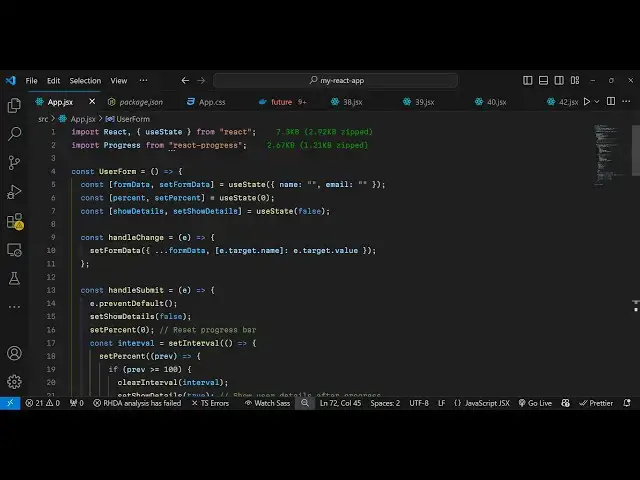
statement so import progress
1:31
and it will be coming from this package
1:33
react progress so it is only 2.67 kiloby
1:37
size of this package and we are
1:39
importing this progress bar and now we
1:42
need
1:44
basically if you want to show directly
1:47
this progress bar uh the component is
1:49
very very much
1:51
simple let me show you the actual
1:53
progress bar so inside this div I will
1:57
Whenever Wherever You need to show this
1:59
progress bar simply put this component
2:01
and it actually takes two options first
2:03
is a percentage of the progress bar and
2:07
uh you can provide a value from 0 to 100
2:10
so let me provide 50 and then you can
2:13
change the color of the progress as well
2:15
progress bar so blue let me set it to
2:18
Blue and here you can even control the
2:20
height of the progress bar as well so
2:22
let me put H 50 so now what happens if
2:25
you see in the browser you will actually
2:27
see this progress bar
2:31
so the height is 50 so we can even
2:34
decrease this height let's suppose only
2:36
20
2:38
here so you can adjust the height
2:41
accordingly I think five is more than
2:45
enough so it will look something like
2:47
this so it is similar to YouTube uh
2:49
YouTube I think is having the red color
2:52
so I will change it to Red so something
2:55
like this you can even control the
2:57
height to Let's suppose three
3:00
so it basically looks like YouTube
3:02
progress part so when whenever you go to
3:06
youtube.com you have seen this progress
3:08
part while the things are loading this
3:11
exactly looks like this if you go to the
3:14
YouTube website so let me go to
3:16
youtube.com so you will actually see
3:17
this progress bar in this position so so
3:22
my internet connection is fast so you
3:24
can't see that but you will see this uh
3:26
red progress bar appearing so exactly we
3:29
are implementing this so what we can
3:31
simply
3:33
do so these are the three properties
3:36
where we control the progress bar very
3:38
simply and
3:41
uh now if you want to implement this we
3:44
can actually have a form where the user
3:48
will submit the information so we can
3:52
give it a padding of 20 pixel and a
3:54
maximum width
3:56
of 400 pixel
4:00
and
4:03
margin of
4:08
Auto so inside this we will
4:12
actually have two input Fields where we
4:15
allow the user to actually enter the
4:18
name and the email so we have these two
4:23
input
4:27
Fields so if you refresh now
4:31
uh so we do need to Define these
4:34
functions as well which is on change so
4:36
handle change on both these input Fields
4:39
I binded this onchange event handler so
4:41
when the value is
4:47
changed so it's a complete example uh
4:50
all the source code will be given in the
4:51
description so it's this tutorial is not
4:54
about uh the forms so it's a very simple
4:57
form which does the same thing where if
4:59
the user submits the information and
5:01
once they click the submit button we
5:03
actually show the progress bar and then
5:05
the details so what is happening right
5:07
here when we are clicking the button we
5:09
are actually submitting the form and
5:11
this onsubmit event handler uh executes
5:15
and this inside this I have defined a
5:17
function here handle submit which uh
5:20
handles the submit submission of the
5:22
form and here we are preventing the auto
5:24
submission and then we are setting the
5:27
progress bar percent to zero and we are
5:30
start starting from zero and then we are
5:33
simply executing set interval function
5:35
to have a
5:37
delay so we are showing this progress by
5:40
incrementing it from 0 to 100 and in
5:44
about 200 millisecond so we are Simply
5:48
Having a delay to
5:50
just so that the user can see the
5:52
progress part appearing so once they you
5:55
enter the details you will see it will
5:58
take almost half of a second to actually
6:01
let the user know that the progress bar
6:04
is there so in this way you can use this
6:06
package specifically designed for react
6:08
Chase application react progress to make
6:11
a progress bar similarly to YouTube and
6:14
you can change the color and look and
6:16
feel of this progress bar very simply by
6:18
changing the color to red and now if you
6:22
submit you will see this red progress
6:24
bar so it's a very simple component
6:27
specifically designed for react CH app
6:30
so thank you very much for watching this
6:31
video and do check out my website as
6:33
well free mediat tools.com which
6:36
contains thousands of tools
6:38
regarding audio video n MH and I will be
6:41
seeing you in the next video