live_tv
Livestream Starting Soon
00
Hours
:
00
Minutes
:
00
Seconds
Up next in 10

Build a React.js Video to GIF Editor Using FFMPEG WASM in Browser Using HTML5 & TypeScript
Jan 9, 2025

Buy the full source code of application here:
https://procodestore.com/index.php/product/build-a-react-js-video-to-gif-editor-using-ffmpeg-wasm-in-browser-using-html5-typescript/
Hi Join the official discord server to resolve doubts here:
https://discord.gg/cRnjhk6nzW
Visit my Online Free Media Tool Website
https://freemediatools.com/
Buy Premium Scripts and Apps Here:
https://procodestore.com/
Show More Show Less View Video Transcript
0:02
uh hello guys welcome to this video so
0:04
in this video I will actually show you a
0:08
fmpg web assembly video to give editor
0:12
that I developed inside uh react CH so
0:16
the job of this uh application is to
0:19
actually create GIF animations from your
0:22
MP4 or Avi videos you can take any
0:25
extension of videos so this is actually
0:28
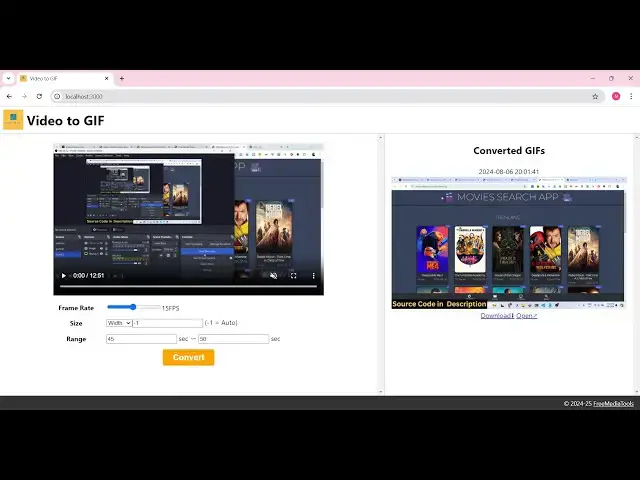
the interface of the application that
0:30
you can see right here you can actually
0:32
drag and drop your input video or you
0:35
can select your video so we can
0:38
basically select my video file here so
0:42
this will be the interface so you can
0:44
play your video file like this and here
0:47
this is the actual cont you can control
0:49
the FPS of your GIF animation and then
0:52
you can control the size as well width
0:55
and height and here is actually the
0:59
range here you need to provide on which
1:02
second to which second you can control
1:04
let's suppose I want to have the GIF
1:06
animation created
1:08
from the 25th second till the 30th
1:13
second in the video so it will actually
1:14
trim out that portion in the video and
1:17
as I click the convert button it is
1:19
status is converting so now it will
1:22
actually
1:24
create you will see the file has been
1:27
created
1:30
so it's 5 Second long GIF animation we
1:33
can simply download this so you can see
1:37
this will be the second GIF animation
1:38
created you will see so you can see as
1:41
you create GIF animations you can open
1:43
it inside a new window or you can
1:45
download them as well you can see that
1:47
so if you download it you will actually
1:49
see this is actually your GIF animation
1:52
is
1:54
created so in this way you can do this
1:57
uh very
1:58
easily so let's let's suppose I want to
2:01
create the GIF animation which starts
2:03
from the 90th second and it reaches up
2:07
to 95 so here you provide your from and
2:11
to and click on convert so now you can
2:13
see a new GIF animation will be
2:17
created a third GIF animation will be
2:23
created so just
2:28
wait so it is done veloped inside react
2:31
CH using typescript and we have used the
2:33
fmpg web assembly library for carrying
2:37
carrying out this
2:41
conversion so now if you see on the
2:45
right hand side a gift will be created
2:48
if you open the inspect element go to
2:50
console you will actually see fmpg
2:53
commands
2:55
are executing so first of all fmpg is
2:59
down downloaded inside your browser and
3:01
it has been executed directly in the
3:04
browser using fmpg web assembly library
3:08
and we have used react CH for having
3:11
this project so it's a complete uh react
3:15
chers project guys you will see various
3:17
components are there this is the header
3:19
component footer drop and paste video
3:22
content it is coded inside typescript
3:24
which is a super set of JavaScript so
3:27
this is the overall project if you would
3:29
need to Chase it the link is given in
3:31
the description you can directly go to
3:32
my website Pro Cod store.com you can see
3:35
the GIF animation has been created so
3:39
you can go to proc Cod store.com the
3:40
link is given in the description of this
3:42
live stream you can purchase the full
3:44
source code so after you purchase it you
3:46
will be redirected to Google Drive where
3:48
you will actually get the zip file you
3:50
need to extract the content of the zip
3:52
file to actually get this full directory
3:54
structure and now to run this
3:56
application it's very simple if you're
3:58
running it for the very first time
4:00
simply in npmi this will install all the
4:03
modules which are present in the
4:05
package.json file and it will actually
4:07
create the node modules folder which you
4:09
see in the left hand side after that you
4:12
just need to say npm run def this will
4:14
start the development server on Local
4:16
Host
4:17
3000 and if you want to
4:20
also you will see that if I run this you
4:24
can see the application is running so if
4:26
you want to deploy this it's very simple
4:28
npm run B build this will actually build
4:31
out the react application you can see
4:37
that so now you can see
4:40
that the it has created a disc folder
4:44
and here you can
4:46
simply need
4:48
to actually deploy this if you're
4:51
purchasing a domain name you can deploy
4:54
this code to any hosting shared hosting
4:56
Cloud hosting or any kind of Hosting so
4:58
it's very simple the link is given you
5:00
will find the ZIP file you need to
5:02
extract it and for building this we are
5:05
actually using
5:06
fmpg web assembly Library which allows
5:11
you to actually use fmpg directly in the
5:14
browser and it's a library it has its
5:16
own official documentation you can read
5:18
more about it we have used it to
5:21
actually build this video to GI editor
5:24
where you actually select your video and
5:26
then the GIF animation has been created
5:29
so here you need to provide the from
5:32
location and the to location so it will
5:35
trim out that portion of the video and
5:37
it will actually create a gif animation
5:39
for you like
5:42
this it's very quick and effective you
5:45
will see that it will actually also
5:48
store the history how many GIF
5:50
animations you created it will show you
5:52
so you will see you can either download
5:55
this inside the GIF animation or you can
5:58
open it inside and new window as well so
6:01
if I come back to the code right here we
6:03
have various components out there if you
6:05
see if this is a Content component
6:07
footer header history select video file
6:11
so all these application is actually
6:13
divided into various components in react
6:15
CH you'll see that this is a settings
6:20
one so these are different settings that
6:23
you can control for the GIF animation
6:24
frame rate size and the range as well
6:28
from which location to which location
6:30
so these are different settings status
6:33
like this we have used this Library
6:35
buffer you can
6:41
see you can see that so in this
6:49
way we actually loading the fmpg library
6:54
like this you can see that and this is
6:56
actually the command right here to
6:58
actually convert it to give Animation
7:01
from this this is a framework from which
7:04
second to the starting location to the
7:06
ending location we are providing this
7:09
withd if the vid is selected by the user
7:11
this is a video filter this is a simple
7:14
fmpg command to actually convert a video
7:17
to GIF animation so we have used this to
7:20
actually build this so if you're
7:22
interested guys the link is given in the
7:24
description of this project you can
7:26
directly purchase it and this will be
7:28
the directory structure you will get all
7:30
the source code you can modify it or you
7:32
can change it to accordingly you can
7:35
extend this application as well it's a
7:37
complete project that you will get so
7:39
thank you very much for watching this
7:41
video and I will be seeing you in the
7:43
next one
#Fun & Trivia
#Flash-Based Entertainment
#Movies
#Online Media
#Programming
#Multimedia Software
#Online Goodies
#Clip Art & Animated GIFs
#Animated Films