Up next in 10

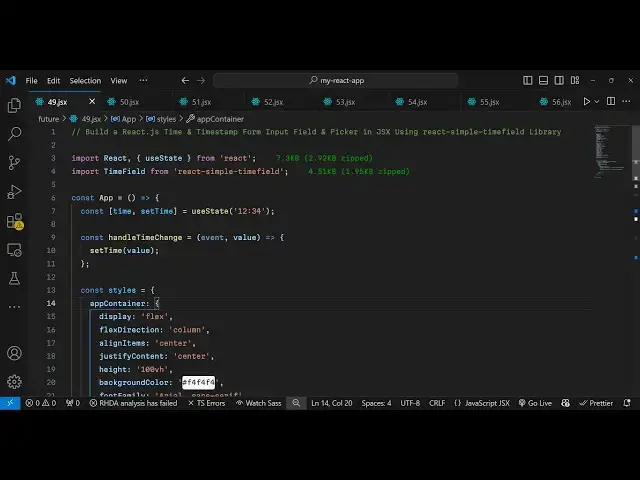
Build a React.js Time & Timestamp Form Input Field & Picker in JSX Using react-simple-timefield
Jan 9, 2025

Buy the full source code of application here:
Show More Show Less View Video Transcript
0:00
uh hello guys welcome to this video so
0:02
in this video I will show you a Time
0:05
Field
0:06
picker so if you want to select time
0:08
inside your react CH application there
0:10
is a Time picker available to you so if
0:13
you're making some kind of application
0:14
related to time so such that that you
0:17
want the user input to input the time so
0:21
this is the input field you can simply
0:24
integrate inside your react CH
0:25
application so we are putting this time
0:27
period which is 12:34
0:31
so this is a simple input field where
0:33
you can input the
0:34
time this is the hour here automatically
0:38
whenever you write it it will
0:39
automatically format
0:42
itself so as soon as you put the this is
0:45
hour this is
0:46
minute and this is in
0:50
second so you can't write automatically
0:54
as you as the user
0:57
write it will automatically adjust you
1:00
will see as soon as you write the hour
1:03
minute second it will adjust
1:05
automatically so this is the actual
1:07
package which allows you to input time
1:09
period very efficiently inside your
1:11
react Chase application there is a
1:13
specific package for this if you go to
1:15
npmjs.com and just search for this
1:18
package which is react simple Time Field
1:22
this is actually the
1:24
package uh I've already installed it so
1:27
actually this is a command here so
1:29
simply install this package and it's
1:31
almost got 10,000 weekly downloads it's
1:34
a pretty popular package so the default
1:37
purpose of this package is that you
1:39
allow the user to input the time so they
1:43
simply can uh input the time in a very
1:46
efficient manner so I will show you
1:49
complete example here so just make a
1:51
simple functional component and first of
1:55
all we will import
1:56
the module by using the import statement
2:00
so right at the top we just need to
2:03
write here import time field and then
2:07
from this react time simple time field
2:11
so this is 5 kilobyte package so we
2:14
importing time field so after doing
2:18
this we will add declare a state
2:22
variable for keeping track of the time
2:26
and this is again a hook function for
2:28
adjusting the state UST State function I
2:31
will use which is initial time I will
2:33
give which is
2:35
12:34 so this is initial time that I'm
2:39
giving to the time picker and now we
2:42
will declare some Styles this is
2:44
actually a Styles object you can align
2:48
you can basically declare
2:54
it right here let just declare it it's a
2:57
simple Styles object which contains
2:59
information about
3:02
your whatever jsx that you will
3:05
write so I will give all this source
3:09
code in the description so don't need to
3:11
worry about
3:12
it so this video is not about CSS so
3:16
that's why I'm not explaining you about
3:18
this CSS this is just the code
3:21
responsible for styling this time Pi we
3:25
we declared all the Styles now we need
3:28
to declare this in the J s x so we
3:30
simply in the div we apply the style
3:35
which is the Styles object containing
3:38
the app container in this way you can
3:40
dynamically apply Styles and in that one
3:44
we will give it the style which Styles
3:49
dot heading and you simply say react
3:53
simple time
3:56
field example
4:00
and after this
4:03
we have another div tag and inside this
4:06
we will give it the Styles which are
4:09
Time
4:11
Field styles. Time Field
4:16
wrapper and here we embed the component
4:19
which is time
4:20
field and it actually takes the actual
4:23
value of the time picker which is
4:25
contained inside this variable of time
4:27
the second parameter is on change so so
4:29
whenever you change the time this handle
4:32
time change function will execute you
4:34
can call this anything so whenever you
4:37
change the time whenever the user input
4:40
some time this function will execute so
4:43
we just need to Define this function so
4:50
handle handle time change and just
4:53
inside this what we will do we will set
4:57
the time so whatever automatically event
5:01
will be passed here event and then the
5:05
value so here you'll be using the hook
5:08
function set time and pass the value so
5:12
after we do this
5:16
uh we bind this on change if you just
5:19
refresh your application just look you
5:22
will see this time picker and you will
5:24
see this
5:25
1234 and now if I try to change this you
5:28
will see as soon as I
5:33
write it
5:36
changes and also if you want to change
5:39
the format there is also this third
5:42
option which is input so in this
5:45
parameter that you can provide an
5:47
object you can specifically provide in
5:50
which format you want the time to be
5:56
appearing and there is one other option
5:58
which is show show seconds so if you
6:01
also want to show seconds you can put it
6:03
to true so now what happens you will see
6:06
the seconds input as
6:08
well so 0 0 will automatically get added
6:11
so seconds will also get added so this
6:14
is the hour this is minutes this is
6:17
seconds so this is your time picker so
6:19
here the user can provide any dat date
6:22
and time and then you can even provide
6:25
colon as
6:26
well so if you want to also show
6:30
colons you can put colon as well so
6:34
essentially guys this is a Time picker
6:36
available inside react is to efficiently
6:39
allow the user to select time and
6:41
automatically your time will be
6:43
formatted whenever you are taking user
6:45
input let's suppose time period so this
6:49
is actually the package so thank you
6:51
very much for watching this video and do
6:53
check out my website as well free mediat
6:55
tools.com uh which contains thousands of
6:58
tools regarding audio video and image
7:01
and I will be seeing you guys in the
7:03
next video