Up next in 10


Buy the full source code of application here:
Show More Show Less View Video Transcript
0:00
uh hello guys welcome to this video so
0:03
in this video I will yet another show
0:05
you a package in react which allows you
0:08
to input time period or select a range
0:12
of time period so this is actually the
0:15
package you can select very efficiently
0:19
this is actually the time period which
0:21
is mentioned you can drag and drop your
0:23
mouse to whatever time period that you
0:25
want to select whichever time range you
0:28
can adjust it using your mouse
0:30
and you will see automatically the time
0:33
period will be mentioned here from 10:30
0:36
to 14:30 so whatever time period that
0:38
you select in between this red section
0:42
automatically it will be highlighted so
0:44
in this easy way intuitive way if you
0:46
want to select time period efficiently
0:49
there is a certain package in react sh
0:51
that you that allows you to select
0:53
certain time periods time ranges very
0:56
efficiently using this time picker so
0:59
the Library name is uh react time range
1:03
picker so if you go to npmjs.com and
1:07
just search for this package react time
1:10
range picker uh this is actually the
1:14
package if you
1:17
see I've already installed it so this is
1:20
actually the command and it's almost
1:22
having 62 weekly download it's a pretty
1:24
popular package and it efficiently
1:28
allows you to select time period certain
1:30
time periods in a very efficient way I
1:34
will show you a complete example so just
1:36
make a simple functional component and
1:39
just after that you need to import
1:42
this we simply import this by time
1:46
range picker and it will be available
1:48
from this package which is react time
1:50
range picker and it's almost 8 kilobyte
1:55
package so in this way you can first of
1:57
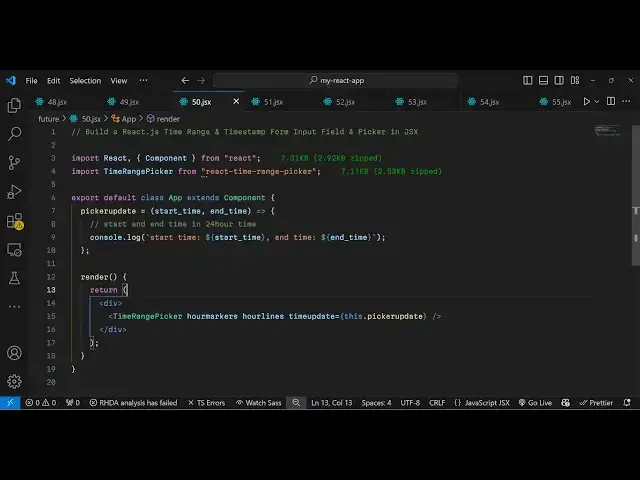
all import this so after importing it
2:00
we come to the jsx and wherever you need
2:03
to embed this we simply embed this
2:05
component which is time range picker and
2:08
it actually takes some options first of
2:11
all if you want to show
2:15
our hour marker then you will put this
2:19
option if you also want to show the hour
2:21
lines you will also
2:25
show and if you just
2:28
refresh and and see
2:31
the whatever it is you will
2:34
see in this way the now the time period
2:38
is not there for time period we do need
2:41
to uh bind in this call back function
2:45
time update so this function executes
2:48
whenever user tries to pick up sometime
2:51
uh some kind of time range so right here
2:55
this function that we defined which is
2:57
Pier update I will just Define this so
3:00
whenever the time period changes
3:02
whenever user selects certain period of
3:05
time I will Define this function picker
3:09
update and right
3:12
here automatically the starting time and
3:15
the ending time will automatically get
3:18
start time end time so in this way you
3:22
can console log whatever start time the
3:24
end time user selects in this easy way
3:36
so if you just try to refresh
3:53
uh so I think this com this specific
3:56
Library doesn't allow you to use
3:58
functional component we need to write
4:00
something like this which is export
4:02
default class app extend component it's
4:04
a class level component so it's this
4:08
specific library is not supported with
4:10
functional component so you do need to
4:12
write it in a class level component like
4:14
which is class app extends component and
4:17
now you will actually see it will work
4:21
very efficiently so you will be able to
4:23
select certain time ranges using this
4:25
nice little interface so red color will
4:27
be highlighted so
4:31
you will see you will print out
4:33
whichever time period the user has
4:34
selected using the mouse so this is
4:37
actually the package guys you can use
4:39
this package if you are making some kind
4:41
of time related application so this
4:43
package will be perfect for
4:45
that so thank you very much for watching
4:47
this video and do check out my website
4:50
as well free mediat tools.com uh which
4:54
contains thousands of tools regarding
4:56
audio video and image and I will be
4:59
seeing you guys in the next video
#Time & Calendars