live_tv
Livestream Starting Soon
00
Hours
:
00
Minutes
:
00
Seconds
Up next in 10

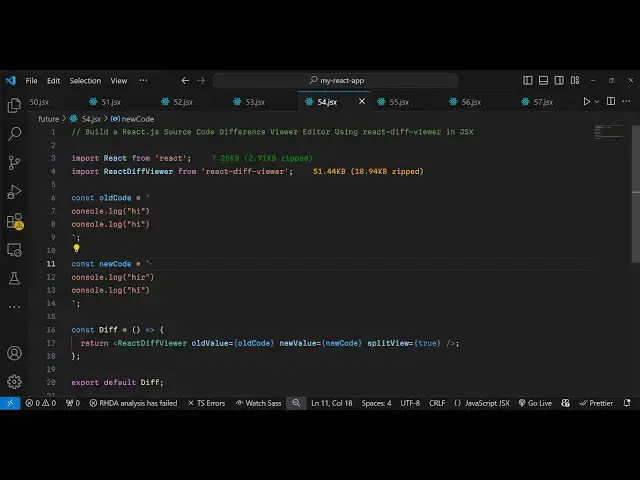
Build a React.js Source Code Difference Viewer Editor Using react-diff-viewer in JSX
Jan 9, 2025

Buy the full source code of application here:
Show More Show Less View Video Transcript
0:00
uh hello guys welcome to this video so
0:03
in this video I will show you a package
0:06
inside react ches where you can use this
0:09
package to compare your source code line
0:12
by line and find out if any sort of
0:15
error has taken place so this is let me
0:17
show you the demo here uh side by side
0:21
you can compare
0:23
text
0:24
and this is your source code we have
0:27
this left left side and it is actually
0:30
targeting this it is showing you there
0:33
is this difference right here this is
0:36
different here so this is not comparable
0:39
so inside your source code it exactly
0:42
pinpoints and tells you
0:45
wherever the difference is it will
0:47
highlight that very simply this line is
0:51
equal you can see console log High
0:53
console log high but the very first line
0:56
if you see we have some kind of space
0:58
right here but here we put this symbol
1:01
of R this is not equal that's why this
1:04
is highlighted right here there is this
1:06
package here inside react CH which you
1:09
can do it side by side compare your code
1:12
so the package name is react difference
1:16
viewer so this is actually the package
1:20
if you want to compare your source code
1:23
line by line this this is a simple and
1:26
beautiful text difference viewer
1:27
component made with it's almost got
1:31
57,000 weekly downloads so the command
1:34
is very simple you first of all exe uh
1:37
execute this command to install this
1:39
I've already installed it so I will just
1:41
show you a very simple example so just
1:44
make a simple functional component and
1:47
then you need to import this package
1:49
simply by using the import statement and
1:52
then you write import react difference
1:58
viewer and then it will be coming from
2:01
react difference viewer so it's almost
2:04
52 kiloby if you see the size here and
2:07
the package name is this and we simply
2:09
import the like
2:12
this and then we create these two
2:14
variables uh inside our state first of
2:18
all the old code and the new
2:22
code so here you can create you can have
2:25
two variables you can compare it this
2:29
can be sourced code this can be simple
2:31
text as well so we have these two
2:33
variables this is source code we are
2:35
comparing it so two console log
2:37
statements but if you see this is having
2:40
high this is having high R so this is
2:42
not equal so the job is the job of this
2:46
uh application will be to compare these
2:49
two Source codes so right in the jsx we
2:53
embed this component we simply say react
2:56
difference
2:57
viewer and we pass the these two options
3:01
here you need to provide the old value
3:03
which is there in this old code and the
3:07
new value which is contained inside the
3:10
new
3:12
code so very split view there is a third
3:15
option which is supported it's a Boolean
3:17
parameter so if you want to have a split
3:19
view side by side you provide this
3:22
option put it to true so once you
3:24
execute your application you will see a
3:26
side by side split view of these two
3:29
source code line by line it exactly
3:32
tells you at what line number you will
3:34
have this difference appearing so from
3:37
exactly you will know it at which line
3:40
number you have this difference so it
3:43
exactly tells you you can compare it
3:45
line by line you can have a source code
3:48
as well you can use this react
3:50
difference viewer package to compare
3:52
source code line by line a split
3:56
view so in this you can have any sort
4:00
code you you may want it can be react
4:02
shares it can be PHP it can be anything
4:05
you paste the source
4:07
code so then what happens if you see it
4:11
exactly tells you at which line
4:16
number if the both the source code are
4:18
equal then in that
4:21
case you'll see no difference is there
4:24
you will see here also the code is same
4:27
here also the code is same but if you
4:29
make any any sort of mistake right here
4:31
let's suppose I eliminate L here so now
4:33
what happens if you see it is exactly
4:36
telling you that here L is present but
4:39
here L is not present so it is
4:42
highlighting this line number second
4:44
line number with these different colors
4:46
so exactly know where the problem is
4:50
there so you can use this guys to
4:52
actually compare source code so I found
4:54
it very interesting package so you can
4:56
install it and use it so thank you very
4:59
much for watching this video and do
5:01
check out my website as well free mediat
5:03
tools.com uh which contains thousands of
5:06
tools regarding audio video and image
5:10
and I will be seeing you guys in the
5:11
next video
#Programming
#Software