live_tv
Livestream Starting Soon
00
Hours
:
00
Minutes
:
00
Seconds
Up next in 10

Build a React.js Responsive Image Carousel With Controls Using react-responsive-carousel in JSX
Jan 9, 2025

Buy the full source code of application here:
Show More Show Less View Video Transcript
0:00
uh hello guys welcome to this video so
0:02
in this video I will show you a
0:03
component which is used in react GS
0:06
application which is used to make this
0:09
responsive Carousel so if you have a
0:11
series of images that you want to
0:13
display inside your react Chas
0:14
application this will be a very good
0:16
package so it integrates fully with all
0:19
the screen sizes it may look good on
0:22
mobile devices tablet and also PC as
0:25
well it's completely responsive and you
0:27
can see we have a series of images we
0:29
you can toggle through these images by
0:32
clicking on them and it is actually
0:33
displaying it in a nice little Carousel
0:35
like structure nice little animations
0:38
and we also see the number of images
0:40
three out of six the pagination controls
0:43
all this ones you can go to the previous
0:46
image next image so nice little Carousel
0:49
structure here you can display PNG jpg
0:52
images right inside your react CH
0:55
application so there is a specific
0:57
module which is available for react is
1:01
application which is used to build this
1:03
awesome looking
1:05
Carousel responsive so the name of this
1:08
package is if you go to npmjs.com and
1:11
just search for this package react
1:13
responsive Carousel it is almost got
1:16
355,000 weekly downloads it's a popular
1:19
module and this is actually the command
1:22
I've already installed it so I will just
1:24
show you a very basic example just
1:27
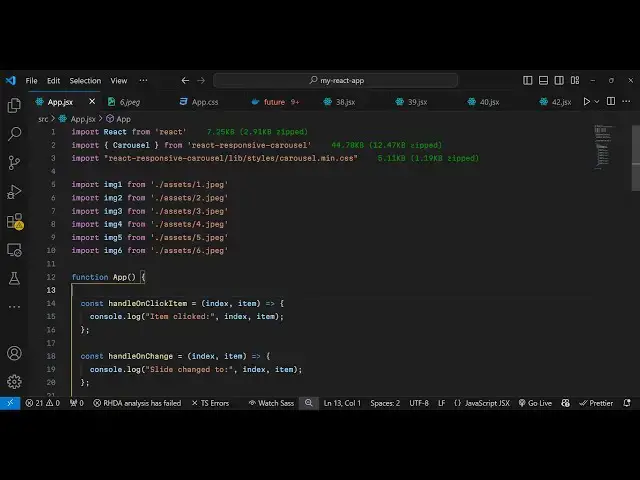
create your app.js file and just create
1:31
a very basic functional component and
1:34
now we just need to import this module
1:36
at the very
1:37
top using the import statement and this
1:40
Carousel method is
1:42
available and it will be coming from
1:45
this package which is react responsive
1:49
Carousel so you can see we have imported
1:52
this module and we also need the CSS
1:55
file as well for this module for The
1:57
Styling so this module contains a lip
2:01
folder and inside this we have the
2:04
Styles folder and inside this we have
2:07
the carousel do main. CSS so we are
2:12
importing the CSS
2:14
file and then we just need to import
2:18
these images which are stored in my
2:19
assets directory inside my source
2:21
directory so it is present all these
2:23
images that I will be displaying it for
2:25
the carousel these are six images you
2:27
can use any images of your choice
2:30
just you need the images so we can
2:33
simply import these images by the import
2:36
statement so I will just paste these six
2:39
import lines so we are simply importing
2:41
these six files and which is present in
2:44
the assets folder you can even take PNG
2:47
images as well so we are simply
2:49
importing the six images so now we just
2:52
need to show the carousel so right in
2:55
your jsx you simply type the component
2:59
which is carousel
3:00
and it actually takes some options first
3:03
is if you want to show arrows then there
3:06
is an option right here you can toggle
3:07
this to true if you want to bind an
3:11
onchange event handler so when your
3:13
image is changing you can bind in this
3:16
function handle on change I will Define
3:19
this function and it also takes the
3:21
function when you click an item inside
3:24
the carousel so when whenever you click
3:27
any image inside the carousel this
3:29
function will execute and on click
3:32
thumbnail as well the same function
3:35
handle on click thumbnail so if you
3:39
click the thumbnail of the image so now
3:42
we need to Define these three functions
3:45
which are responsible so what I will do
3:47
one by one I will Define all these three
3:54
functions handle on click
4:00
and
4:01
handle onclick thumbnail so we have just
4:05
defined all these three
4:07
functions and now inside this what we
4:10
can do we can embed our images one by
4:14
one so we will
4:17
do we will
4:19
say image
4:24
one and after this we can write a simple
4:26
heading which will be showing a simple
4:29
simple paragraph that this
4:31
is image one and we do need to give it a
4:34
class which
4:36
is which is
4:38
Legend So this needs to be the spelling
4:42
needs to be the same so Legend that's
4:44
all so if you refresh your application
4:46
you will see the single image appearing
4:49
and you will see this
4:51
uh taking the form of a carousel so
4:54
there is only a single image present so
4:55
that's why you see one of one it is also
4:58
see the thumbnail as well
5:01
appearing so now uh we also need to
5:04
paste all the rest of the images so what
5:07
I will
5:09
do I will copy this five more
5:14
times and change this to image two image
5:18
three image
5:22
4 and I will change this to image two
5:31
4 Mage
5:37
5 and one more time the sixth image so
5:41
Image
5:47
six so now we have these six images so
5:50
we have all these controls there if I go
5:52
to the next image I will see the next
5:55
image you will see that third Image
5:57
Fourth image fifth image sixth image
6:00
so we see these pagination controls
6:02
available to us and we also see the
6:04
total images right here so this is a
6:06
nice little Carousel component
6:08
specifically designed for react Chas
6:11
applications and uh whenever you click
6:13
on the individual thumbnail these
6:15
callback functions will execute which is
6:17
handle on click item so inside this we
6:20
can simply console log the messages so
6:24
once you click on the individual uh
6:28
image so we basically receive these
6:31
parameters which is index and
6:34
item so when whenever you click these
6:37
console lock messages will be there so
6:42
in this
6:45
way and similarly we can Define the
6:48
handle on change
7:04
so in this way guys you can design this
7:06
nice little Carousel it's completely
7:08
responsive on all
7:10
devices so you can take as many images
7:13
as you want I'm taking six images from
7:15
my local file system so in this way you
7:17
can design this Carousel using this
7:20
package which is react responsive
7:22
Carousel so thank you very much for
7:24
watching this video and do check out my
7:26
website as well free mediat tools.com
7:29
which contains thousands of tools
7:31
regarding audio video and image and I
7:34
will be seeing you in the next video
#Online Media
#Multimedia Software