Up next in 10

Build a React.js react-window Example to Show Panels & List Windows to Display Data in JSX
Jan 9, 2025

Buy the full source code of application here:
Show More Show Less View Video Transcript
0:00
uh hello guys welcome to this video so
0:02
in this video I will show you how to
0:04
show uh data inside a panel window or a
0:08
vertical or horizontal panel or you may
0:11
call it window in specific react Chase
0:13
application so let's suppose you are
0:14
fetching data from an API and you want
0:17
to show that data with inside a window
0:20
or a panel with scroll bar attached to
0:22
it so you can actually show this inside
0:25
this window so it's a very simple
0:27
component Library uh it's a pre bu
0:30
window that it comes you can use it in
0:32
any location so the actual name of the
0:35
module is react window so if you just go
0:39
to npmjs.com and just search for this
0:43
module react window so this is actually
0:46
the package it's a component for
0:49
efficiently showing the data which is
0:52
coming from a Tablo data or scrollable
0:55
list this is actually the package name
0:59
I've already installed it they do offer
1:01
their official website as well it's a
1:03
very popular module 1.4 billion
1:06
downloads so this is
1:08
their official website react Window
1:11
worsal app so you can see the example so
1:14
I will just show you a very basic
1:16
example so just make a simple functional
1:18
component and then you need to Simply
1:21
import this module so I will use the
1:23
import statement and it say fixed size
1:28
list and it will be coming from this
1:32
react window and I will just call this
1:35
as list so it's a 9 kilobyte package
1:38
it's very light weight so once you
1:40
import this package you come to the jsx
1:43
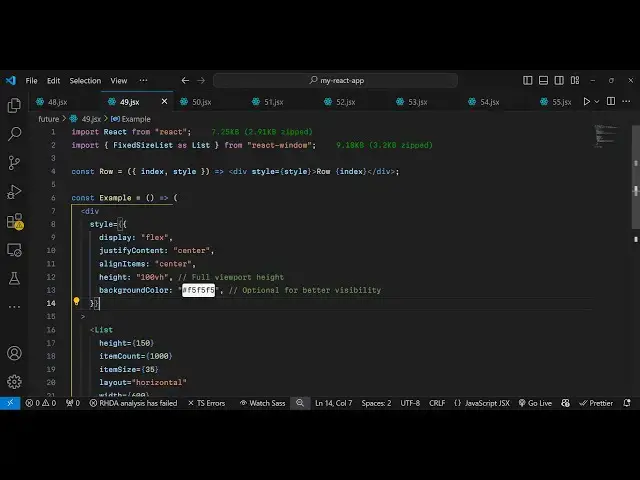
where you want to show this window so I
1:45
will just make sure that it appears in
1:47
the center position so I will just give
1:49
it as some custom CSS display I will
1:51
change it to
1:53
flex and justify content I will change
1:56
it to
1:56
Center align items I will change it to
2:00
Center so that it appears both
2:02
horizontally and vertically Center and I
2:05
will give it a fixed height of 100
2:07
vertical height and a background color
2:11
of grayish color F5 F5
2:16
F5 these are all custom styles that I
2:19
have given now I embed this component
2:22
this list component
2:25
directly and it actually takes some
2:27
options first of all you can configure
2:30
the height of this window I will just
2:32
give it 150 and how many items that you
2:35
want to show so you can even configure
2:37
that as well so how many items inside
2:40
item count so I'm just displaying
2:42
thousand items so then we need to also
2:45
configure the size of this the item here
2:49
you can configure
2:52
35 and then we also have a
2:55
property layout how you how much you
2:58
want to show these items in a horizontal
3:00
or vertical way so I want to show it in
3:02
a vertical way from top to bottom and
3:06
then you can even configure the width of
3:07
the window which will be 600 let me give
3:11
all these properties you can change and
3:14
if you just refresh now what should be
3:16
displaying if you see in the right in
3:19
the center of the
3:21
screen now we do need to inside this uh
3:25
list we also need to configure the
3:27
actual row that we need to show so I
3:30
will just make a simple example
3:31
functional component
3:33
example so this component I will call
3:36
this as
3:37
row and essentially inside this it takes
3:41
the index and the style and actually it
3:44
returns a simple
3:47
div having the style which is passed to
3:51
it and I will just call it
3:56
row and we can dynamically
4:00
provide the value here which is passed
4:02
which is index so essentially we are
4:05
calling this component we are making a
4:06
dynamic component every time passing it
4:09
index and the style and we are returning
4:11
this simple string value and now we can
4:15
simply from
4:18
here pass the
4:23
row like this
4:29
so now what happens whenever you call
4:32
this
4:33
row this component we are passing this
4:36
value to these two values which is the
4:39
index if you refresh now you will see
4:42
the data will show so this data can be
4:46
coming from an API or database for the
4:48
sake of this example I'm just showing a
4:50
very basic uh data it is simply a div
4:54
which represents the rows here you
4:56
configured how many items that you want
4:58
to show so we are displaying a, items
5:02
you can scroll down and just check the
5:04
total item size from is from 0 to
5:08
9999 so essentially we are just
5:11
displaying this and you can even
5:13
customize the look and the feel of this
5:14
window as well by providing an object of
5:18
style right
5:21
here and then you can give it a border
5:23
of one pixel solid gray
5:27
color and then you can give it a b
5:29
radius
5:31
of 8 pixel and then we can give
5:35
configure a background
5:39
color of white so now what happens if
5:43
you
5:44
check the background color will be
5:46
changed if you see and we also have
5:50
given this nice little uh uh border as
5:54
well you can change to any color you can
5:56
change to red you'll see that so it
5:59
changes so it's a very basic you can
6:03
even change the layout from vertical to
6:06
horizontal so you can make both types of
6:09
list and panels it can be in horizontal
6:12
vertical now it is having in horizontal
6:14
but I think vertical looks
6:17
good most of the time you will be making
6:19
vertical
6:20
list so this is a very handy package
6:23
guys you can definitely use it react
6:27
window and essentially it is the package
6:30
to actually make list and panels so
6:33
thank you very much for watching this
6:35
video and do check out my website as
6:37
well free mediat tools.com uh which
6:40
contains thousands of tools regarding
6:42
audio video and image and I will be
6:45
seeing you in the next video
#Development Tools
#Other