live_tv
Livestream Starting Soon
00
Hours
:
00
Minutes
:
00
Seconds
Up next in 10

Build a React.js react-awesome-slider Example to Make Presentation & Image Sliders Animation in JSX
Jan 9, 2025

Buy the full source code of application here:
Show More Show Less View Video Transcript
0:00
uh hello guys welcome to this video so
0:02
in this video I will show you how to
0:04
make these awesome little sliders inside
0:06
react chairs so if you have a series of
0:08
images that you want to display inside
0:10
react chairs you can display them inside
0:12
this fashion and with nice little
0:14
animation uh so it's a slider you can
0:19
basically create these awesome looking
0:20
slides which contains images so it will
0:23
have these nice little animations so
0:25
actually the package name for this
0:27
package application is react awesome
0:30
slider if you just go to npmjs.com and
0:34
just search for this package which is
0:36
react awesome slider so this is
0:39
essentially this
0:40
package so here you can actually have
0:43
any content it can be text or it can be
0:47
image and you can animate
0:50
that very easily so it's a full page
0:53
animations which happens you'll see all
0:56
sort of animations you can create using
0:57
this package so actually this is command
1:00
here I've already installed it so you
1:02
just need to install it it's almost got
1:04
5,000 weekly downloads and uh now to
1:08
actually get started they do offer a
1:11
demo as well you can access their demo
1:15
so by going to this website so it has
1:19
various animations if you
1:22
see so react awesome slider
1:31
so these animations are supported you
1:33
will see open animation scale out cube
1:36
animation so now to actually get started
1:39
I will just show you a very simple
1:41
example so just make a simple functional
1:44
component and you need to require this
1:48
package so just make a functional
1:53
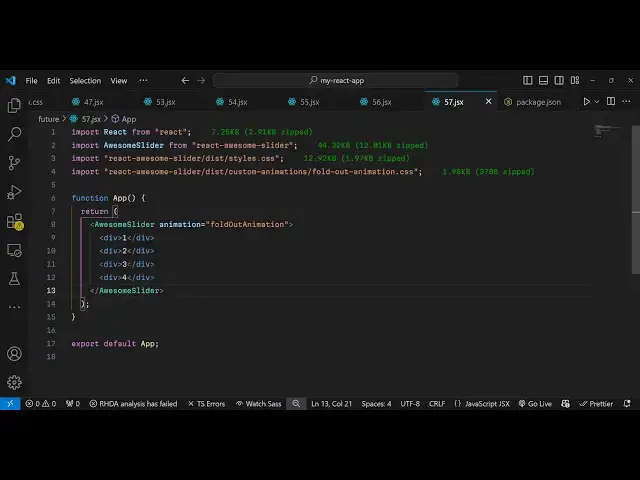
component and just using this import
1:56
statement we will simply say import and
1:59
then say awesome slider which will be
2:02
coming from this Library we have
2:05
imported is 44 kiloby and it is called
2:08
awesome slider and for this we do also
2:11
need to import the CSS file of this
2:13
package so it is react awesome slider
2:17
and slis SL
2:20
styles.css so this a CSS file of this
2:24
and also for each animation that we are
2:26
using we need to import it CSS file so I
2:30
will be simply be using this uh custom
2:34
animations and it actually
2:36
contains this uh folding animation so
2:40
for
2:43
this custom animations and it contain
2:46
this animation which is the name is fold
2:49
out
2:51
animations.
2:54
CSS so after importing everything now we
2:57
are actually animating these images so I
3:00
have these six images present in my
3:02
assets directory which is present in the
3:04
source directory so we will import this
3:06
images one by one so I will
3:10
simply import this I can call this image
3:14
one so which will be imported from the
3:16
assets
3:17
folder so in the similar way we can
3:20
import the rest of the
3:25
images so I can just change the name
3:27
here
3:33
so once you got all the
3:36
images we can simply animate this
3:40
so so right here in the jsx so wherever
3:44
you need to embed the animation you
3:46
simply first of
3:53
all use this component which is awesome
3:55
slider and it actually takes whatever
4:00
data that you want to animate and it
4:02
also takes this attribute which is you
4:04
can directly attach the animation that
4:06
you want to apply so mine animation is
4:09
fold out animation so I've already
4:11
imported the CSS file for this animation
4:14
at the top so now I can safely use this
4:16
animation so right here you can embed
4:20
anything it can be a heading or image
4:24
but in in my case I will be animating
4:26
the image so I will simply attach this
4:28
image like
4:37
this so here we'll be embedding all the
4:40
four images in the div
4:51
tag so if you check the
4:54
browser you will see the animation will
4:57
look something like this the images so
5:00
you can navigate to this next image and
5:03
then the next image if you see so this
5:05
is actually the animation
5:08
and now you can actually
5:14
attach uh if you go to the
5:17
website so all these animations are
5:20
there you you also have the cube
5:22
animation so if you want to now attach
5:25
this Cube animation you need to import
5:28
first of all the CSS file for
5:30
this the CSS file uh so here you'll
5:34
simply
5:37
have the cube animation so if you now
5:42
check just refresh
5:45
now so you'll see now the it's a cube
5:49
animation so after each image this is
5:52
actually the transition which happenings
5:54
which goes to the next image the slight
5:56
little animation which take place so
5:59
this this is a slider react awesome
6:01
slider package which you can use to
6:04
animate text images and create awesome
6:07
looking slides in your website so thank
6:11
you very much for watching this video
6:13
and do check out my website as well uh
6:16
free mediat tools.com uh which contains
6:20
thousands of tools regarding audio video
6:23
and image and I will be seeing you in
6:25
the next video
#Online Media
#Clip Art & Animated GIFs