Up next in 10

Build a React.js Random Particles Background Component Using particles-bg Library in JSX
Jan 9, 2025

Buy the full source code of application here:
Show More Show Less View Video Transcript
0:00
uh hello guys welcome to this video so
0:02
in this video I will show you how to add
0:04
these particles background animations
0:07
inside your react Chas application so
0:10
you can see how beautiful it is looking
0:13
and it actually supports multiple level
0:16
of particles background that you can add
0:18
inside your react CH application so
0:21
there is a simple package which is
0:23
available in react CH which is particles
0:27
dbg so if you just go to npmjs.com and
0:31
just search for this
0:33
package and just type
0:38
particles
0:39
dbg this is actually the name of the
0:42
package and it actually adds this nice
0:45
little particle background it's almost
0:47
got 879 weekly downloads this is
0:50
actually the command so simply install
0:52
this and after this you will see these
0:56
particles backgrounds all these
0:59
particles are supported and they do
1:01
offer
1:03
the online demo as well you can try out
1:06
all the particles demo so now to get
1:09
started it
1:11
actually I will show you a very basic
1:14
example so first of all you need to
1:17
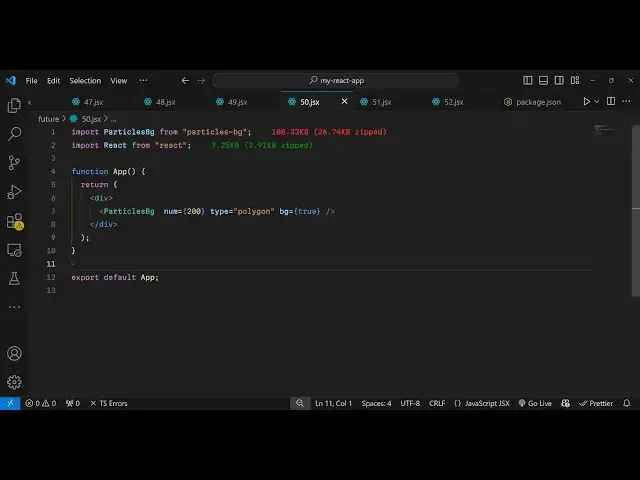
import the module so just make a simple
1:21
functional
1:23
component and at the very top we need to
1:26
import the module so we just write
1:28
import particles
1:30
background and it will be coming from
1:32
this package particles background it's
1:35
almost 108 kiloby package and we have
1:38
this component particles background so
1:41
now in where in whichever location we
1:44
won't need to embed this we simply type
1:47
the particles background component and
1:49
it takes some options first of all which
1:52
type of Animation you want to add so I
1:54
want to add a polygon
1:57
animation number of particles you want
1:59
to add let me just th000 I will put and
2:04
background there is an option if you put
2:07
it to true it will add the particles in
2:09
the background position so these three
2:11
parameters it takes first is a type of
2:14
Animation then number of particles and
2:17
if you want the animation to take place
2:19
in the background so if you just refresh
2:21
now what happens is that your particles
2:24
will appear on the screen as the
2:27
background and it's animation Library so
2:30
you may experience some delay or
2:32
flickering in the screen but still it's
2:34
a good package and you can add as
2:39
many uh if you see they do offer the
2:42
documentation where you can see which
2:45
types of animations you can add the
2:48
options are you can add this color
2:50
animation as well if I change this to
2:53
from polyon to color you will see a
2:56
slight difference so it will look
2:58
something like this you will see that
3:01
this is a color
3:03
animation so here you can control a
3:05
number of particles which are there I
3:08
will let's suppose I change it to 50 so
3:11
now what happens is that lesser
3:13
particles will be present so I think
3:15
this looks good because fewer particles
3:17
are there but it happens all the time
3:20
because it runs in the background
3:22
infinite number of times so you can add
3:24
these nice little backgrounds using this
3:26
package and if you don't want the it to
3:29
appear on the background you can put it
3:31
to false so now it will only appear at a
3:33
certain location you will see
3:39
that so in this way you can add this
3:42
animation and it also supports all these
3:45
options if you want let's suppose a
3:48
thick animation you will change it to
3:51
thick so various types of animations you
3:54
can just
3:56
see so now it will look something like
3:59
this
4:00
so you can see how beautiful it is and
4:02
you can even control let's suppose I
4:04
changeed the particles to 500 so now the
4:07
number of particles will be 500 so you
4:10
can control and customize the look and
4:12
feel of this package you can control
4:14
everything
4:16
and if you want let's
4:19
suppose a
4:22
fountain let me change this animation to
4:25
Fountain so now what happens is that you
4:28
see this animation appearing so in this
4:32
way you can use this package guys to
4:35
create these awesome looking particle
4:37
background
4:39
animations and you can even create
4:42
custom animations as well using this
4:45
package if I change it to random so now
4:48
it changes to random every time this
4:51
random animation will take place so you
4:53
can even you can see all the animations
4:56
if you refresh every time a random
4:59
animation be present so in this way you
5:02
can use this package guys you will see
5:04
that random particle backgrounds in
5:06
specifically reacts application you can
5:08
use this package so thank you very much
5:11
for guys for watching this video If you
5:13
like this video then please hit that
5:15
like button and also check out my
5:17
website as well free mediat tools.com uh
5:21
which contains thousands of tools
5:23
regarding audio video and image and I
5:26
will be seeing you in the next video
#Arts & Entertainment
#Programming
#Software