live_tv
Livestream Starting Soon
00
Hours
:
00
Minutes
:
00
Seconds
Up next in 10

Build a React.js Project to Download File From URL as an Attachment Using Filesaver.js Library
Jan 9, 2025

Buy the full source code of application here:
Show More Show Less View Video Transcript
0:00
uh hello guys welcome to this video so
0:02
in this video we will show you how to
0:05
download a file as an attachment in
0:08
react CHS using file saer Library so we
0:13
have this demo right here we have a
0:15
input field where we allow the user to
0:17
input the URL to download and we have a
0:20
button of download file so you can
0:23
actually get any image so I'm just
0:25
getting this image from this URL which
0:28
is pexels.com it's just an image file
0:31
jpg image I will simply paste the full
0:35
URL of the image and then click this
0:36
button so as I click the button you will
0:39
see the file will get downloaded as an
0:41
attachment and I can save it inside my
0:43
machine so the name of the library if
0:46
you don't know about this Library it's a
0:48
open source file saer Library uh it's a
0:52
JavaScript library which allows you to
0:54
download any file as an attachment in
0:56
the browser and it has this function
0:59
called as save
1:01
as
1:03
and it also have a npmjs module so if
1:07
you just search for this module which is
1:09
file saver it does provide you with this
1:12
popular module almost 3 million weekly
1:15
downloads so this is actually the
1:16
command that you need to do npmi file
1:19
saver so I've already installed it and I
1:22
will show you a complete example in
1:24
react CHS just make a very simple
1:27
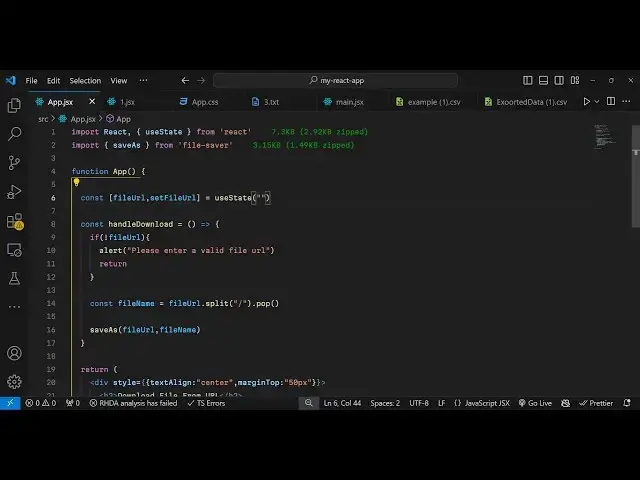
functional component and and first of
1:30
all you need to import the module at the
1:32
very top so just write import and then
1:36
there is a function as I already told
1:37
you which is save as which is available
1:40
in this module file
1:42
saver and now we need to declare some
1:45
State variables so we need to keep track
1:48
of the URL that the user write so file
1:52
URL so the initial value here will
1:56
be we will use the UST State hook
2:00
it will be
2:01
empty and now in the jsx we will
2:04
actually have uh a simple input field
2:07
where we allow the user to input the so
2:11
we'll have a simple div and you'll be
2:13
giving a style to it we will align this
2:17
in the center position and then we will
2:19
give it a margin from the top which is
2:22
50
2:24
pixel and inside this we will actually
2:27
have a H2 heading which will say
2:29
download
2:30
file from
2:33
URL and then you'll be having a simple
2:36
input
2:37
field input type text and be having a
2:42
placeholder where I will say enter file
2:46
URL and the value will be equal to the
2:50
file URL this variable that we declared
2:54
and we'll also be minding an onchange
2:55
event handler so whenever you write some
2:58
value right here in this input field
3:00
this e parameter will contain the values
3:03
so set file URL we'll call this function
3:06
this hook function right here so now to
3:09
get the value we'll simply say e.
3:11
target.
3:15
value and then we give it a style
3:18
parameter to it it'll give it a fixed
3:20
width of 300 pixel and a padding of
3:25
uh 10 pixel and a margin
3:30
write of also 10
3:37
pixel so if you refresh your application
3:40
uh it will look something like this your
3:41
input field we have this input field now
3:44
we just need a simple button
3:48
so this button will simply say download
3:51
file and we will
3:55
actually bind a onclick listener to this
3:58
button so whenever you click the button
4:00
we will execute this custom function
4:01
which will say handle download so now we
4:04
need to Define this function so giving a
4:07
style parameter to it padding to 20
4:12
pixel so now here we need to define the
4:15
function so you simply Define this I
4:18
will call this as handle
4:24
download
4:26
so in this F function first of all we
4:30
will compare if the URL is not entered
4:32
by the user this will evaluate to true
4:35
so here it'll be simply saying in this
4:37
alert window to the user please enter a
4:40
valid file URL and then we will return
4:43
from this program we will not execute
4:45
the rest of the code but if the file
4:47
name is entered then we need to extract
4:50
the file name from the URL for this we
4:53
can use the split function in JavaScript
4:56
and we will split the file name like
4:59
this using the pop function and now you
5:02
will use the file saver Library we have
5:04
this function save as and pass the file
5:08
URL and the second argument is the file
5:11
name so it takes two arguments first is
5:14
the actual URL that you want to download
5:16
and secondly what file name that you
5:17
want to give so we using this function
5:20
so if you refresh now and if you paste
5:23
any
5:24
link if you copy image address paste it
5:28
here
5:30
click on download file and if you now
5:32
see your image has been
5:35
downloaded so you can see the image has
5:37
been downloaded successfully so you can
5:39
take any URL from the internet you can
5:41
download this in react Chase using this
5:44
simple module file
5:46
saver so thank you very much for
5:48
watching this video please hit that like
5:50
button subscribe the channel and do
5:52
check out my website as well free mediat
5:55
tools.com which contains thousands of
5:57
free tools regarding audio video and
5:59
image
6:00
and I will be seeing you in the next
6:01
video
#Other
#Other