Up next in 10

Build a React.js Monaco Code Syntax Highlighter Editor With Different Themes in Browser Using JSX
Jan 9, 2025

Buy the full source code of application here:
Show More Show Less View Video Transcript
0:00
uh hello guys welcome to this video so
0:02
in this video I will show you how to
0:04
integrate the Monaco code Editor to
0:07
syntax highlight code inside your
0:09
application and you can allow the user
0:11
to Simply type your code with syntax
0:14
highlighting and also autocomplete so
0:16
it's a mini vs code clone inside vs code
0:20
you write your code you get the
0:21
suggestions as well so similarly inside
0:23
the browser as well you will even get
0:25
the suggestions right here using the
0:28
syntax highlighting with various teams
0:30
so there is this Library called as mon
0:33
Monaco editor so where you can allow the
0:36
user to paste code in certain languages
0:40
all the programming languages and all
0:41
the themes so in this way we can paste
0:44
it you also see these line numbers also
0:46
appearing so we have this theme as well
0:50
so if you want to show the value you'll
0:51
see it will show the value everything
0:53
the user has typed so I will show you
0:56
this complete example specifically in
0:58
react CHS and and the library is we are
1:01
using is Monaco editor if you know about
1:04
Monaco editor it's a code editor that
1:07
powers Visual Studio code that is a
1:10
software of
1:13
Microsoft so it do offer a library as
1:16
well specifically for react so it's a
1:20
browser based code editor and you can
1:22
install this package by executing this
1:25
command and it's almost got 7 98,000
1:28
weekly downloads
1:30
so I will show you a very simple example
1:33
how to get started so just make a simple
1:36
functional
1:37
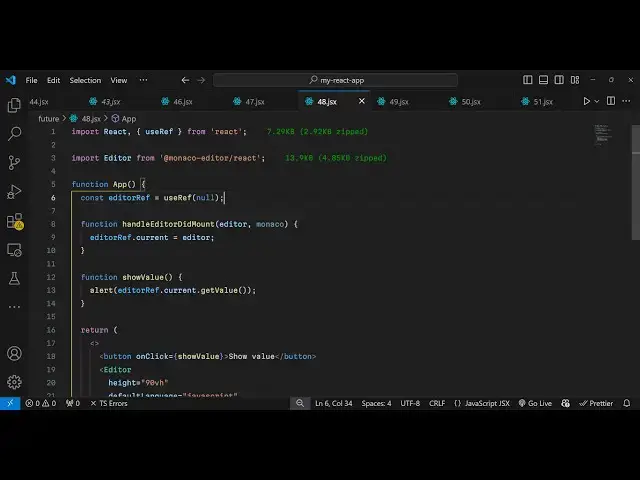
component and now I will import this
1:40
package at the top I will say import
1:44
editor from and then it comes from this
1:48
Monaco SL monaco-editor
1:52
react it's a 13.9 kilobyte size package
1:56
and we are simply importing the editor
1:59
and then we have create a state variable
2:03
just creating a reference to the editor
2:05
so that we can attach this reference
2:07
using use ref hook initial value will be
2:10
null and uh after this inside your jsx
2:15
now to include this editor you simply
2:19
type first of all we have a button to
2:22
actually show the value that the user
2:25
has written inside the code editor we'll
2:28
bind this on click listener so show
2:30
value so I will just have this nice
2:33
little function so whenever you click
2:34
the button we execute this
2:38
function so after this we show the
2:42
actual
2:43
editor where the user will write the
2:46
code so this is actually the component
2:48
so we are simply embedding the component
2:51
and it actually takes some options first
2:53
is the height of the you can control it
2:56
so let's suppose I give height to be 90
3:00
view height viewport
3:02
height and if you just refresh now you
3:05
will see by
3:07
default the editor has been loaded so
3:10
now you see you can write the code and
3:14
you will not get the autocomplete
3:16
suggestions because we do need to
3:18
specify the language so for the
3:21
detection to take place so here you need
3:23
to specify the default language so it
3:26
supports all the languages you can
3:27
provide python PHP JavaScript RT Ruby
3:31
C++ C all the languages so let me
3:35
provide JavaScript language and then it
3:38
takes this next value is default value
3:40
you can even provide so let's suppose I
3:43
write a simple console log
3:45
statement hello
3:47
world so we write
3:50
this now if you see refresh it you will
3:53
see by default this console log
3:55
statement will be written and if you
3:57
hover onto this you will see more
3:58
information about this variable and if I
4:03
just now write it you will see the
4:05
autocomplete suggestions as well so by
4:08
default it has capabilities now of vs
4:11
code you can write a
4:17
function so same goes for PHP as well
4:20
let's suppose I change this from
4:22
JavaScript to
4:23
PHP and now I replace it now with
4:27
instead of console laog we say
4:32
Echo hello white and I put the PHP tag
4:36
as
4:41
well put a semicolon so now this is your
4:45
PHP
4:47
code so you can see that it supports all
4:49
the languages all the programming
4:51
languages and uh in this way you can do
4:54
this and it also takes the second option
4:58
let me change to JavaScript
5:02
it also takes the fourth option on Mount
5:05
so this option here you can specify a
5:08
function so when the editor is loaded in
5:10
the browser what you need to do I just
5:13
Define this custom function handle
5:16
editor did Mount so here you can specify
5:20
this function so when the editor is
5:22
loaded you can have this function handle
5:25
editor did
5:26
Mount and here we will get the editor
5:29
reference and the
5:31
Monaco has two arguments inside this
5:34
specifically inside this function so we
5:37
can attach this
5:43
reference
5:55
sorry so we have these two variables
5:58
editor and mon
6:11
so we can attach this reference which is
6:13
editor ref. current to be editor
6:18
so as you can see we are binding this
6:21
function handle editor D
6:23
Mount so now whichever value that you
6:26
write let me you can even print out the
6:28
value as well using this editor ref do
6:32
current. get
6:34
value so let's suppose I paste this
6:37
JavaScript code inside this text editor
6:40
you will get this all syntax High
6:42
writing this line numbers as well you
6:44
can see the default theme which is
6:46
supported by Monaco editor if you click
6:49
the button show value you will get
6:51
everything that the user has written
6:53
inside this text field so in this way
6:55
you can get your source code as well so
6:58
in this way guys you can
7:00
integrate monacco editor inside your
7:04
react CHS application with syntax
7:06
highlighting and with various themes as
7:09
well so this is actually the package
7:11
I've shown you step by step it's a very
7:14
popular package and if you want to do
7:17
some kind of syntax highlighting and do
7:19
some kind of browser code editing
7:22
activities you can use this package and
7:25
thank you very much for watching this
7:26
video and do check out my website as
7:29
well uh free mediat tools.com
7:32
uh which contains thousands of tools
7:35
regarding audio video and MH and I will
7:38
be seeing you in the next video
#Development Tools
#Open Source
#Other