Up next in 10

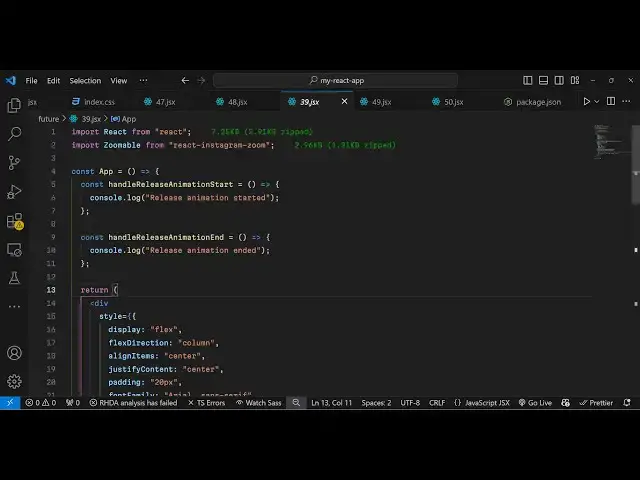
Build a React.js Mobile Instagram Image Zoom Editor Using react-instagram-zoom in JSX
Jan 9, 2025

Buy the full source code of application here:
Show More Show Less View Video Transcript
0:00
uh hello guys welcome to this video so
0:02
in this video I will show you a package
0:05
which can be used for displaying images
0:08
and also for zooming in zooming out of
0:12
something like Instagram feature has so
0:15
it's specifically related to Instagram
0:17
Zoom feature so in Instagram you have
0:20
the tab and zoom feature so specifically
0:23
this react package supports that feature
0:26
and it's specifically for mobile devices
0:28
so if you are uh watching the image or
0:31
if you are viewing the image from a
0:32
mobile device you can directly tap on
0:34
the image and then that image will be
0:36
zoomed in so this is essentially this
0:39
package you can see as I'm tapping on
0:41
this image this call back function is
0:43
releasing so I'm essentially on desktop
0:46
devices so that's why it is not working
0:49
so it's can be used only on mobile so
0:51
this package provides you that
0:53
functionality of Instagram Zoom so the
0:57
package name is simply Instagram Zoom so
1:00
if you go to npmjs.com and just search
1:03
for this package react Instagram
1:09
Zoom so it's almost it is saying react
1:12
component that implements Instagram like
1:14
Zoom for mobile no
1:17
dependencies so it's almost have 7 s
1:21
seven downloads and you can install it
1:24
by simply executing this command Ive
1:26
already installed
1:28
it so do they do offer a demo as well if
1:32
you go to code
1:35
sandbox so they do provide a good
1:38
documentation so it's a complete example
1:42
you can
1:45
see again it only works on the mobile so
1:48
that's why I can't show here but now to
1:51
get started here uh you
1:53
simply first of all require this
1:58
package and what ever image file that
2:00
you want to
2:03
include you will first of all import the
2:06
package
2:08
by from this package use react Instagram
2:11
Zoom it's almost 3 kilobytes very
2:14
minimalistic package and now you
2:19
actually render the image that you want
2:23
to zoom in so you can even have a local
2:26
image as well so I can just import a
2:28
local image which is stored in my assets
2:36
directory so you can see this image is
2:38
present in the assets directory so I
2:40
will load this image so what I will do I
2:43
will simply use this
2:45
component which is
2:50
zoomable and it takes some options the
2:53
first option it takes is the release
2:56
animation timeout so it actually is the
2:59
time period of the animation so we are
3:02
simply saying 500
3:04
millisecond half of a second maximum
3:07
scale you can scale the image to
3:09
whatever zoom level that you want to and
3:12
then we also have the option to Z
3:14
index so all these options are supported
3:17
so we can
3:21
also style the image as well provide a
3:26
certain amount of width height using the
3:29
style
3:33
object border border radius so if you
3:37
just go to now if
3:40
you and just need to inside this
3:45
component we now need to render the
3:48
image so we have this image inside image
3:54
one so now you will see this image
4:00
and now make sure that it appears in a
4:02
full width so we can provide a width
4:05
property
4:08
of a style
4:13
property which is
4:20
100% so we'll cover the entire image so
4:24
it will take the full space so we are
4:26
simply providing this object object F to
4:28
cover
4:30
so now this image actually shows right
4:40
here now if you want to show it in the
4:43
center of the screen we
4:45
can just change the display to flex so
4:48
now it appears in the center so you can
4:51
actually change the zoom level so if you
4:53
want to zoom it more you can change from
4:56
3 to 8 now it almost zooms more so this
5:01
is on the mobile device if you are on a
5:03
mobile device if you tap on the image we
5:06
will bind some callback functions so
5:09
there are some functions which you
5:11
can align which is on
5:15
release animation
5:17
start and on release animation
5:22
end so these two functions whenever you
5:25
tap on the image what sort of thing that
5:27
you want to do so we have defined these
5:29
two fun
5:32
functions so if you want to do something
5:35
whenever user interacts with the image
5:37
you can have these call back functions
5:39
appearing so whenever you tap on the
5:41
image you will
5:43
see these functions will execute every
5:47
time
5:51
so this is essentially this package and
5:54
specifically made for mobile devices so
5:56
it's a very handy package in reactjs
5:58
which you can configure for only mobile
6:01
users so thank you very much for
6:04
watching this video it's a Instagram
6:06
Zoom plugin for react CH specifically
6:10
for mobile
6:11
devices and also check out my website as
6:15
well freem mediat tools.com uh which
6:18
contains thousands of tools regarding
6:20
audio video and image and I will be
6:23
seeing you in the next video
#Arts & Entertainment
#Computers & Electronics