Up next in 10

Build a React.js Material Audio Player to Play MP3 Files Using material-ui-audio-player in JSX
Jan 9, 2025

Buy the full source code of application here:
Show More Show Less View Video Transcript
0:00
uh hello guys welcome to this video so
0:02
in this video I will show you how to
0:05
actually make a simple audio player and
0:07
play your audio files in the browser in
0:09
react CH so we have a simple package
0:11
material design audio player package so
0:14
here we choose our whichever audio file
0:17
that we want to play let me pick this
0:19
MP3 audio file hello guys welcome to
0:21
this video so as I pick the audio file
0:24
you will see this nice little audio
0:25
player will come up and you will see
0:27
this uh you can play at any it shows you
0:31
the total minutes of this audio file
0:33
which is 15 minutes 3 seconds and we
0:36
have these three
0:37
buttons closed and you will see the A on
0:40
device is
0:42
simple function and then we have then we
0:46
also have this nice little download
0:48
button so if I if the user clicks this
0:50
button the file will get downloaded and
0:53
they can download this file inside the
0:54
machine hello guys welcome to this and
0:57
then if you want to adjust the volume as
0:59
well you can use this option to adjust
1:01
the volume so in this way you can do
1:04
this nice little thing and if you see we
1:08
have the play and stop Button as
1:10
well we have the shuffle Button as well
1:13
so this is a nice little material design
1:15
audio player component I will show you
1:17
so there is a specific package for this
1:20
so if you go to npmjs.com and just
1:22
search for this
1:24
package uh this package is if you go to
1:26
this website npmjs.com and just search
1:29
for this this package material UI audio
1:32
player this is essentially this
1:37
package and it got almost 418 downloads
1:41
and this is actually the command I've
1:43
already installed it so you just need to
1:46
install it by executing this command and
1:49
uh now to actually get started I will
1:51
just make a simple functional
1:53
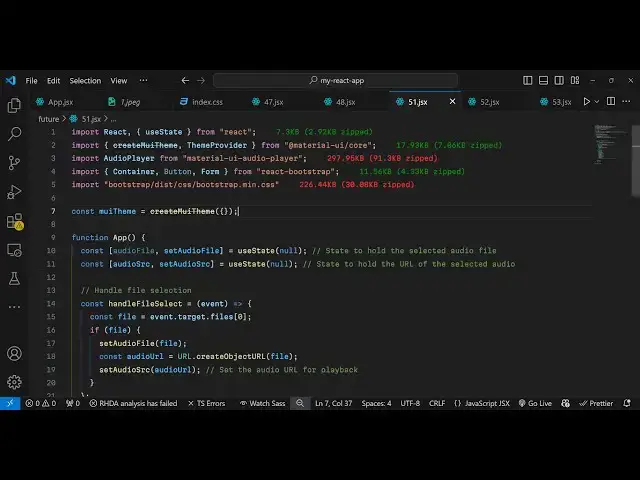
component and then I will simply import
1:57
the module here which will be
2:01
the audio player which will be coming
2:03
from this material or UI audio player
2:06
this component it's almost 297 kiloby
2:10
size and for this we also need to import
2:13
the base material design Library as well
2:15
so import we will say
2:20
create and also the theme provider as
2:23
well so we also need that as well which
2:25
will be coming from Material design
2:30
and for this we also using a bootstrap
2:33
for just designing the form such as the
2:36
overall interface we have these
2:38
predefined components available which
2:40
will be coming from react bootstrap so
2:45
specifically bootstrap you can use it
2:48
inside your reactj application and then
2:50
you'll be including the CSS file of
2:52
bootstrap simply including the CSS file
2:55
like
2:57
this so this is bootstrap so now we
3:00
imported all the packages now we just
3:02
need to configure the material design so
3:04
for configuring this theme we declare a
3:07
variable and we call this function M uh
3:11
create like this we call this function
3:13
and we store it in this variable
3:15
material design theme and now we come to
3:18
this uh app functional component and
3:20
declare some State variables first of
3:23
all for keeping track of whichever audio
3:24
file the user will select we will have
3:26
this variable I'll be using the UST
3:28
State hook initially value will be null
3:31
and secondly we will also be having a
3:33
variable for holding the source of the
3:35
audio file so we will have this two
3:37
variables and again this US state
3:39
variable will be null so these two
3:41
variables are there and now we just need
3:44
to uh inside your GSX we just need to
3:48
wrap everything inside the theme
3:50
provider class this component so theme
3:54
provider and actually here we will wrap
3:56
everything and specifically we will be
3:58
providing this theme
4:00
this option and
4:03
this this variable that we declared so
4:05
we are wrapping everything inside this
4:08
theme provider tag and now we'll be
4:10
having the container class of bootstrap
4:12
and inside this we'll have this H1 tag
4:15
we say that select and play the audio
4:19
file so we will have simply this uh
4:22
class bootstrap class which is margin
4:25
top
4:27
five just to create some space from the
4:30
top and then we'll be having a simple
4:31
form where we allow the user to Simply
4:34
select a audio file from their computer
4:38
and play it and for this we are using
4:40
some bootstrap elements and then we will
4:43
have a simple
4:46
label form label and we allow simply
4:50
select an audio
4:56
file and then we simply have the control
4:59
field right here and simple input type
5:03
will be
5:06
file and we'll be accepting uh only the
5:09
audio files so we'll simply say audio
5:12
slash star and we'll binding an onchange
5:15
event handler so whenever you
5:17
change this file here we will execute
5:21
this call back function which will
5:23
execute whenever the user clicks the
5:26
browse file button so we just need to
5:28
Define this function handle file select
5:31
so e parameter will automatically get
5:33
passed so right here we will read the
5:35
audio file first of all so if you
5:37
refresh your application now you will
5:40
see a simple choose file button being
5:43
added and uh now inside this handle file
5:47
select method I will just get the file
5:50
that the user selects by simply saying
5:52
e.
5:54
target. files. Z and once we get the
5:57
file we can simply read the file we can
6:00
set the file set audio file in the state
6:04
and then we can read the audio file by
6:07
simply creating using this object uh
6:11
method url. create object URL and
6:14
passing the file and then we set the
6:16
audio
6:17
source to whatever is the audio URL
6:20
coming so in this way you can actually
6:23
read the audio file and set this audio
6:25
source and now we just need to display
6:28
this audio file for displaying it just
6:30
after this form we will have this
6:33
condition that if the audio source is
6:35
available in that case we need
6:39
to show it in the audio player so we'll
6:42
have this audio
6:45
player so we have this audio player and
6:48
it actually this component takes some
6:50
options right here that you need to pass
6:52
first of all this elevation that you can
6:54
pass let me put it one this is the
6:56
shadow that we'll have in the audio
6:58
player then you can control the width I
7:01
will give it 100% And then you can give
7:03
it a variation let me choose the default
7:06
variation and spacing you can give here
7:08
let me give it three and download if you
7:12
want the download button to to to be
7:14
present you will say true if you also
7:17
want the audio to autop play then you
7:19
will say true order you can put here
7:23
which will
7:25
be standard this option preload if you
7:29
if you want to preload the audio you can
7:31
say Auto and if you Loop through if you
7:33
want to Loop through the audio you can
7:35
say true it's a Boolean parameter and
7:37
then you will simply attach the source
7:40
audio Source in the source
7:42
parameter that's all so these are all
7:45
the options it takes and you don't need
7:47
the closing tag you can just
7:49
say close it like this and now if you
7:52
see if you refresh your application if
7:54
you select the audio file and we have
7:56
this audio file hello welcome will play
8:00
and we have all these buttons nice
8:02
little buttons so it's clearly a
8:04
material design Google material design
8:07
audio player is shown to you and you can
8:09
play the
8:11
audio also that camera so nice little
8:15
Shadow is also present this download
8:17
button you can adjust the audio from
8:18
this button as well so it is also having
8:21
nice little Shadow it also tells you how
8:24
much long the video uh audio is nice
8:27
little audio player it provides you so
8:29
in this this way you can play your audio
8:31
files directly in the browser
8:33
480 inside specifically it is designed
8:35
for react applications so thank you very
8:38
much for watching this video do check
8:40
out my website as well free mediat
8:42
tools.com
8:43
uh which contains thousands of tools
8:45
regarding audio video and image and I
8:48
will be seeing you in the next video
#Audio Equipment
#Multimedia Software