live_tv
Livestream Starting Soon
00
Hours
:
00
Minutes
:
00
Seconds
Up next in 10

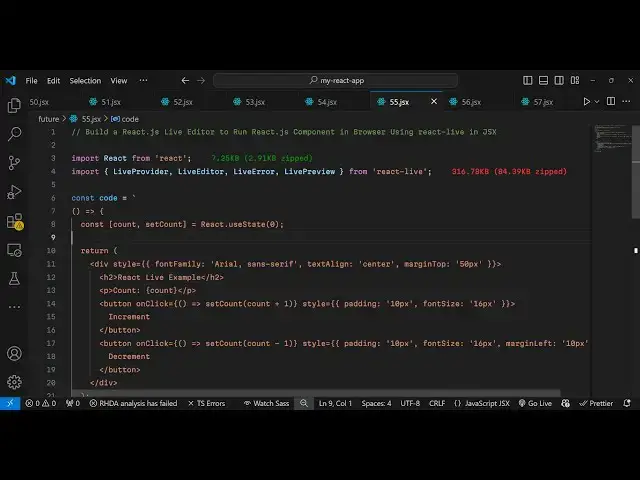
Build a React.js Live Editor to Run React.js Component in Browser Using react-live in JSX
Jan 9, 2025

Buy the full source code of application here:
Show More Show Less View Video Transcript
0:00
uh hello guys welcome to this video so
0:03
in this video I will show you a reactjs
0:06
editor which supports how to run react
0:10
CH components directly in browser with
0:13
live preview so if any suppose let's
0:15
suppose you want to troubleshoot or
0:17
debug your react CH application you can
0:19
use this package so you can see we are
0:22
executing react CH code directly in the
0:24
browser with live preview so this is a
0:26
simple react CH component which have
0:28
these two buttons increment and
0:30
decrement and we displaying the state
0:33
which is a account value if I click the
0:35
increment button the count value will
0:37
increase if I click the decrement button
0:39
the count value will decrease but here
0:41
you will see this is a source code of
0:43
this component and you can directly
0:46
embed code right here let's suppose I
0:48
change the button here let's suppose
0:51
increase increment increase you can see
0:54
directly as I'm changing the component
0:57
is automatically reflecting the change
1:00
so in this way you can troubleshoot your
1:02
react sh component by directly executing
1:05
it if you have any sort of code react is
1:09
valid code that you want to execute
1:12
let's suppose
1:13
uh
1:15
I can make any sort of
1:19
component I change it ined you will see
1:23
it will also highlight errors as well
1:26
syntax error if any syntax error is
1:28
there it will also highlight this so
1:31
automatically as you
1:35
write hello world now you will see H3
1:38
hello world so this is actually the full
1:42
uh react editor uh if you go to
1:45
npmjs.com there is a package which
1:48
allows you to do this which is react
1:51
live
1:53
react and as you write react
1:56
dasli this is actually the package uh
1:59
product
2:00
ready debugger for react CH a playground
2:04
for live editing the react code it's
2:07
almost got 49,000 weekly download so
2:09
it's this this is a package I've already
2:12
installed it you just need to execute
2:14
this command so they do offer their
2:17
website as well if you go to their
2:19
GitHub repo and this is their
2:23
website so react live so a flexible
2:27
playground for live editing react
2:29
components so now to get started it's
2:32
very simple you declare your functional
2:34
component and now to include this
2:36
component we simply write the import
2:38
statement and just it has a pre-built
2:41
methods live provider live
2:45
editor and it also have the Live error
2:48
system as
2:49
well and live preview so all these four
2:53
methods will be coming from this package
2:55
which is live react live it's almost 36
2:59
16 kiloby so it's a pretty big
3:02
package here you will embed your react
3:06
code that you want to embed this can be
3:09
any component react valid react CH code
3:12
I'm just taking a very simple example so
3:15
we have this count little component a
3:18
functional component and now inside
3:21
your wherever you need to embed this you
3:25
will simply embed this so you will wrap
3:28
everything using using this tag of live
3:32
provider live
3:35
provider and here you will it actually
3:37
takes the
3:39
code as an argument so I will simply
3:42
provide the code and then it takes the
3:44
second option which is the scope so here
3:47
you will specify inside double cly
3:49
bracket which is react it's a react code
3:52
so then we show a simple diff inside the
3:57
live preview
4:00
so we can have a
4:04
style a border
4:07
of 1 pixel solid gray color and a
4:13
padding of 20
4:18
pixel you can have this
4:21
uh div tag and inside this you will see
4:26
you will embed all your live preview
4:31
which is having this nice little
4:33
component which is live review and then
4:36
the live editor we have the live editor
4:38
so all these components prebuilt
4:40
components we are embedding and for live
4:43
editor we can style it providing a phont
4:45
family font size and then for showing
4:48
errors we to have this component as well
4:51
so all these are pre-built components
4:52
which are coming from this package react
4:54
LIF so if you refresh your application
4:57
now just see in the browser we see this
4:59
nice little react editor so here you can
5:02
make changes directly by editing the
5:05
code and you can see you can live
5:09
troubleshoot react code in the directly
5:11
in the browser using this package so I
5:14
found it package very interesting
5:16
because sometimes you don't want to
5:19
waste your time creating react
5:21
components you can directly edit them
5:23
inside the browser using this package so
5:26
thank you very much for watching this
5:28
video and do check out my website as
5:30
well free mediat tools.com uh which
5:33
contains thousands of tools regarding
5:35
audio video and image and I will be
5:38
seeing you guys in the next video
#Programming