Up next in 10

Build a React.js JSON Viewer & Editor App to Render JSON Using react-json-view Library in Browser
Jan 9, 2025

Get the full source code of application here:
https://gist.github.com/gauti123456/1cb4f9dc9c58ba8de8b2c892e9feeeff
Show More Show Less View Video Transcript
0:00
uh hello guys welcome to this video so
0:02
in this video we will talk about how to
0:05
integrate Json viewer or editor inside
0:09
react CH application so if you have a
0:12
Json file that you want to see in the
0:15
browser with a nice little syntax
0:18
highlighter for Json files so this is
0:20
actually the interface we have a
0:22
bootstrap choose file button and here
0:25
you can select any Json file that you
0:27
want to if I select a sample Json file
0:29
you will like actually see this nice
0:31
little viewer editor where you can
0:33
actually see the Json file what is the
0:35
type
0:37
size so in this way we have different
0:40
themes which it supports this module let
0:43
me take a Json file with a lot more data
0:46
in it so we have this data if you see
0:48
integrally it is showing it it has 0 to
0:51
100 items total items it is showing
0:55
6,113 items then 0 to 100 100 to 200
1:00
so it is divided into so it is clearly
1:03
you can plus click the plus icon and now
1:06
you can expand this to see more
1:08
information so this is your name email
1:10
address if you have any sort of Json
1:13
file that you want to see the structure
1:15
if you want to integrate this Library I
1:16
will show you step by step in this way
1:20
you can integrate this Json
1:24
viewer you can basically expand any of
1:27
these items and see the structure sure
1:31
so I will show you guys how to integrate
1:34
this Json viewer inside your application
1:37
the library that we are using is react
1:39
it's specifically for react if you go to
1:42
npmjs.com and just search for this
1:45
Library which is react Json
1:51
view so this is actually the module
1:53
react Json view it's a component and it
1:56
has got 5 38,000 weekly downloads and
1:59
this is actually the command npmi react
2:01
Chason view so simply install this by
2:04
going to your command line and uh I've
2:08
already installed it react
2:11
Json View and also we are using react
2:14
bootstrap as well for making the
2:18
interface so just additionally install
2:20
these two modules as well react
2:22
bootstrap and bootstrap so these are
2:25
three modules I've already installed
2:28
it so what I will do I will start my
2:31
development server so in order to start
2:34
this I will delete everything and just
2:36
start from scratch so first of all we
2:39
need do need to make a functional
2:41
component
2:43
so it will automatically refresh and uh
2:46
it will look something like this so for
2:50
this first of all we need to declare
2:52
some State variables so we need to keep
2:54
track of which Json file the user will
2:57
select for that we will have Json
2:59
content
3:00
set Json content and we will have use
3:03
the initial use State hook initial value
3:06
will be null so no file will be selected
3:09
if you load the application for the very
3:11
first time the second variable is for
3:14
the error if any sort of error take
3:16
place we can show the error by using
3:18
error set error and use State again
3:21
initial value will be
3:23
nothing and then we have these two
3:25
variables State variables and now coming
3:28
back to the
3:30
jsx we will import the bootstrap for
3:34
importing bootstrap we need to import
3:35
first of all their base CSS file which
3:39
is located bootstrap dis CSS bootstrap
3:42
main. CSS after that we do need to
3:47
import all the components which we will
3:49
be using in bootstrap which is container
3:52
form and alert and this is all coming
3:54
from react bootstrap so one by one we
3:57
can use that so in the jsx what we need
4:00
to do we just need to use the container
4:04
tag and inside this we will have the
4:06
heading which will say react Json viewer
4:12
and we will attach some bootstrap
4:13
classes to it which will
4:17
be just to align this heading in the
4:20
center position we will use text
4:23
Center and then we will basically have
4:26
uh the form group class
4:30
and inside this we will basically give
4:32
an control ID to
4:34
it which will be Json file and we'll
4:37
giving a class name to
4:41
it and inside this uh we will basically
4:46
have a form
4:49
label and here you'll simply say that uh
4:53
upload adjacent
4:56
file and you will see this and after
5:00
this we need to have a form
5:04
control and this form control will the
5:08
type will be of file we will be
5:10
accepting a Json file so we'll only be
5:12
accepting do Json files only so accept
5:16
parameter and we'll also be attaching a
5:18
on change event handler so this will
5:20
execute whenever you actually select a
5:22
Json file this function that we are
5:25
attaching will execute let me Define
5:27
this function which will be handle file
5:32
upload e parameter will automatically be
5:35
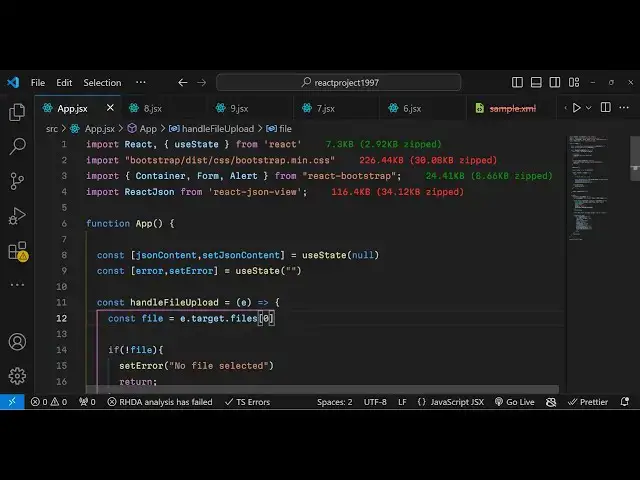
passed as an argument if you see inside
5:37
this function so what this function will
5:41
do is actually read your files so in
5:45
order to pass and read whatever Json
5:49
file the user will submit we will
5:51
actually inside this get access to the
5:54
file first of all by using e. target.
5:56
files after getting access to that file
5:59
we compare it if that file exist or not
6:02
if it doesn't exist in this if condition
6:05
we will simply show a error message just
6:09
set
6:10
error that no file
6:15
selected and then we will set this error
6:19
uh basically return from this we will
6:20
not execute the rest of the code and
6:23
then we will have another condition here
6:25
if the file that is submitted by the
6:27
user doesn't is is not uh Json file in
6:30
that
6:31
casee so we are simply checking that if
6:34
the file is not ending with Json then we
6:37
will simply show a different error
6:38
message this time that please upload a
6:41
valid Json
6:44
file so in that case also we don't
6:47
execute we return and
6:50
now if all things are correct then we'll
6:53
set this error to nothing and then we'll
6:55
read the file for reading the file use
6:57
the buil-in file reader
7:00
which is used to read any file that the
7:01
user submit in the browser so we read
7:04
this by using
7:06
incat instantiating a new Constructor of
7:09
file reader and then this reader object
7:12
contains a event which is onload and
7:15
this will execute event parameter will
7:17
be passed and here inside your TR catch
7:20
block we will read our
7:25
file if any sort of error take place you
7:27
can set that error in reading the file
7:30
file and also we will use this method
7:34
which is reader read as text we will
7:38
read the file as text and just pass the
7:40
file so this will be executed first this
7:44
function read at text so this will call
7:46
this function which will onload so now
7:50
inside this here in the TR catch block
7:53
we need to pass the Json
7:57
file so for passing it we will use this
8:00
module passed Now to create a variable
8:03
and then we'll use this function json.
8:05
pass and we'll simply say whatever is
8:08
the result event. target. result and we
8:11
simply set the Json content to be passed
8:16
Json that's
8:21
all
8:23
so after you do this guys what will
8:26
happen uh if you now select a Json file
8:29
and
8:30
uh nothing will display but uh that Json
8:34
will be successfully passed and if I
8:36
show you the console log
8:38
result because before passing it to the
8:41
library that we'll be using we need to
8:43
Simply pass suggestion read this as a
8:46
text file so whenever I select this if
8:49
you go to inspect element go to console
8:52
you will see you'll receive an object
8:54
right here and it contains information
8:56
about this as a text so we have three
8:59
property these three Json properties and
9:01
we are uh just parsing it and reading it
9:05
so now after successfully reading this
9:08
now we need to use our
9:11
library this Library will be coming from
9:15
react Json view we need to import this
9:18
package which will be
9:20
react Json and this will be coming from
9:24
this react Json view now we need to go
9:27
to our jsx right
9:31
here so just after this form group we
9:34
will actually have a condition that if
9:36
the error exist in that case on only we
9:41
will display a alert
9:45
box and inside this alert we will simply
9:48
be showing the
9:51
error so we will be having the variant
9:55
which will be
9:56
danger and it'll be showing a danger m
9:59
Mage so now what happens if you
10:01
basically select any different file if
10:04
it's not a Json
10:07
file you will receive this alert message
10:10
that please upload a valid Json file so
10:12
you will see this error message coming
10:14
because of you this so now after you
10:17
will have again a conditional jsx that
10:21
if the Json content is set in that case
10:24
only we need to show the Json view so
10:29
for this we will use the bootstrap class
10:31
which is margin top 4 inside this div we
10:35
will have an H5 tag which will say the
10:38
Json
10:40
content
10:41
semicolon sorry colon and now we'll be
10:44
using that module which is react Json
10:48
and this component basically you need to
10:52
pass some properties to
10:54
it because if you don't pass any
10:56
properties and just select it it will by
11:00
default it looks something like this so
11:02
it has a root property and it doesn't
11:04
tell you anything about it so we need to
11:06
pass some properties to this so it takes
11:09
some properties the first one is the
11:11
actual source so here you need to
11:13
specify the Json content so by default
11:16
if you select it will show something
11:18
like this the default theme it is you
11:23
can even change the theme as well by it
11:25
takes an argument which is the theme and
11:28
uh various themes are supported but the
11:31
famous one is
11:32
monokai and this is actually the theme
11:35
the black and the orange the next option
11:38
is takes is the icons so we have the
11:41
different icon Styles so circle is one
11:44
of them so it actually have these icons
11:48
which change to circle the second
11:51
property is the collapse
11:53
option if you don't want the collapse to
11:56
be you can set it to false
12:04
and uh enable clipboard simply means
12:06
that you can copy to clipboard so we can
12:09
set this option to true so what this
12:12
means it you can simply copy whatever
12:20
options and the next two options are
12:24
simple which is display data types if
12:26
you want to display the data types of
12:29
all the elements you can display them
12:32
basically it shows you this what is the
12:35
type of this variable it's a string
12:36
value so basically it shows side by side
12:39
if you toggle this to false it will not
12:41
show so depending upon whether you want
12:43
this or feature or not so I want this
12:46
feature so I will set it to true and if
12:49
you want to also see the size of it so
12:52
you can toggle this option to true and
12:55
now you will see the size as well
12:59
so it will also show the size if I show
13:02
you a Json file with lot more you can
13:05
see now we show these much of items and
13:10
we can
13:11
expand and like
13:14
this so in this way you
13:18
see this is actually the module where
13:21
Json viewer and uh it basically supports
13:25
various themes you can check their
13:27
documentation uh which is react Json
13:30
View
13:33
and so just go to npmjs.com and if you
13:37
want to read more about this
13:46
module so you can see that it has got
13:50
538 weekly downloads so it has got a
13:53
nice little documentation as well you
13:55
can try out various themes are there
13:59
so thank you very much guys for watching
14:01
this video If you hit if you like this
14:04
video then please hit that like button
14:05
subscribe the channel and do check out
14:08
my website as well freem mediat
14:10
tools.com which contains thousands of
14:12
free tools regarding audio video and
14:14
image and I will be seeing you in the
14:16
next video