Up next in 10

Build a React.js Image Lightbox Gallery Slideshow Using yet-another-react-lightbox Library in JSX
Jan 9, 2025

Get the full source code of application here:
https://gist.github.com/gauti123456/83915ab88f31d70374566767d900698b
Show More Show Less View Video Transcript
0:00
uh hello guys welcome to this video so
0:02
in this video I will show you a light
0:04
box Carousel Gallery plugin for react CH
0:08
if you have a series of images that you
0:10
want to display on your website and have
0:12
a light box effect this is a video and
0:15
you can see I have a button out there if
0:17
I click this button this light box
0:20
Gallery will open and you will see the
0:22
image appearing we have all the controls
0:24
out there we can navigate to the next
0:27
image so we have all the countries
0:30
controls to download the image zoom in
0:32
as well we can zoom in on the image zoom
0:35
out we can share this image as well by
0:38
clicking the share button download the
0:40
image as well you can see you can
0:41
download this image it's a complete mini
0:44
image editor you can even show a title
0:46
to this image and a short little
0:49
description as well so we can navigate
0:51
to the next image in the gallery so in
0:55
this way you have the close Button as
0:57
well so it's a mini light box so when
1:00
you click the button a light box appears
1:03
and if a user is visiting your website
1:06
it's a very good way by which you can
1:08
show your images and you have seen these
1:12
used a lot inside websites so if you
1:16
have a image sharing website and it's a
1:18
quite a good plugin and the name of this
1:20
plugin is yet another react light boox
1:24
so if you go to npmjs.com and just
1:27
search for this plug-in uh yet
1:32
another just search it yet another
1:36
react light box so this is essentially a
1:40
modern react lightbox plugin uh it's
1:44
very popular
1:46
112,000 weekly downloads and this is
1:49
actually the command I've already
1:51
installed it so just install this by
1:53
executing this command and they do have
1:56
their own official website as well you
1:59
can check out the documentation they
2:00
have a quite a good documentation
2:02
various ex examples as well so I will
2:05
show you a very simple example so I will
2:08
start it from scratch just make a very
2:10
simple functional component and the very
2:13
first thing we need to do we need to
2:15
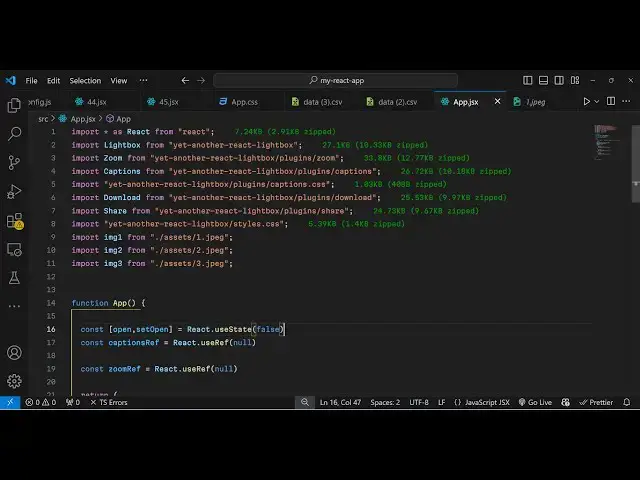
import this modu using the import
2:17
statement so right here I will simply
2:20
import this import light box it will be
2:23
coming from this plug-in which is yet
2:25
another react light box it's just a 27
2:30
bytes plug-in and we do need to import
2:33
their CSS file as
2:36
well so for the styles of this plugin so
2:40
I will just import this CSS file as
2:43
well which is the part of the library
2:46
now we need to import the images that we
2:49
will be using it in the light box or
2:50
Gallery so in my react Chas project the
2:53
images are stored in the assets folder
2:55
so by default if you create a react
2:57
Chase project in the source directory
2:59
automatically assets directory will be
3:01
present so you need to paste all your
3:04
images which you will use in the gallery
3:06
I've already pasted the six images so
3:08
what I will do I will simply import
3:11
these images one by
3:14
one you can call this anything but it
3:17
will be coming from
3:19
this so depending upon your path replace
3:26
it so in this way you can import the
3:29
images
3:35
so after you import your images I'm just
3:38
importing these three images
3:40
so now we do need to import create some
3:44
variables first of all for opening the
3:46
image we opening the light box we are
3:49
using a UST State hook initial value
3:52
will be
3:53
false and also we will use the caption
3:57
plugins as well so for this we do need
3:59
the use
4:00
reference hook of react initial value
4:03
will be null and same thing we will do
4:06
this for the zoom as well we will attach
4:08
the zooming capabilities as well and use
4:11
ref again null so I've declared these
4:14
three variables uh for opening the light
4:17
box caption plugin Zoom plugin so now
4:20
for inside your jsx you will have a
4:23
simple button so this button will
4:26
actually open your light
4:28
box so what once the user clicks this
4:30
button your light box will open so
4:34
button type button and it will be when
4:36
we click the we will
4:39
execute this function set open and we
4:42
will make it to
4:43
true so now inside this after this
4:48
button we will have this plugin light
4:51
box and
4:54
uh here it takes some options first is
4:57
the open property it basically it's a
5:00
Boolean parameter so we are basically
5:03
putting this variable open whether it's
5:06
true or false so when we click the
5:08
button it makes it to true so now this
5:10
opens so after it opens we need to
5:16
attach the slides slides is generally
5:19
what images that you want to put so this
5:23
takes an object and it will be array of
5:25
images so each image will be an object
5:28
which will contain three properties the
5:30
source of the image which contains the
5:33
path we'll attach the path then the
5:35
title of the image so I will just say
5:37
first
5:38
image and then it takes the description
5:41
as well so we'll say first image
5:45
description so you can replace it
5:47
accordingly and then I will repeat this
5:50
for the second
5:52
image title which will be second image
5:56
description
6:04
so you will have your description
6:08
uh second image
6:14
description and I will repeat this for
6:16
one more
6:19
time which will be image
6:25
3 so if you just refresh your browser
6:28
you will see
6:30
a button appearing if you click the
6:32
button uh these three images will
6:35
there the first image second image and
6:38
the third image but you can't see the
6:40
titles if you see we haven't seen the
6:43
title in the description for seeing
6:45
these things we do need to attach the
6:47
caption plugin so right here we need to
6:51
provide a property here which will be
6:54
captions and here you need to specify
6:57
this object reference that we put which
7:00
is captions reference and we also need
7:03
to provide a plugins it takes the series
7:06
of plugins that you can pass to enhance
7:09
your light box so one such plugin is
7:14
captions this captions plugin will be
7:16
imported if you see it's there in the
7:19
plugins
7:21
directory so now if you see
7:32
uh we do need to actually after we do
7:35
this
7:37
captions we provide the source in title
7:41
and the description in the similar way
7:44
we can even attach the zoom plugin as
7:46
well so just put
7:48
Zoom it will also be
7:53
imported sorry this Zoom will be a
7:57
plug-in import Zoom
8:00
yet another and it contains plugins and
8:03
it contains the zoom
8:12
plugin and we also need the CSS files as
8:15
well so all the source code will be
8:18
given in the description so what I have
8:20
done I imported these all these plugins
8:22
alongside with their CSS file as well so
8:25
we do need the caption CSS file as well
8:29
and and then we are attaching this
8:30
download share plugin as well captions
8:33
Zoom plugin as
8:35
well so if you refresh now what
8:44
happens uh let me check the
8:46
error it is saying use state is not
8:49
defined
8:51
sorry
8:55
let react dot I can use react Dot
9:12
so now if you see you will see your
9:14
title in the description just the CSS
9:16
file was missing I have just replaced
9:18
the CSS file if you see which is part of
9:21
this caption CSS I just included this
9:24
and now it is working and same thing I
9:26
will do this for the zoom plug-in if you
9:29
see we also need to attach the zoom as
9:34
well the reference that we have for
9:38
Zoom so now you will also see the zoom
9:41
zoom plugins as well you can zoom the
9:44
image zoom
9:46
out and we also have similarly we can
9:50
attach the download functionality as
9:53
well the plugins inside plugin we also
9:57
have the download
9:59
we can attach this so now you will also
10:02
see this download button so you can
10:04
click the download and the image will be
10:06
downloaded and same thing we also have
10:11
the share plugin as
10:14
well so you can attach the share
10:18
plug-in and now if you open it
10:51
so in this way you can make this nice
10:53
little uh image light box
10:56
editor uh thank you very much for
10:58
watching ing this
11:01
video If you like this video then please
11:04
hit that like button subscribe the
11:06
channel as well I think Local Host
11:08
spelling was not right that's why it was
11:11
not working so now you'll also see this
11:14
share button appearing as well so if you
11:15
click the share button you can share
11:17
your images as well so these are all the
11:21
plugins supported you can check their
11:22
documentation it's a very good plugin so
11:24
inside react to actually make these nice
11:27
little light box gallery or Carousel
11:30
structures so thank you very much for
11:32
watching this video and do check out my
11:34
website as well free media tools.com
11:37
which contains thousands of tools
11:40
regarding audio video and image and I
11:43
will be seeing you in the next video
#Online Image Galleries
#Online Video