live_tv
Livestream Starting Soon
00
Hours
:
00
Minutes
:
00
Seconds
Up next in 10

Build a React.js Google Material UI Phone Picker With Flag & International Country Codes
Jan 9, 2025

Buy the full source code of application here:
Show More Show Less View Video Transcript
0:00
uh hello guys welcome to this video so
0:02
in this video I will show you how to
0:04
integrate this uh phone number input
0:07
field where you will have all the
0:09
country codes of all the countries in
0:11
this drop down you can select whichever
0:13
country that you want if you are
0:16
allowing the user to input their phone
0:17
number then they can select whichever
0:19
country that they want inside the select
0:21
field and automatically this country
0:24
code will be applied so India has plus
0:26
91 so already this country code will be
0:29
applied and they will will be able to
0:31
enter their phone number so in this way
0:34
you can see that so this is actually a
0:36
material kind of input field you can see
0:39
the design of it looks like material
0:41
design and you can see all these country
0:44
codes you can even have region specific
0:46
country codes as well you can even
0:48
display only a specific kind of
0:50
countries as well so the package name if
0:52
you go to it just search on npmjs.com
0:56
and just search for this package which
0:59
is material UI phone number this is
1:02
actually the
1:04
package and almost it's got 18,000
1:08
weekly downloads and this is actually
1:10
the command so simply install this
1:12
package I've already installed it so I
1:14
will just show you a very basic example
1:17
so just make a simple functional
1:19
component and you just require this
1:22
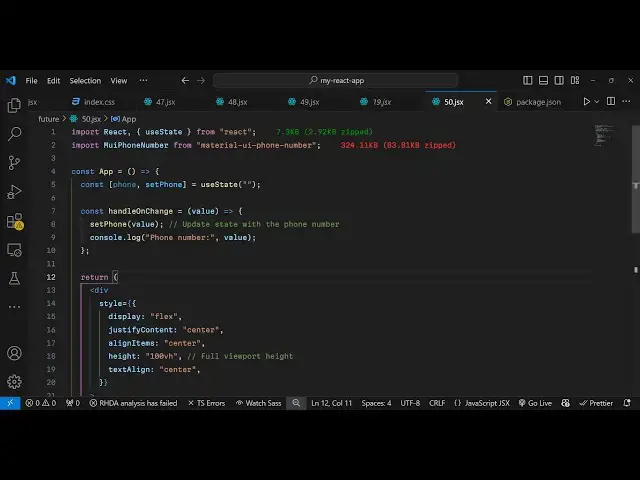
package using the import statement so
1:25
import from this package you can see
1:28
that so 320 4 kiloby is the size of this
1:31
package so we have this mui phone number
1:35
component and after importing it you
1:38
come to the jsx part and just before
1:42
that I will just declare a simple State
1:44
variable for keeping track of whichever
1:47
phone number the user will write so you
1:49
can have a UST State
1:51
variable initial value will be nothing
1:54
so right here in the jsx I will just
1:57
align it in the center position so I
1:59
will just give it some custom styles to
2:02
it we'll change the display property to
2:06
flex justify content I will just make it
2:11
as Center and I will align the items in
2:14
the center
2:16
position and I will just give it a fixed
2:19
height of 100 vertical height and text
2:22
align to Center so it will just make
2:25
sure that it aligns it in the uh center
2:28
of the screen horizontally vertically
2:30
now you use this component Mi phone
2:33
number material phone number input and
2:36
it actually takes some options which is
2:38
the default country that you want to
2:40
show inside
2:42
your input field so I will just say us
2:46
United States and there is also an
2:48
option to Auto
2:51
format so you can make it true so now
2:54
the formatting will automatically format
2:56
as you write the phone number as the
2:58
user will write the phone number if you
3:00
refresh your application now you will
3:02
see this input field and by default us
3:05
will be selected and then you can click
3:07
this and you can select whichever
3:09
country that you want to choose from
3:11
here so automatically you will see as I
3:14
selected the country the country code
3:16
has been automatically been added and
3:18
now I can enter the 10 digigit phone
3:20
number whatever that I want to write so
3:23
in this easy way you can do this and now
3:26
after user writes this phone number you
3:28
can get this value by attaching this
3:30
onchange event handler so when the input
3:34
is changed this function will
3:36
automatically fire so you can bind this
3:39
handle change function you can call this
3:42
anything so inside this function you
3:44
will get the phone number that the user
3:46
will
3:49
write you can easily get
3:53
this you can
3:56
allert phone number
4:00
so now what happens as you write the
4:02
phone number now if you select the
4:05
country
4:08
code so as as soon as it changes it
4:11
actually fires you you will see country
4:13
code is 91
4:16
selected and then as soon as the user
4:18
writes it so this handle change will
4:21
execute so I will just console log it
4:34
so after you enter your number you will
4:41
get so every time it will fire as soon
4:44
as the value changes and you will get
4:46
your phone number so you can easily
4:48
process it whatever you want to do for
4:50
your application so it's a great module
4:53
uh it's material design of course
4:55
powered by Google so it looks like
4:57
material design and uh
5:01
and there are certain options as well if
5:03
you want to exclude or include only
5:07
countries you there is an option right
5:10
here so let's suppose you only want to
5:12
show countries so there is an option
5:14
here of
5:16
for only
5:21
countries so here you can specify an
5:23
area of countries that you all only want
5:25
to show which is US India and Australia
5:29
New Zealand so we have to show only
5:31
these four countries so we mention the
5:33
country codes right here inside this
5:35
array so now what happens if you see in
5:39
the we only see these countries
5:41
appearing at the top so these four
5:43
countries so in this way uh you can
5:46
include a specific set of countries and
5:49
then there is also an option to exclude
5:53
countries as well if you don't want to
5:54
show some certain countries you can
5:56
exclude it here you can provide the
5:59
default country so all these options are
6:01
available you can even style these as
6:04
well uh which input class drop down
6:07
class you can check out the
6:08
documentation inside their
6:11
npmjs so localization as well if you
6:14
only want to Let's suppose only show
6:18
certain regions
6:20
so you can pass this regions property so
6:23
now they will only show countries which
6:26
belongs to the specific regions which is
6:29
in North America and Caribbean so if you
6:31
refresh now and if you see only the
6:36
countries related to that specific
6:38
regions will show so in this
6:41
way so you can customize the look and
6:43
feel of this phone picker and with
6:47
automatic formatting country code so
6:49
it's specifically made for react sh so
6:51
thank you very much for watching this
6:53
video If you like this video then please
6:55
hit that like button and also check out
6:57
my website as well uh free mediat
7:00
tools.com uh which contains thousands of
7:03
tools regarding audio video and image
7:07
and I will be seeing you in the next
7:09
video