live_tv
Livestream Starting Soon
00
Hours
:
00
Minutes
:
00
Seconds
Up next in 10

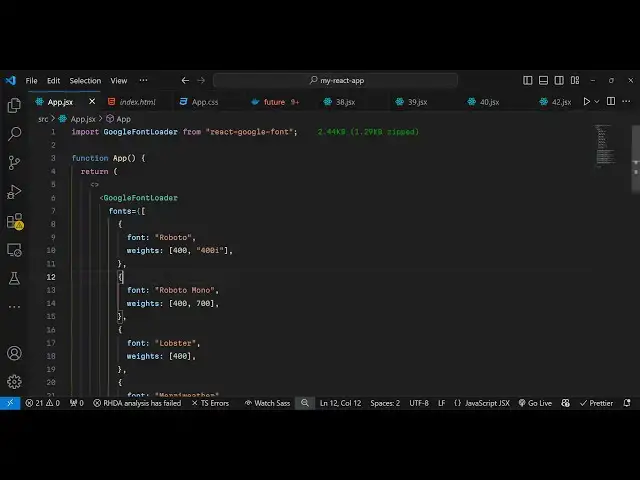
Build a React.js Google Fonts API to Include Dynamic Google Fonts in Browser Using react-google-font
Jan 9, 2025

Get the full source code of application here:
https://gist.github.com/gauti123456/2f89a1fe4fa65f45ddc2f805b5dcddec
Show More Show Less View Video Transcript
0:00
uh hello guys welcome to this video so
0:02
in this video I will show you a
0:04
component Library specifically designed
0:07
for react CH application where you can
0:09
include Google fonts remotely you can
0:12
basically load any Google font of your
0:13
choice you just need to know the name of
0:16
the Google font and if you input the
0:18
name inside the react Chas component it
0:21
will automatically style this text using
0:25
that Google phone so you will see we are
0:27
basically loading these Google fonts
0:28
dynamically
0:30
and uh you can just see these are
0:32
different Google phones out there
0:33
Lobster Roboto so you can go to Google
0:37
phone website and uh just search the
0:40
name of whichever Google phone that you
0:42
want to load and there is a specific
0:44
component re react inside react CHS so
0:48
let me show you the actual component
0:50
name so if you go to npmjs.com just
0:53
search for this package react Google
0:56
font so this is the name of the package
0:59
I've already installed called it this is
1:01
actually the command and it's a fairly
1:03
new package only 70 downloads are there
1:05
so I will show you a very basic example
1:08
just make a simple functional component
1:11
and you will use the import statement to
1:13
import the actual module so Google font
1:16
loader this is actually the method
1:18
available actual component which is
1:21
coming from this package react Google
1:23
font so after you load this now it is
1:26
very simple to actually embed this so
1:29
wherever you want want to embed this
1:31
simply you register whichever phones
1:33
that you want to load inside this
1:35
component so it takes a property called
1:38
as
1:39
phones and here you need to exactly tell
1:43
inside this how many phones you want to
1:46
load so it's an array
1:48
of basically of all the objects so we
1:53
basically provide the font name whatever
1:56
font name so you provide the font name
1:59
Roboto and then you can even provide the
2:01
weights as well so I want the 400
2:04
version I in this way you can provide
2:07
this 400 version I want I also want the
2:11
400 italic version as well so in this
2:14
way you can provide whichever font that
2:16
you want alongside with the weights as
2:19
well and so some more Google fonts let
2:23
me just
2:27
put so you just need to wrap everything
2:29
in the
2:31
object so we also need Roboto mono this
2:35
is again a Google font so weights is 400
2:41
700 then a famous font is lobster inside
2:46
Google phones so in this way you can do
2:50
this 400 so now we have three phones we
2:54
have registered globally inside this
2:56
component now if I basically
3:00
make any after this if I write a
3:03
paragraph and I can apply this font
3:07
easily by using the font family tag and
3:10
here we can simply put the lobster
3:15
font and I can simply say hello this is
3:19
a lobster
3:22
font so if you refresh your browser you
3:25
will actually see the lobster font has
3:27
been successfully applied so inside your
3:31
Google application you can see I'm I'm
3:33
not including any sort of Google CDN
3:35
link it is dynamically loading remotely
3:39
these Google phones directly from the
3:41
website and in this way you can directly
3:44
use it inside your application reactj
3:46
application using this custom component
3:49
and uh if you just search for this font
3:52
if you want to just cross check if you
3:55
want to search for this it's a very
3:57
popular font Lobster
4:00
that we are
4:02
using so it's a Google
4:08
font so this is exactly what we are
4:11
doing this is actually the font name
4:13
Lobster which we are loading right here
4:15
inside our react CH application so in
4:18
this
4:19
way one such another font is also there
4:22
which is called as popins so you can
4:25
search for your favorite fonts in this
4:28
you just need the name of the phone font
4:30
so once you got the name so let's
4:32
suppose I want this font so I will
4:35
create another object right here simple
4:37
object give it a font name which is
4:40
popins and just give it a weight
4:42
category so I want multiple weights
4:46
which is 400
4:47
700 so what I will do I will simply
4:50
apply
4:53
this so I will simply pass it now this
4:56
is Poppins font so this is a Poppin
5:04
so if you refresh now you will actually
5:06
see now we have the popins font also
5:09
available to us so in this way you can
5:12
load any Google font inside your react
5:14
CH application using this custom
5:18
component
5:23
so so in this
5:26
way you can go to the website I have
5:29
shown you this is a complete process a
5:32
custom component where you register all
5:34
your Google phones at once and it will
5:37
save you a lot of time because you no
5:39
longer need to include the CDM link of
5:41
each font you can install this package
5:43
once you globally register all your
5:45
modules at once and then you can reg use
5:48
your Google phones directly so it's a
5:51
pretty good
5:53
module so I personally use it a lot
5:56
inside my applications so at any time I
5:59
I need custom phones I use this package
6:01
specifically for my reacts applications
6:03
so thank you very much guys for watching
6:06
this
6:07
video all the source code will be given
6:09
in the description of this video so if
6:11
you need the source code you can go to
6:13
the description and also check out my
6:16
website as well free mediat tools.com
6:18
which contains thousands of tools
6:20
regarding audio video and image and I
6:23
will be seeing you in the next video
#Online Media
#Internet Software