Up next in 10


Buy the full source code of application here:
Show More Show Less View Video Transcript
0:00
uh hello guys welcome to this video so
0:02
in this video I will show you a input
0:04
field form input field which supports
0:08
DeLay So to read and write data inside
0:12
your application specifically this is
0:14
delay input field in react CHS so if you
0:18
want to have some delay inside your
0:21
input field you can use this
0:26
package so this is our input field
0:30
so very simply you will write read and
0:32
write data so once you write something
0:35
right here there will be some DeLay So
0:38
after
0:39
that you will
0:40
see after some delay we will print out
0:44
the values there is some kind of delay
0:47
after I write something in this input
0:49
field there is some delay and then after
0:51
that the values are being printed so if
0:54
you want to have this effect inside your
0:56
react CH application if you have to have
0:58
some delay in reading and writing data
1:01
inside the form input Fields so there is
1:04
a specific package which is can be used
1:07
react delay input so if you go to
1:11
npmjs.com just search for this package
1:15
react delay
1:18
input so I'm using this package and is
1:23
it's input field where you put some kind
1:26
of delay in the form input field so it's
1:29
almost C 735 weekly
1:31
downloads so I will just show you a very
1:34
simple example so just make a simple
1:37
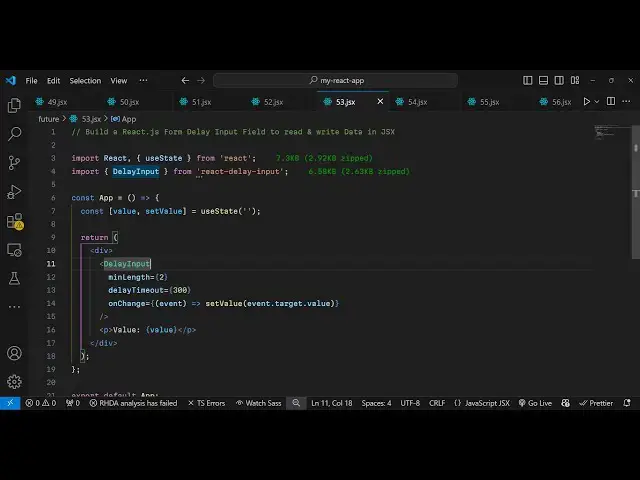
functional component and now to import
1:41
this we use the import statement and
1:43
then we import this package which is
1:45
delay input it will be coming from this
1:47
react delay input package it's almost 7
1:51
kilobytes so we simply import this so
1:54
now to use this first of all we need a
1:57
state variable just to keep track of
1:59
which value the user will write value
2:02
set value and then we use the UST State
2:05
hook which initial value I will give it
2:08
to nothing and then wherever you need to
2:11
embed this you will give the component
2:13
name which is delay input and it
2:16
actually takes some options so here you
2:18
can specify validation so let's suppose
2:22
you only want the minimum length to be
2:25
two so there should be minimum
2:27
characters two that would be enter by
2:30
the user the second restriction that you
2:32
can put in terms of the time period you
2:35
can put a delay so there is a specific
2:38
variable that you can put 300
2:41
millisecond so you can have a delay of
2:43
300 millisecond so whenever you enter
2:46
anything inside this input field so here
2:49
we are specifying there should be a
2:51
delay of 300 this value is in
2:56
millisecond and then you can even attach
2:58
an onchange event handler so whenever
3:00
the value changes this event handler
3:02
will fire and it will print out this
3:05
value so now simply if you go to the
3:07
application and try to run this
3:10
application there is this input field
3:13
and you can
3:14
even print out the value as well you can
3:17
have a paragraph and then here inside
3:19
this we are printing the value very
3:22
simply so after some kind of delay 300
3:27
millisecond let me change this value and
3:29
make it
3:30
1,000 millisecond so now what happens
3:33
there will be a delay of 1
3:35
second after that the value will be
3:39
readen so once you write it there will
3:42
be a delay of 1 second so if you want to
3:45
have this effect guys you can use this
3:47
package there will be a delay of 1
3:49
second and after that the value will be
3:51
read by the by
3:54
the input field so thank you very much
3:57
guys for watching this video
4:00
and do check out my website as well
4:02
freem mediat tools.com uh which contains
4:05
thousands of tools regarding audio video
4:08
and image and I will be seeing you guys
4:11
in the next video
#Programming
#Software