live_tv
Livestream Starting Soon
00
Hours
:
00
Minutes
:
00
Seconds
Up next in 10

Build a React.js FFMPEG Timeline MP3 Audio Trimmer Editor in Browser Using Lame.js & Wavesurfer.js
Jan 9, 2025

Buy the full source code of the application here:
https://procodestore.com/index.php/product/build-a-react-js-ffmpeg-timeline-mp3-audio-trimmer-editor-in-browser-using-lame-js-wavesurfer-js/
Buy Premium Scripts and Apps Here:
https://procodestore.com/
Show More Show Less View Video Transcript
0:03
uh hello guys welcome to this video so
0:05
in this video I will basically introduce
0:07
to a new audio editor that I developed
0:10
inside react CHS and I basically used
0:13
fmpg web assembly Library lame JS and
0:16
wave surfer. JS so we are used three
0:19
open-source libraries guys to actually
0:21
build out this 100% client side fully uh
0:25
onepage sound editor right in the
0:28
browser itself using JavaScript in react
0:31
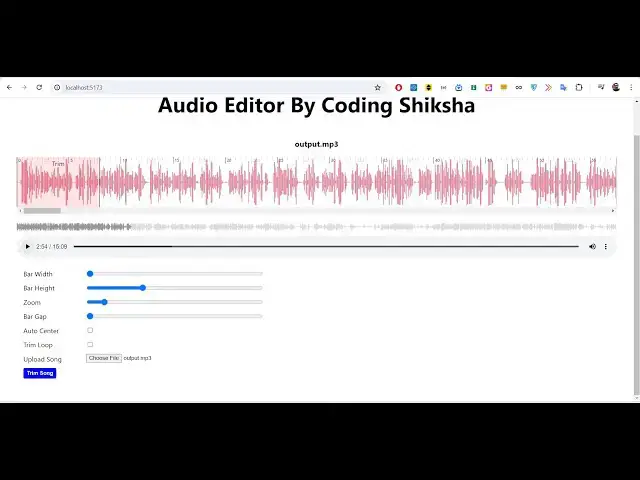
CH so you can just see like the demo
0:33
that I'm running it on Local Host 5173
0:36
locally inside my machine and this will
0:39
look something like this there is this
0:41
simple interface you will actually want
0:42
to select your audio file all extensions
0:45
are supported it should be a it should
0:47
be a valid sound file so there is an
0:50
option choose file button so basically
0:52
you will simply select that option and
0:55
just go to
0:57
your directory wherever your file are
1:02
stored so I will simply select my
1:04
output. MP3 file you can just see here
1:06
it is 15 minutes 32 second long so it
1:10
will actually create a wave form guys
1:11
using Wave surfer. JS and it will
1:14
actually show you a nice little timeline
1:17
where these waveforms will be shown and
1:20
basically here we have the trimmer right
1:22
here we can control this using the mouse
1:24
here you will see that very easily we
1:26
can trim any portion in the audio that
1:29
we don't want and uh like this so we
1:32
actually coded this application inside
1:34
the react jsk SK so you will basically
1:36
see we have used lame JS which is
1:38
actually a open- source MP3 encoder
1:41
Library we have used react CH for this
1:44
project react audio react Tom wave
1:46
surfer. JS we also use fmpg web assembly
1:49
in the background to actually carry out
1:51
the conversion so if you need this
1:53
project guys the link is given in the
1:54
description you can directly purchase
1:56
the full source code with full directory
1:58
structure and you will get this full
2:00
direct full application you can
2:02
basically run this
2:04
application uh after you purchase it
2:07
from my website you will be
2:08
automatically be redirected to Google
2:10
Drive where you will actually get this
2:12
ZIP file you just need to extract the
2:15
zip file and this will actually contain
2:18
all this jsx code this react CH code and
2:22
basically you can see that I'm running
2:24
this application on Local Host
2:27
5173 so after you do extract it go to
2:31
the folder and just run this command npm
2:33
run Dev so it will actually start the V
2:36
server which will actually host your
2:38
react Chase application it is basically
2:41
developed guys with the latest version
2:43
of react node so it will basically
2:45
compatiable with all the versions of
2:47
node and react with all the older
2:50
versions as well so if you reload that
2:52
you will look something like this you
2:54
will actually choose your audio file and
2:57
uh it will now create the audio wave
2:59
form
3:00
using wav surfer. JS so now guys let's
3:04
suppose we can control the bar width you
3:06
will see that using the slider we can
3:10
basically control the bar width you can
3:12
if you want larger you can do
3:14
that you can even control the height as
3:17
well if you don't want higher height
3:19
like this you can control the height as
3:21
well so all the things are customizable
3:23
guys using these sliders it makes it
3:26
Dynamic so totally depends upon the
3:29
functionality zoom level if you want to
3:31
zoom it on a different level you can
3:33
even do that as
3:36
well so I just want to do this like
3:42
this so bar Gap also you can
3:48
control like
3:50
this so it is almost 15 minutes 5 Second
3:54
long so basically uh you can just see it
3:57
created this awesome little waveform and
4:01
uh uh the primary objective guys is to
4:05
remove the background noise and also
4:07
remove the silence so basically we can
4:09
select this portion and delete this
4:11
portion as well or trim it so it's a
4:15
audio trimmer guys and now let me show
4:17
you the trimmer portion so this is
4:19
actual trimmer portion so let's suppose
4:21
I want to trim this portion awesome
4:25
ultimate
4:26
Advan so this is a trimmer right here
4:28
and basically we can can select it using
4:31
our Mouse so it will start from
4:37
this and you can just see here 25 second
4:40
to 45 second so this is your starting
4:42
time and this is your ending time and
4:45
here you can basically have this option
4:48
of trim song So if you click on trim you
4:51
can basically see your video has been
4:53
successfully trimmed and now it only
4:56
contain 20 second you can see that you
4:58
can play this you can see the audio file
5:01
is successfully trimmed and now you can
5:03
simply download This by clicking on
5:05
download your file is successfully
5:07
downloaded so this is a wave no server
5:09
site code is involved so only if you
5:11
upload 20 second is there in the audio
5:13
you can see that the audio was
5:15
successfully cut using the selection
5:18
that you selected the starting time and
5:19
the end time so basically it did that
5:22
portion pretty well so in this way guys
5:25
you can carry out the conversion process
5:28
just select your file if if you want to
5:30
trim your audio without using any third
5:32
party software just select that it will
5:35
create the
5:45
waveform this is a application guys if
5:48
you are interested the link is given in
5:50
the
5:55
description so this is your trimmer will
5:57
be there you can go to any location in
5:59
the audio whichever portion that you
6:02
want these things are written right here
6:05
you can see 60 second this is 1 minute 5
6:09
Second the timing is written right here
6:12
you can also go to a particular location
6:15
by using this
6:28
also so this is your trimmer which is
6:30
available to
6:32
you you can navigate to the location
6:36
where you want to trim the portion cut
6:38
the audio
6:42
file let's suppose I want to
6:45
trim 2 minute 5 Second up till 250 so
6:49
the length will be around about 45
6:51
second click on
6:53
trim and now you can see almost 45
6:57
second you will see the audio was
6:58
successfully cut you can
7:01
my it will my and automatic it's a very
7:06
minimalistic Guys audio trimmer audio
7:08
cutter application right in the browser
7:10
which is built using react chairs you
7:12
can download
7:14
your you can even basically have a
7:17
second option playback speed you can
7:19
control the speed of the
7:21
audio if you now do this it will play
7:24
very
7:25
[Music]
7:28
slowly so you can basically increase the
7:31
speed decrease the speed depending upon
7:37
that will be converted to we format you
7:39
see back so in this way so the next
7:42
thing is so if you download
7:46
this format you want a image to convert
7:49
let's suppose I want simp let's suppose
7:52
I want so the audio is successfully
7:54
downloaded guys so this is a great uh
7:57
application guys if you are interested
7:59
the link is given in the description
8:01
it's a audio editor built inside react
8:04
CHS and it uses three libraries first is
8:07
we are using fmpg Library if you don't
8:10
know about fmpg it's a open source audio
8:13
and video processing library and we are
8:16
actually using it in the browser so it's
8:18
a command line Library built for Windows
8:21
Linux and Mac but we are using this
8:24
package fmpg web assembly which allows
8:27
fmpg to be used in the browser to
8:29
actually make these awesome
8:31
applications so this is their GitHub
8:33
repo you can check out their library and
8:36
also we are using this Library which is
8:38
a MP3 encoder which is lame JS so
8:41
actually it is used to actually export
8:44
the MP3 file after you make the modify
8:47
the changes you download the MP3 file so
8:49
we actually encoding the MP3 or audio
8:52
files using this library and the third
8:54
Library guys Wave Surfer which is a very
8:56
important Library whenever you select
8:58
your audio file it actually construct
9:01
the waveform using this open-source
9:03
JavaScript library which allows you to
9:07
construct your audio visualization for
9:10
creating interactive customizable
9:11
waveform so whenever you select the
9:13
input audio file it actually create
9:15
these audio
9:18
files so it actually create these
9:20
awesome files right here whenever you
9:22
select any audio file it construct this
9:25
audio fave forms so coming back to the
9:28
code guys you will actually get this
9:29
full source code after you purchase it
9:31
from my website from Google Drive you'll
9:33
get a zip file you just need to extract
9:36
the content and start the
9:38
project and uh various
9:41
uh app jsx if you see basically all the
9:45
content is
9:46
there so it is built using valid jsx and
9:50
JavaScript you can see that each
9:52
component has have different files
9:55
associated with it so this is the main
9:57
audio editor component which is coded in
10:00
jsx so this is the main component this
10:03
is the waveform
10:05
component so if you want to deploy this
10:07
project guys we have this simple command
10:10
npm run build command as well you can if
10:13
you want to deploy this inside your
10:15
domain name let's suppose if you're
10:17
building it in your own website if you
10:19
want to deploy this application what you
10:22
can do if you are running it you can see
10:27
that close this just just run this
10:29
command npm run build it will actually
10:32
build your application it will actually
10:34
create a new directory called as build
10:37
directory dis folder it will create and
10:39
it will actually create the minified CSS
10:42
and the JavaScript code and this is your
10:43
index. HTML file so you can directly
10:46
upload these files to your hosting
10:48
platform and actually uh you can see it
10:51
is built for production so you can run
10:54
locally or you can build it for
10:56
production if you're developing it for
10:57
your own domain name you can easily do
11:00
this so this is audio editor guys in
11:03
react chers timeline audio editor and it
11:07
is built using fmpg ljs and W surfer. JS
11:10
and if you are interested guys the link
11:12
is given in the description thank you
11:14
very much for watching this video and uh
11:17
I will be seeing you guys in the next
11:19
video Until then thank you very much
#Multimedia Software
#Other