live_tv
Livestream Starting Soon
00
Hours
:
00
Minutes
:
00
Seconds
Up next in 10

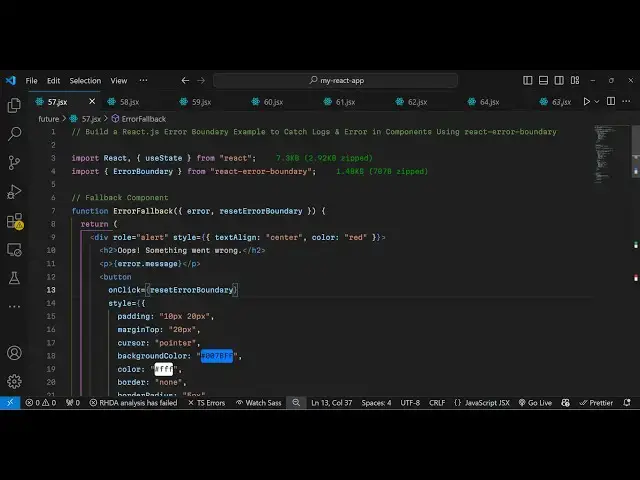
Build a React.js Error Boundary Example to Catch Logs & Error in Components Using JSX
Jan 9, 2025

Buy the full source code of application here:
Show More Show Less View Video Transcript
0:01
uh hello guys welcome to this video so
0:03
in this video I will show you a error
0:05
boundary example inside react chair so
0:09
we have a very simple application where
0:11
we allow the user to catch any error
0:14
that occurs inside your react CH
0:16
component so we have two buttons out
0:18
there either we can click the increment
0:20
button so it will increase the value of
0:22
count so initial value of count if you
0:25
see is zero as I click the increment
0:28
button it will increase so we have put a
0:30
restriction that whenever the value
0:32
reaches three so as soon as I click the
0:34
button one more time you can see the
0:37
count value is three so as soon as it
0:39
reaches four you will see count ex
0:42
exteded the limit of three and this
0:44
error message will pop in so in this way
0:47
if any kind of error untimely error take
0:51
place you can catch it using the concept
0:53
of error boundary and for this we are
0:56
using a simple package to show this
0:58
error message and there you also see a
1:01
try again button so that you can try it
1:04
again we also have a reset button as
1:06
well you can reset the value of count to
1:09
zero whenever you click this button but
1:11
the prime uses of this react boundary
1:14
example is that if you also want to show
1:17
a custom error message to the user you
1:20
can customize this error message
1:22
accordingly depending upon your
1:24
application and then we also got try
1:25
again button so react boundary uh if you
1:29
go to npmjs .c and just search for this
1:31
package which is react error boundary uh
1:36
this is actually the example this
1:39
package
1:40
here the command is very simple I've
1:42
already installed it it's almost got 1.6
1:46
million weekly downloads so it's a
1:49
popular package so I will show you now a
1:52
very simple example so first of all you
1:54
need to import this package using the
1:57
import statement
2:01
so right here at the very top we simply
2:04
use the import statement and from this
2:07
we
2:08
import error boundary and which is
2:11
coming from
2:12
react error boundary so this is actually
2:14
the package it's almost 1.5 kilobytes of
2:18
size so so here we inside our app level
2:22
component we need to
2:24
wrap our application inside this parent
2:27
tag parent component which we have have
2:30
which is error boundary so now you will
2:33
Define everything inside your
2:35
application if you have so I will Define
2:38
a component custom component which I
2:40
will call this as buggy
2:43
component so I this will be your
2:46
application you will Define all your
2:48
components inside this parent tag of
2:49
error boundary so here I am defining
2:52
this custom component of buggy component
2:54
and inside this error boundary component
2:57
it takes two options fallback component
3:01
it typically refers to the error
3:05
component so whenever error take place
3:08
this component will execute error fallar
3:11
I will Define this it's a custom
3:12
component and secondly whenever you
3:15
click the reset button what should
3:17
happen so I will just Define a very
3:20
simple inline component here so I will
3:23
just console log a simple line that
3:27
error boundary re set and now we just
3:31
need to Define this custom component
3:33
which is buggy
3:35
component so this will be a simple
3:38
custom component and
3:41
here we will Define a simple react
3:45
component and also here we also need to
3:48
Define this error component as well so
3:50
here if any kind of error message we
3:53
need to display we will use this
3:56
component to display it error fallback
4:00
so this is a configuration that you need
4:02
to do while you
4:04
are making a simple error boundary
4:08
example so this will actually we need to
4:11
extract the
4:12
error and the
4:16
reset error
4:24
boundary so here from this we need to
4:26
return a simple
4:35
so just make sure that you
4:39
put it's a function so just make it a
4:43
function here because we are not using
4:46
it es6 function ins that's why it's a
4:49
function simple functional component and
4:52
right here you'll be displaying so first
4:54
of all you need to make this buggy
4:55
component so this will be the overall
4:58
application so for this we will have
5:00
simply declare a variable of count to
5:04
keep track of the count variable initial
5:06
value will be zero so we are simply
5:09
using the U State hook inside react CH
5:12
and then here we'll be putting a
5:13
restriction a condition right here if
5:15
the count value is greater than three in
5:18
that case we just need to throw a
5:23
error and this error will say count
5:27
exteded
5:30
the limit of three so I'm just taking a
5:32
very simple example you can have your
5:34
own application depending upon that your
5:37
you will give your error so in this way
5:40
you can do that and then we simply
5:42
return the jsx inside using jsx
5:45
expression and then here we can
5:49
Define we can align it in the center
5:51
position so text align to Center and
5:54
then we can give it a margin from the
5:56
top position which will be 50 pixel
6:03
and here we'll be having an H1 here
6:05
which will say that react error boundary
6:13
example and we'll be outputting the
6:16
count value inside this cly brackets so
6:18
we simply say this is your count value
6:22
and after that we will have a simple
6:24
button to increment the value of count
6:28
so we will have this button which will
6:30
say
6:31
increment so whenever you click this
6:34
button your value will get incremented
6:36
so we'll bind a simple on
6:39
click function inline function so it
6:42
will look something like this we given
6:45
some styling to this button so whenever
6:47
you click your button the set count will
6:49
get executed and we are passing count
6:51
plus one so what should happen now if
6:54
you see we will have this nice little
6:56
button increment and as I click the
6:58
button it reaches three but you will see
7:01
the application will crash after I click
7:04
the button for the fourth time you will
7:06
see the application will crash so that's
7:08
the prime usage of react boundary
7:11
because we don't want the application to
7:12
crash we need to show a customize error
7:15
message for that purpose we use this uh
7:18
module of react error boundary because
7:21
we don't want our application to crash
7:23
this is not acceptable by the user for
7:25
the user experience and after that we
7:28
can even have a reset button as well
7:30
just allowing the user to reset the
7:32
value of count this is not necessary for
7:35
this application but do we can define a
7:38
reset button as well so whenever you
7:40
click it you will reset the values to
7:43
zero so now we'll have two
7:47
buttons as you click the reset button it
7:50
will reset this count value to zero now
7:52
you can see that so now to Define this
7:55
error message if you see we defined this
7:57
error message we put this condition
8:00
and now in this error
8:05
fallback in the GSX we Define
8:09
this and we write here we use
8:14
this rooll here and we will put a alert
8:17
simple alert message and we will style
8:20
it in the center position once
8:23
again and you'll make the color to
8:28
red and simply say
8:32
oops something went
8:38
wrong and then you output the error
8:41
message which will be coming from this
8:44
error object that we have inside this
8:47
passed this will be automatically be
8:49
passed if you call this error call back
8:52
this error and reset error boundary will
8:55
automatically be pass we are just
8:56
destructuring it these two properties so
8:59
this holds the error message and then we
9:02
also got a reset button as well so here
9:07
we uh provide a try again option for the
9:10
user so that they can try again go back
9:13
to the application so we also provide a
9:15
try again button as well so whenever the
9:17
user clicks it we are actually calling
9:20
this reset error boundary function and
9:23
it actually resets your error boundary
9:25
so now what happens your application
9:28
will not crash once once you click the
9:30
button for the fourth time now you will
9:32
see this customize error message oops
9:35
something went wrong count exceeded the
9:37
limit of three try again once you CL
9:40
click the try again button you again uh
9:42
revert back to the application so this
9:45
is a nicer way of handling errors inside
9:48
your application using react boundary
9:50
error boundary the concept is very
9:52
simple whenever error occurs you show a
9:55
simple customized error message rather
9:57
than uh the application crashing so this
10:00
is a nicer way of handling the error
10:03
message so this was the complete
10:06
tutorial guys I showed you uh the
10:08
example code will be given in the
10:10
description of this video you can use
10:12
this nice little package of error
10:14
boundary in react CH thank you very much
10:16
for watching this video and do check out
10:19
my website as well free mediat tools.com
10:21
uh which contains thousands of tools
10:24
regarding audio video and image and I
10:28
will be seeing you guys in the the next
10:29
video
#Programming
#Software