Up next in 10

Build a React.js Date & Time Form Input Picker in JSX Using react-day-select Library
Jan 9, 2025

Buy the full source code of application here:
Show More Show Less View Video Transcript
0:00
uh hello guys welcome to this video so
0:02
in this video I will show you a react
0:04
CHS package which allows you to select
0:08
date very efficiently so if you're
0:11
building a application which allows you
0:14
to select some kind of dates so this is
0:17
actually the package it's the if you
0:20
click this input field this date picker
0:23
will open and you will be able to
0:25
efficiently select whichever date from
0:27
the calendar this is a simple little
0:30
calendar will which will show and it
0:33
will have this we can select certain
0:37
from the history as well you can select
0:39
any year and then you can select the
0:41
month and then the date specific date
0:45
click on that the date will be selected
0:47
and then you can click okay and that
0:50
date will be outputed in this input
0:52
field January 8 1994 so in this way you
0:56
can select any date if you change it the
0:59
date will get up dated so this is a very
1:01
simple module uh which is called as
1:04
react data select so if you go to
1:06
npmjs.com and just search for this
1:09
package which is react day select so
1:13
I've just used this package and the
1:16
command is very simple uh this is a
1:18
command and it's almost got 57 weekly
1:22
downloads so I will now show you step by
1:25
step how to make this module so RF just
1:28
make a simple function
1:32
component and then you need to import
1:34
this package by using the import
1:38
statement so just write here just write
1:41
import and then you
1:44
put the actual package which is date
1:47
picker which will be coming from react
1:50
day select it's almost 13
1:53
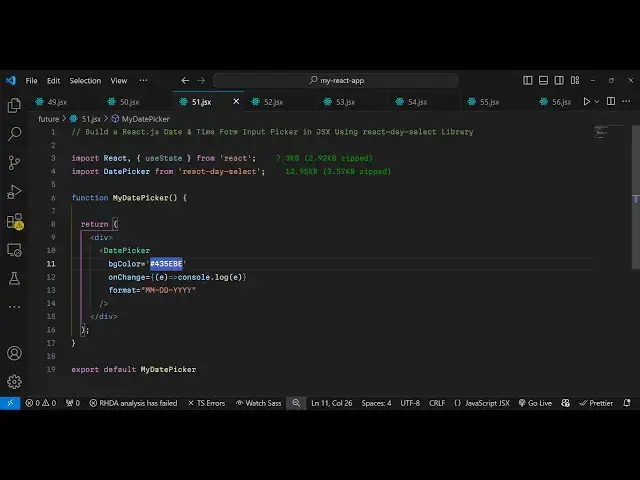
kilobyte and once you import the package
1:56
you can go to the jsx and directly embed
1:59
the pack uh the package name which is
2:01
component date picker and it actually
2:04
takes three options first of all the
2:06
format of the date that you are
2:08
expecting the user to select it so month
2:11
mm then the day and then the Year this
2:15
is actually the format on receiving the
2:18
date month date and year the second
2:22
object is the background color so you
2:25
can select the background color just
2:26
give it to the calendar date fcker
2:30
I am just giving this color hexad
2:32
decimal which is this
2:34
one it will also get highlighted and you
2:37
can even give it a onchange event
2:39
handler so whenever you change the date
2:42
this callback function will execute and
2:45
right here we conso log the actual date
2:48
the user selects so in this way if you
2:52
refresh your application now you will
2:54
see as you select this input field this
2:58
calendar this date picker will show and
3:00
you will be able to select any year any
3:04
month any date once you select it click
3:07
on the okay button and you will see the
3:10
date will be there very simple package
3:13
but very effective as well if you are
3:15
building some kind of application which
3:17
involves taking input the date you can
3:20
easily use it I've shown you the
3:22
configuration very simply once you
3:23
import this you can directly use
3:27
it so this is a module so thank thank
3:29
you very much for watching this video
3:31
and do check out my website as well free
3:34
mediat tools.com uh which contains a
3:37
thousands of tools regarding audio video
3:40
and image and I will be seeing you guys
3:43
in the next video