live_tv
Livestream Starting Soon
00
Hours
:
00
Minutes
:
00
Seconds
Up next in 10

Build a React.js Data Grid with CSV and PDF Export Using jsPDF-Autotable & Papaparse in Browser
Jan 9, 2025

Get the full source code of application here:
https://gist.github.com/gauti123456/d819efd68d82d7c2bb7d20973c3901b4
Show More Show Less View Video Transcript
0:00
uh Hello friends welcome to this video
0:02
so in this video I will show you how to
0:06
export uh data to CSV file and PDF file
0:10
and you'll be using simple data grid
0:12
kind of a library inside react chairs
0:14
and you'll be showing this tabular data
0:16
if you see we have three columns name
0:19
Age Country and ID as well and we have a
0:22
set of rows of data and it is actually
0:25
showing it in a data grid like a
0:27
structure we have using a specific react
0:29
data gr library and we have two export
0:32
functionalities so that you can export
0:34
your data into comma separated value CSV
0:37
file and PDF file as well so we have
0:39
these two buttons available right at the
0:41
top so we are showing this data in a
0:44
tblo structure so we have 20 rows of
0:47
data and as I click the export to CSV
0:51
button so what will happen you will see
0:53
the CSV file will get downloaded comma
0:56
separated value so all the table data
0:58
that you saw has been converted to CSV
1:01
file all the rows and similarly we will
1:04
be also be doing for PDF as well so we
1:07
have a second button so if I click this
1:09
button now it will convert all this
1:12
Tablo data into the PDF
1:15
document and all the data has been
1:18
converted so for PDM conversion we are
1:21
using this package JS PDF Auto table
1:24
which is essentially a open-source
1:27
library for creating PDF documents and
1:29
JS PD PDF Auto table is a plugin for
1:32
jspdf and we also need the jspdf package
1:36
as well apart from this which is actual
1:40
PDF document creation library for
1:43
JavaScript apart from that we are also
1:47
using Papa pars Library which is
1:50
actually a powerful CSV
1:54
parser Library where you can actually
1:57
create CSV files so so it is also a very
2:01
popular
2:02
package so we are using these three
2:05
packages in conjecture to build this
2:07
application so apart from that we are
2:10
also using a package to download the
2:13
file as an attachment which is file saer
2:17
so it's using filesaver.js to this is
2:20
actually the command so we are using
2:23
these four packages so just go to your
2:25
command line and install these packages
2:31
jspdf jspdf Auto
2:36
table our pars library and file saver so
2:41
this is actually the command here and
2:43
just pause the video and install
2:46
this by executing this command I've
2:48
already installed all these four
2:50
packages so I will just show you a very
2:53
basic example so just create your
2:56
functional component
3:06
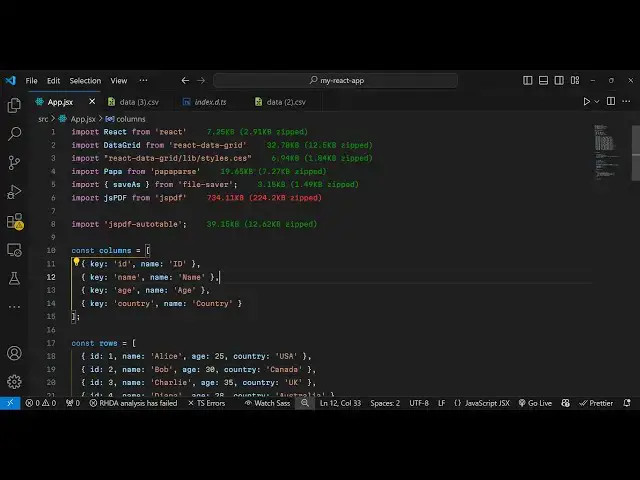
so first of all we need to actually
3:10
import all the packages which are
3:17
necessary and here we need to first of
3:19
all declare some columns and rows of
3:21
data that we want to export so it can be
3:25
anything it can also be come from
3:27
database or API as well so I have Define
3:32
these so let me paste it so these are
3:35
the set of data which will be displayed
3:37
in the tblo structure in a react data
3:40
grid so we have these two variables rows
3:43
and columns so we have uh four columns
3:47
which is ID name Age Country this is
3:50
these are the columns and these are the
3:51
rows of data so is an we have an array
3:55
of object each object contain these four
3:57
properties and we have 20 rows of data
4:00
so this data can be anything and now we
4:03
need to display this data so first of
4:06
all for displaying it we will be
4:07
importing this package which is data
4:14
grid and we will be using this package
4:18
react data grid to display the actual
4:23
tabular data so this is actually the
4:26
package if you just go to npmjs.com just
4:29
search for this package react datag
4:32
grid which is essentially a datag grid
4:35
component where you can display your
4:38
table like data in the browser so this
4:41
is actually the command it's a quite a
4:44
popular module 165,000 weekly downloads
4:47
and it also offers a CSS file as well we
4:50
do need to import that as well for the
4:54
styling so it is contained inside react
4:57
data grid and it contains s liip folder
5:00
and inside this we have the styles. CSS
5:04
file so after you import it you can
5:07
directly embed this in the jsx so we
5:13
simply embed this data grid
5:16
component and it actually takes some
5:19
properties First Column first prop it
5:23
takes as the actual rows of data so it
5:25
is located in the rows variable and the
5:27
columns
5:30
so simply it takes two parameters first
5:32
is the rows and columns if you refresh
5:35
your browser you will see the data will
5:38
be
5:43
displayed so now you can see the data
5:45
has been displaying right here uh these
5:48
are 20 rows of data and it also has a
5:52
built-in scroll bar as well if the data
5:54
is large you will see the scroll bar as
5:56
well
5:57
so these are the column names as well
5:59
now we need two buttons to actually
6:02
export these data into CSV and PDF so
6:05
right before that you can have these two
6:08
buttons
6:18
appearing so first button will be for
6:20
exporting the data to CSV file and the
6:23
second one will be for exporting to PDF
6:28
so we'll basically bind a onclick
6:30
listener to both these buttons so when
6:33
we click the button we execute this
6:35
function export to
6:42
CSV and similarly you'll be binding an
6:45
on click listener to this second button
6:48
so when we click this button we
6:52
will so now we just need to Define both
6:55
these functions at this top so
7:07
so export to
7:14
CSV and secondly we have the export to
7:17
PDF
7:18
function so first of all we will tackle
7:21
the CSV operations so for CSV operation
7:24
we first of
7:27
all need to get the CSV dat data and for
7:30
this we'll be using the papaers
7:35
package and here we just need to import
7:38
this so we go to the top just import
7:40
this P AA and it will be coming from
7:44
Papa par
7:46
package it's powerful CSV parser and it
7:49
actually contains a
7:52
function which is unpass and here we
7:55
need to pass the rows of
7:57
data and then we need to convert this
7:59
into into glob
8:01
so the CSV data and then here in specify
8:06
the MIM type so for the CSV file text /
8:12
CSV and here you just need to provide
8:18
the character type which is
8:22
utf8 lastly we need to call the save as
8:25
function from file saver to download
8:28
this file as an attachment so we'll just
8:31
give it a file name data. CSV so this is
8:34
coming from file saver if you see this
8:37
function so if you execute now uh you
8:40
will actually see these two buttons
8:43
appearing if I click the first button
8:45
you will see all the data will be
8:47
converted to CSV file so you will see
8:49
comma separated value so now we come to
8:53
the second
8:54
operation which is when we click the
8:57
second button we need to convert this
8:59
data into a table in PDF
9:02
document so right here we'll be
9:04
instantiating a new instance of
9:11
jspdf and for this we need to import the
9:14
JS PDF package right here
9:21
so so it will be coming from
9:27
jspdf and then we need to also Import
9:30
jspdf Auto
9:34
table so we importing both these
9:36
packages so now we can actually
9:43
use after we instantiated there is a
9:46
method and here we need simple heading
10:04
so here we are giving a simple heading
10:06
data export and I will just give it x
10:09
coordinate and y
10:13
coordinate and
10:38
so here you'll be giving the rows and
10:41
columns right
10:46
here so you'll be giving the rows and
10:49
columns mapping through each row and
10:51
column which is there in the
10:53
table so after this we'll be using this
10:57
uh function which is available which is
11:00
auto
11:04
table and here you'll be adding the
11:08
headers which is contained inside table
11:10
column and inside the body we will put
11:14
the rows of data which is located inside
11:17
table rows and lastly we will save this
11:20
PDF document as data.pdf
11:25
so now if you execute your application
11:28
and if if you click the second button
11:30
export to PDF your data will get
11:33
exported in the PDF document and you can
11:36
see that so in this way you can use this
11:39
react CH application to export your data
11:41
into CSV and PDF document using this
11:45
react datag
11:46
grid papaers package and jspdf auto
11:50
table so thank you very much for
11:52
watching this video and do check out my
11:54
website as well free mediat tools.com uh
11:58
which contains thousands of tools
12:00
regarding audio video and image and I
12:02
will be seeing you in the next video