Up next in 10


Get the full source code of application here:
https://gist.github.com/gauti123456/910ab65b9339d1779383d793ba738f77
Show More Show Less View Video Transcript
0:00
uh hello guys welcome to this video so
0:02
in this video I will show you how to
0:04
create CSV file in react CHS from
0:08
tabular data so you can see inside the
0:11
demo we have a table like structure we
0:13
have four columns ID name age email and
0:17
we have four rows of data so we have a
0:19
button as well to actually convert all
0:22
this data into CSV file so if I click
0:24
the button you will
0:25
see the file will get downloaded the CSV
0:28
file and it's comma separated value so
0:32
you can see four rows of data has been
0:35
constructed so I will show you a library
0:38
in react CH which does this specific job
0:41
and the name of this package is react D
0:44
CSV so if you go to npmjs.com just
0:47
search for this package which is react
0:50
dcsv so it is actually this module
0:53
command is very simple npmi react CSV to
0:56
install this it's a very popular module
0:59
you can see 475,000 weekly
1:02
downloads so now to get started inside
1:06
your react CH project
1:08
simply install this
1:13
module and we are also using react
1:17
bootstrap and bootstrap specifically for
1:20
constructing the user interface also
1:23
install this also so Ive already
1:25
installed these modules so what I will
1:27
do I
1:28
will conr construct this functional
1:38
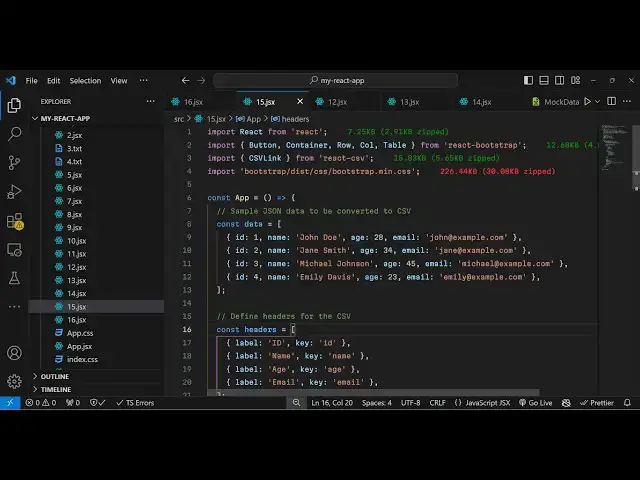
component so at the very top we need to
1:41
import the module so it has a method
1:43
which is CSV link so it basically it's a
1:48
module here CSV link which allows you to
1:50
create CSV files it is coming from react
1:53
CSV and then we need to
1:56
import some modules from react bootstrap
1:59
we will
2:00
use this button container row call table
2:04
and also we will include the main. CSS
2:07
file of bootstrap just import this so
2:10
now in
2:12
the jsx we will construct the interface
2:15
we will have the
2:19
container element of react bootstrap
2:22
inside this we
2:26
will have the row tag and we B basically
2:30
be giving a bootstrap class of
2:35
justify content Center and inside
2:43
this we will have this column here and
2:47
we'll be giving this
2:51
medium and again a text Center
2:58
class and inside this you will have a
3:01
basic
3:08
heading which will say download CSV
3:13
[Music]
3:14
sample essentially this bootstrap thing
3:17
is not necessary for this tutorial so
3:19
I'm just using it for constructing the
3:21
interface so inside this we will
3:24
actually have a
3:27
table where we will have this tabular
3:30
data so we will
3:32
have two columns first will be for the
3:36
ID then is the
3:40
name and also we have two more
3:44
columns age and then we have email
3:48
address so you can have as many columns
3:51
as you want so we are for example we are
3:53
just taking
3:57
for so after this we will have the table
4:01
body
4:05
tag so inside this we need to Loop
4:08
through the data so we just need to
4:10
create a state variable in react CHS to
4:12
hold the data for us so we will just
4:16
create a data array so this array will
4:19
contain an array of objects each object
4:22
will contain three prop four properties
4:25
first is the ID and then we have the
4:27
name
4:34
and then we have the age and lastly we
4:37
have the
4:42
email so this data can be coming from an
4:45
API this from database for this example
4:49
we are just hard coding
4:52
it so now we have these four columns you
4:55
can change the data here
5:09
so now we have this data array
5:14
here we can even declare a headers array
5:17
as well so this
5:20
will actually contain your column names
5:23
so we will have
5:25
uh the label property which refers to
5:28
your ID name a Gmail so these are all
5:31
your column names so now to show this
5:34
inside the
5:35
jsx inside this table body first of all
5:38
we will Loop through all the data so
5:40
data. map operator we will use and for
5:43
each row we will Loop through and in the
5:47
table row tag it will basically give it
5:50
a key parameter here so it will be the
5:53
row. ID and using table data tag we
5:58
will dynamic Al print out all the four
6:02
properties first is the ID then we have
6:04
the
6:05
name then we have
6:07
our
6:10
age so in this way you can print it and
6:13
lastly we have the email address so if
6:16
you check your browser you will
6:21
see the table structure is displaying
6:24
all these four
6:27
rows now we just need a simple button to
6:30
convert this data into CSV file so just
6:32
outside your table we will have use this
6:36
CSV link module that we installed and
6:40
this takes some attributes first of all
6:42
it takes the actual data that you want
6:43
to convert to CSV file so this data
6:45
property here will be providing the data
6:48
variable that we declared if you see so
6:51
we are directly providing it the second
6:53
property it takes is your headers it
6:56
refers to the column names so that's why
6:59
we declared that
7:01
variable so we will be referencing this
7:04
headers variable which contains your
7:06
column names and thirdly we give it a
7:09
file name so whatever file name that you
7:11
want to give let me give users.
7:19
CSV and in between that we will simply
7:23
use the bootstrap button and this button
7:25
will simply say download CSV and
7:29
I will make this button a blue color
7:33
size will be
7:37
large we giving a bootstrap class of
7:40
margin top 3 so if you refresh your
7:42
browser you will see the button
7:44
appearing out just below the table and
7:46
if you click this button automatically
7:48
all the data that you have in the table
7:50
is converted to CSV file and the file is
7:53
successfully downloaded and if you open
7:55
your file in the text editor you will
7:58
see this is your comma SE ated
8:00
value all the data has been converted to
8:03
CSV file so in this way you can use this
8:05
module in react chairs to construct your
8:07
CSV files from the tabular data so it's
8:11
a very simple module you can integrate
8:13
this I've shown you step by step so
8:16
thank you very much for watching this
8:17
video and do check out my website as
8:19
well free mediat tools.com which
8:21
contains thousands of free tools
8:23
regarding audio video and image and I
8:25
will be seeing you in the next video