live_tv
Livestream Starting Soon
00
Hours
:
00
Minutes
:
00
Seconds
Up next in 10

Build a React.js CSV Editor & Data Importer in Browser Using csv-import-react Library in JSX
Jan 17, 2025

Get the full source code of application here:
https://codingshiksha.com/react/build-a-react-js-csv-editor-data-importer-in-browser-using-csv-import-react-library-in-jsx/
Hi Join the official discord server to resolve doubts here:
https://discord.gg/cRnjhk6nzW
Visit my Online Free Media Tool Website
https://freemediatools.com/
Buy Premium Scripts and Apps Here:
https://procodestore.com/
Show More Show Less View Video Transcript
0:00
uh hello guys welcome to this video so
0:02
in this video I will show you how to
0:04
integrate the CSV editor a UI editor uh
0:08
which runs in the in react GS so there
0:11
is a package here so if I click this
0:12
button this editor will open and here
0:15
you need to upload your CSV comma
0:17
separated value file and you can have
0:19
this interface expected column first
0:22
name last name so it is actually accept
0:26
this template so your CSV file must
0:28
contain these two columns and this first
0:30
name column is required but this age
0:33
column is not required so here you will
0:35
select your actual image file that needs
0:37
to be imported this CSV file so you will
0:40
see it will accept this name it will
0:43
compare the header rows the name column
0:46
is available but the age is not
0:47
available so you will certainly click
0:51
the header rows click on continue and
0:53
then here from the drop-down you can
0:55
select whichever column names that you
0:56
want to import and you can tick mark
0:58
these as well
1:02
and tick mark as well
1:06
so after basically just picking which
1:11
columns you need to import simply click
1:13
the submit button you will see the
1:14
import is successful and the data will
1:17
be returned to you in the console after
1:19
you import the CSV data so you can see
1:21
the columns have been successfully
1:24
imported this is the first name age and
1:27
16 rows of data has been successfully
1:30
exported so you can see that so there is
1:33
this package which is there in this
1:35
react CH so if you go to npmjs.com uh
1:38
just search for this package uh which is
1:41
CSV import react it's specifically made
1:43
for react CH application so if you just
1:47
search this CSV import
1:51
react so this is the command here I've
1:54
already installed it and it's almost got
1:56
the 1,600 weekly downloads UI interface
1:59
B CSV editor so I have given all the
2:03
source code in the description of the
2:04
video so now to get started just make a
2:07
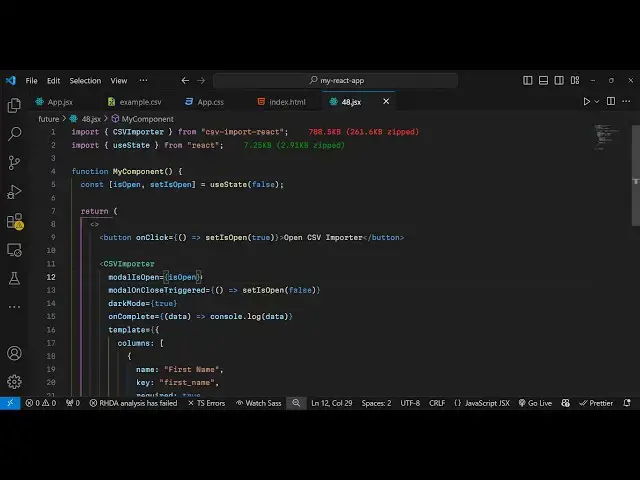
simple uh functional component and at
2:10
the very top we need to require this
2:12
package so we simply say
2:15
import and CSV
2:18
importer this will be coming from this
2:20
package which is CSV import react so
2:23
first of all you require the package by
2:25
adding this import statement and then
2:27
inside your state you declare one
2:29
variable here which will be is open set
2:32
is open and initial value will be
2:36
false and right here in the jsx you
2:39
basically return a button right here you
2:42
have a button and uh we simply say open
2:46
CSV importer so we have this button so
2:49
when you click this button we will
2:51
simply bind an onclick listener to this
2:53
button so as soon as you click the
2:54
button we will execute this make the set
2:58
is open to true
3:01
so initial value is false and whenever
3:04
you click the button we are making this
3:05
value from false to
3:08
true and after that we will use this
3:11
component which will be the CSV importer
3:14
we're directly importing this and it
3:16
actually takes some options the very
3:18
first option it takes is model is open
3:21
and here you'll be initializing whatever
3:23
is the value of is
3:27
open and then there is a second option
3:29
model on close
3:31
triggered and this value will
3:34
be we will again call this set is open
3:38
to to false so whenever you close the
3:42
model then you will make this value
3:43
again to false then we also support the
3:47
dark mode as well so if you want to
3:49
support the dark mode you can toggle
3:51
this option to true so now it will show
3:53
the dark mode after this we provide a
3:58
template to this editor so here we
4:02
provide an object double codes sorry
4:04
double cly bracket and here you specify
4:07
which column names you want to accept
4:09
from whenever user will actually import
4:13
their CSV file so that CSV file must
4:16
have a column name name as first name so
4:20
here you can specify the column names
4:22
the key here which will be first name
4:25
and it should be required so required
4:27
will be true and you can just type a
4:30
short little description the first name
4:33
of the
4:35
user so suggested
4:45
mappings so here you're just specifying
4:47
which column names you need inside your
4:50
CSV file so you can just specify right
4:53
here in this
4:55
columns array here so we need two column
4:58
names first is your first name then the
5:00
age age is a data type is a number and
5:04
required means that it is
5:06
required so that's all that we need to
5:08
do here and if you refresh your
5:10
application go to your you will see this
5:13
button appearing as soon as you click
5:14
the button this UI interface will open
5:17
and it will actually show this first
5:19
name is required and expected columns
5:22
are there so as soon as you import your
5:25
file you will see this header rows here
5:27
you can simply select your whichever
5:30
column names you need and then it will
5:31
be successful so we also have this on
5:36
complete call back function as soon as
5:39
the importing is completed this data
5:41
will be returned and here we can console
5:43
log the data you can do whatever thing
5:45
that you want to do with the data you
5:47
can even display the data in the table
5:49
structure as well after user Imports the
5:51
data so as soon as they import the CSV
5:54
file you will see this nice little
5:56
interface here you can select which rows
5:58
to import
6:00
and and then in the console you will
6:03
find out whatever data that you imported
6:06
like this so thank you very much guys
6:08
for watching this video you can use this
6:10
module which is a very good module for
6:12
CSV it's a CSV imported editor so CSV
6:17
Excel file importer for react and
6:19
JavaScript so thank you very much for
6:21
watching this video and do check out my
6:23
website as well uh free mediat tools.com
6:26
uh which contains thousands of tools
6:28
regarding audio video and image and I
6:31
will be seeing you guys in the next
6:33
video
#Programming
#Multimedia Software