live_tv
Livestream Starting Soon
00
Hours
:
00
Minutes
:
00
Seconds
Up next in 10

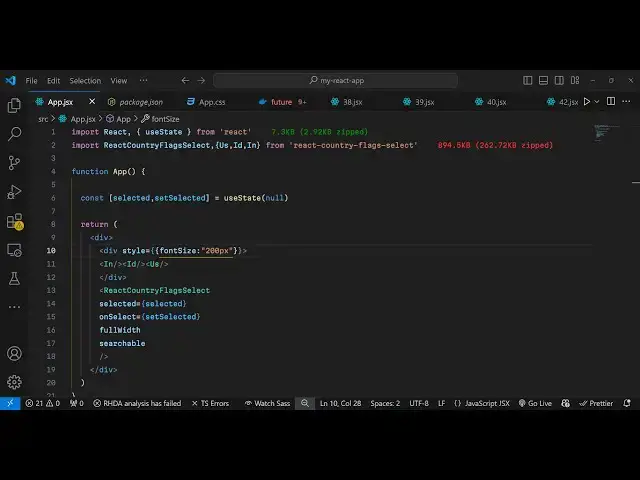
Build a React.js Country Select Dropdown With Flag Input Component in Browser Using JSX
Jan 9, 2025

Buy the full source code of application here:
Show More Show Less View Video Transcript
0:00
uh Hello friends welcome to this video
0:02
so in this video I will show you how to
0:04
integrate a country picker inside uh
0:08
react CH so here you can basically have
0:10
a select drop down which contains all
0:12
the countries in the world alongside
0:14
with their Flags you can see so this is
0:17
a simply select field and here you can
0:20
select any country inside the world and
0:23
you will see the flag as well alongside
0:26
with the country name inside this select
0:28
field so there is a specific module
0:30
which is available for react shs if you
0:32
want to integrate this functionality so
0:35
many of times you need the country
0:37
picker select drop down inside your
0:40
applications if you're making any sort
0:41
of application related to the world you
0:45
will need this so I will show you how to
0:47
integrate this and also you can show
0:49
flags of a certain country you can see
0:52
I'm showing India Flags so we have
0:54
various Flags also available so you can
0:57
simply integrate this so you can see the
1:00
it has changed to US flag so actually
1:03
the name of the package is react country
1:05
flag select so if I show you npmjs.com
1:10
just go to this website and just search
1:13
for this package react country flag
1:17
select so this is actually the component
1:20
which is uh we are using
1:23
here and it's a very simple customizable
1:26
SVG flag select component for re
1:30
and it is almost having 193 weekly
1:33
downloads so this is actually the
1:34
command just pause the video and install
1:37
it I've already installed it so I will
1:40
just show you a very basic example on
1:42
how to integrate this module so first of
1:44
all just make a simple functional
1:48
component and the very first thing we
1:50
will do import this module so react
1:57
country flag
2:01
select this is the name of the module
2:03
and we will be importing it from
2:07
react country flag select so this is
2:11
actually the module here 894 kilobyte
2:13
size and we have this component react
2:16
countryes flag select so now I will just
2:19
declare a very simple variable which
2:21
will keep track of the selected country
2:24
so we'll have this selected set selected
2:30
and for this we'll be using the UST
2:31
State hook of react chairs initial value
2:34
will be
2:36
nothing
2:38
null and now to include this it's very
2:41
simple uh how we include this we come to
2:45
the jsx part and right here we embed
2:47
this component which is react country
2:50
flag select and it actually takes some
2:52
options first of all the selected
2:55
country selected country will be
2:58
the whatever country that you select and
3:02
if you just refresh now what will happen
3:04
you will
3:07
see no country has you can't see the
3:10
select field because we do need to
3:12
Define this function as well on select
3:16
because when you select any country in
3:18
the select picker this custom function
3:20
we need to bind so I will just bind this
3:24
function set
3:26
selected that we have this function if
3:28
you see
3:31
and I will just make this in a field
3:34
full width and searchable as well so you
3:38
can even search country names as well so
3:41
if you refresh now you will see this
3:43
country picker will be available to you
3:45
and you it will contain all the country
3:47
names you will see that from a to zed
3:50
and here you can even search the country
3:52
name as well simply search it and you
3:54
will see as I'm typing New Zealand you
3:56
will see the country has popped in and
3:59
it's very simple you can see it's
4:01
customizable it's SVG
4:03
country select field alongside with this
4:07
flag is also appearing you will see as
4:08
I'm searching you can search for any
4:13
country so it's a very simple module and
4:16
apart from that you can even
4:18
individually if you want to select or
4:20
display a flag of a particular country
4:23
there is also all these codes available
4:26
us from USA and ID from Indonesia Asia I
4:30
and for India so all these country codes
4:33
are available from this actually library
4:36
and now if you want to display the flag
4:38
it's very
4:39
simple uh right here we can display this
4:43
flag which is
4:46
I so at the top you will see this flag
4:51
appearing and then we can even display
4:54
ID which is for
4:57
Indonesia then we have the US flag
5:00
so in this way you can display the flax
5:02
as well very
5:08
simply so if you want to increase the
5:10
size you can wrap element you can just
5:13
wrap everything inside these div
5:17
elements if you want to increase the
5:19
size of the flag you can just add a
5:21
simple custom stylesheet that increase
5:23
the phone size of
5:26
to 200 pixels so now these flags will
5:29
appear larger if you
5:32
see so in this way you can increase the
5:34
size of the flag as well just wrap
5:36
everything inside the div tag and just
5:38
make phone size to 200 pixel so in this
5:41
way this is the country Booker here you
5:43
can
5:44
select can integrate this country select
5:47
field with flags you can select any
5:49
country name in this select field it's a
5:52
very simple component and but it's very
5:54
powerful it's needed for each and every
5:57
kind of application that you're building
5:58
so it's specifically build for react CH
6:01
applications so use it so thank you very
6:04
much for watching this video and do
6:05
check out my website as well free mediat
6:08
tools.com which contains the thousands
6:11
of tools regarding audio video and image
6:13
and I will be seeing you in the next
6:15
video
#Other