live_tv
Livestream Starting Soon
00
Hours
:
00
Minutes
:
00
Seconds
Up next in 10

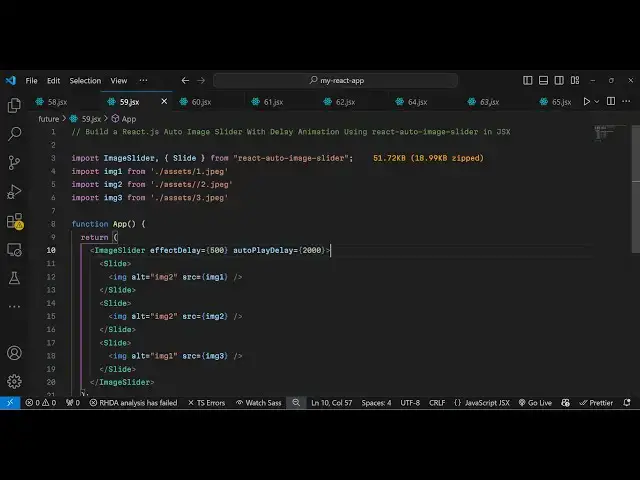
Build a React.js Auto Image Slider With Delay Animation Using react-auto-image-slider in JSX
Jan 9, 2025

Buy the full source code of application here:
Show More Show Less View Video Transcript
0:00
uh hello guys welcome to this video so
0:03
in this video I will show you how to
0:04
make this awesome little automatic image
0:07
slider which runs in the background in
0:10
react CHS we've seen these sliders
0:12
inside websites where the in the
0:15
background automatically the images go
0:18
away so whenever user interact with them
0:20
automatically we'll be having a series
0:23
of images which we will animate and this
0:26
animation will go on in the background
0:28
with image slider so if you have a
0:30
series of images you can also see the
0:32
controls as
0:34
well so we also have the controls to go
0:37
to the previous image next image so the
0:40
name of this module is react Auto Image
0:43
slider so if you just go to npmjs.com
0:46
just search for this module react
0:50
autoimage
0:53
slider so this is actually the
0:56
package I've already installed it this
0:59
is actually the command
1:01
it's almost having 12 it's a new module
1:05
you can even put restrictions such as
1:07
delay animations as well so I will just
1:09
show you a very basic example so just
1:12
declare a simple functional component
1:15
and right here we import this using the
1:18
import
1:20
statement and we simply write we need to
1:23
import this image slider which will be
1:27
coming from this react Auto image slider
1:30
which is 52 kiloby and from this also we
1:34
also need a slide package as well so you
1:37
can create a slides a series of slides
1:41
from a series of images so my images are
1:44
present in my asset directory so we have
1:47
these six images present so I will just
1:49
animate all these six
1:51
images I will simply import these images
1:54
by using the import statement
2:02
so I will just change it here it's four
2:05
you can have your images
2:12
coming so after importing all the images
2:15
now we just need to animate this so come
2:17
to the jsx we just return here we
2:21
include the component which is image
2:23
slider and here it takes two options you
2:26
need to put the effect delay and you can
2:30
put how much time it took from go to one
2:33
image to another you can put a
2:36
millisecond this value is in millisecond
2:38
so 1,000 millisecond is 1 second of
2:42
delay and
2:45
then you can even put a autop play delay
2:49
as
2:50
well so this means that it will took
2:53
this much of time in automatically
2:55
sliding the image so I just put here, as
2:59
well so one second of delay and here you
3:02
define your slides by this component of
3:05
slide each slide you can put your own
3:08
image as a
3:12
slide so if you have a series of images
3:15
for each image it will be a slide here
3:18
like this this is image 1 image 2 image
3:21
three
3:33
similarly for four five and six here you
3:37
can change here this is image 4 image 5
3:41
image
3:46
6 so in this easy way you can create
3:50
sliders if you have a series of images
3:54
and if you try to refresh your
3:55
application now you will see now it will
3:58
this is your first image it will run in
4:00
the automatic in the
4:02
background so I am not doing anything uh
4:04
it is automatically running
4:07
it you also see the controls as
4:16
well you can change the delay here uh
4:19
you can have
4:24
500 you can play with these options so
4:28
this will change the amount of delay in
4:34
animation so this was the module guys if
4:37
you want to animate your images inside
4:39
sliding automatic slider you can use
4:42
this package in react Chase so thank you
4:45
very much for watching this video and do
4:47
check out my website as well free mediat
4:49
tools.com uh which contains thousands of
4:53
tools regarding audio video and image
4:56
and I will be seeing you in the next
4:58
video
#Online Media
#Programming
#Multimedia Software
#Clip Art & Animated GIFs
#Animated Films