live_tv
Livestream Starting Soon
00
Hours
:
00
Minutes
:
00
Seconds
Up next in 10

Build a React Project to Show Responsive Modal & Popup Window Using react-responsive-modal Library
Jan 9, 2025

Buy the full source code of application here:
Show More Show Less View Video Transcript
0:00
uh hello guys welcome to this video so
0:02
in this video I will show you how to
0:04
integrate a model window Library
0:07
specifically required for theact CH
0:09
application so if you hit the button you
0:11
will see this model window will appear
0:13
model dialog box popup window anything
0:17
you can call this so it's a very simple
0:19
dialog box that appears when you click
0:21
the button we have the text written free
0:24
media tools is the online tool website
0:25
and we also have the close icon if you
0:27
see this is a cross icon if you click C
0:30
this the window will close so very
0:32
simple but it's a very powerful package
0:35
because many of times you need to show
0:37
headings model windows inside your
0:39
application so this package will make
0:43
the things far much easier inside reactj
0:45
application so it's specifically built
0:47
for react JS applications so the name of
0:49
the package is react responsive model
0:53
and the nice thing about this package is
0:55
that this responsive window it's
0:57
completely responsive and it it also
1:00
looks good on mobile devices if you
1:02
check and tablet you'll see it will
1:05
response as you just change the screen
1:08
size the window will adapt itself so it
1:12
will look on all the screen sizes pretty
1:15
good so it's completely responsive so
1:19
actually the name of the package is this
1:21
one react responsive model and this is
1:25
actually the command to install this
1:27
I've already installed it so just
1:30
install this by executing this command
1:32
and it is almost having 47,000 weekly
1:35
downloads so I will just show you a very
1:38
basic example of how to integrate this
1:41
so first of all what we need to
1:44
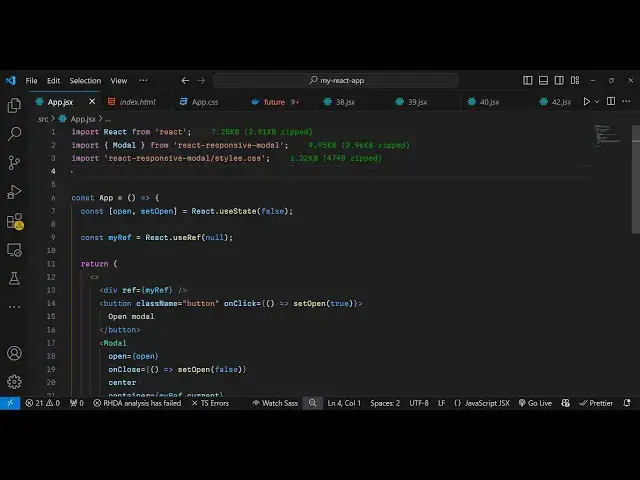
do you need to import this package so
1:47
first of all we do need to import this
1:49
package
1:52
so just make a simple functional
1:55
component and then using this import
1:57
statement we will import the package so
2:01
you'll just write import and Then
2:03
followed by model which will come
2:06
from this package which is react
2:12
responsive model so we are actually
2:14
importing this module if you see that
2:17
this is actually a component coming from
2:19
this package and we do need to import
2:21
the CSS file as well so we just need to
2:23
import the CSS file react responsive
2:27
model and it basically has the
2:30
styles. CSS file as well so we are also
2:35
importing the CSS file as well which
2:36
will hold the styles for this and we are
2:40
also importing our custom stylesheet as
2:43
well where we will import our custom
2:45
Styles as well so app. CSS so now to
2:50
actually get started we first of all
2:52
need to
2:55
actually inside of jsx
3:00
so we will have a div element and this
3:03
div element I will just give it a simple
3:07
reference I will just give it a ref tag
3:09
to it and uh I will just call it as my
3:13
ref so I will just declare a simple
3:17
reference I will attach this reference
3:19
to it we'll be using the use ref hook of
3:22
react shars our initial value will be
3:25
null so this uh reference will be used
3:28
to actually attach the reference to the
3:30
model window so whenever you click the
3:32
button that model window will appear so
3:34
we will have this simple button which
3:36
will say open model window and we will
3:39
give it a on click listener to this
3:41
button so when you click this button we
3:44
will execute this call back function and
3:46
for this we just need a Boolean
3:49
parameter just to keep track of whether
3:52
the user has click the open button or
3:55
not so for this we are simply using the
3:57
UST State hook initial value will be
3:59
false so it's a Boolean parameter just
4:02
to just it is used to keep track of
4:05
whether the user has clicked the open
4:06
model window or not so when they click
4:08
the button we need to toggle this value
4:10
from false to true we will be executing
4:13
this function set open and change this
4:15
value from false to true so now what
4:18
happens when you click the button we
4:20
execute this function set open to true
4:23
and after this here we do need to show
4:26
the model window so we have this
4:28
component and it actually takes an
4:31
option as a prop value which is open
4:33
which is a Boolean parameter it can be
4:36
either true or false and we will make it
4:38
as dependent upon the value of open
4:42
initial value is false but when we click
4:44
the button it changes from false to true
4:47
so now it becomes true when we click the
4:49
button and it also has a onclose event
4:52
handler as well so when the model window
4:56
closes then in that case we will make
4:58
this set open function from from True to
5:00
false once again so then it will hide
5:03
you will Center this so we already have
5:06
a built-in method to Center the dialog
5:08
box popup box so it will Center
5:10
everything and then we also have the
5:13
container class here we will attach the
5:15
reference of this my ref do current so
5:18
here we have declared this reference if
5:20
you see we have this reference and we
5:23
have simply attaching it to this
5:24
container of this
5:26
model and after this here we can clear
5:30
anything any s you will have a paragraph
5:34
you will say hello or whatever that you
5:38
want to write free media tools is the
5:41
online tool website you can add images
5:45
headings
5:46
anything in the popup window so any
5:50
valid HTML you can add so if you just
5:52
refresh your application click the
5:54
button you will see this heading will
5:56
show it contains the H1 heading and then
5:59
it will contain this simple little
6:01
paragraph you also see this cross icon
6:03
as well close icon when you click it the
6:06
heading will close away so it's a very
6:09
simple react responsive model window
6:13
that you can integrate inside your react
6:14
CH application and if you want to
6:17
customize the look and feel of this uh
6:19
you can even do that as well so there is
6:21
an option right here which you can
6:24
directly pass which is called as class
6:26
names so if you want to customize it
6:29
color of it so you can provide a custom
6:32
class to the model so right here I will
6:36
Define this class custom model inside my
6:39
app. CSS so we are importing this so
6:42
inside this we have defined this class
6:45
custom model and I will just make the
6:47
background color to
6:49
be uh this color aqua so what will now
6:54
happen you'll see the color will change
6:57
and you can even change the let's
6:59
suppose if you want to change the text
7:02
color to
7:03
Yellow so it will change let's
7:09
suppose so in this
7:13
way you can change it you can customize
7:15
the look and feel of the so this is
7:18
actually the very simple example guys
7:20
where you can use the specific react
7:22
Chase package react responsive model to
7:25
actually create these beautiful looking
7:27
popup windows inside your react
7:30
application so thank you very much for
7:33
watching this video and please check out
7:35
my website as well free media tools.com
7:38
which contains thousands of tools
7:41
regarding audio video and image and I
7:43
will be seeing you in the next video