Up next in 10

Build a Quill WYSIWYG Rich Text & HTML Editor With Live Preview in Browser Using Javascript
Jan 9, 2025

Get the full source code of application here:
https://gist.github.com/gauti123456/97494bd4088f41ed4508d47e77878107
Show More Show Less View Video Transcript
0:00
uh Hello friends welcome to this video
0:02
so in this video I will show you how to
0:04
integrate the Quil visic Rich Text
0:07
Editor inside the browser using HTML CSS
0:11
and JavaScript so it's a simple visic
0:14
editor where you can select the text you
0:16
can make all these customizations under
0:18
the Bold italic you can even embed
0:22
images as well you will see
0:24
that you can create underlines you will
0:27
see it's having all these controls
0:30
available to you you can change the font
0:32
as well alignment of the text as well in
0:35
the center position so all these
0:37
controls are available for you so it's a
0:40
visic rich text editor and uh you can
0:44
even embed images videos all this stuff
0:47
so that library is Quil k u i
0:54
l so if you just write this on Google
0:57
this is actually the visic text editor
1:00
so they have their own website as well
1:03
so you can see this is a powerful Rich
1:05
Text
1:06
Editor and uh we will be including this
1:10
CDN uh using this SN we will include
1:13
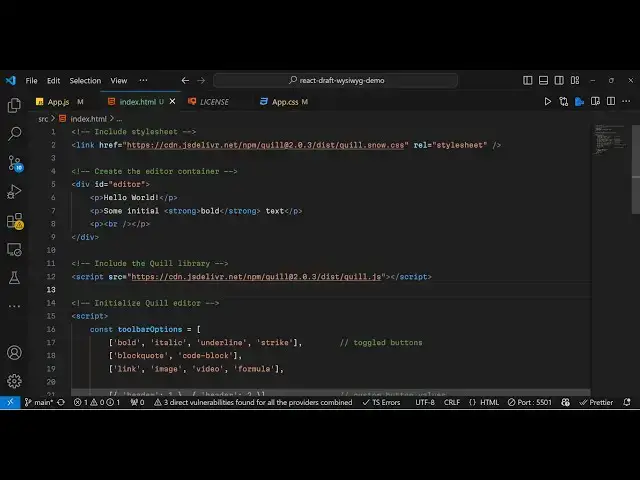
this so just create a simple index. HTML
1:17
file and just include first of all it
1:20
CDN the CSS and the JavaScript so I will
1:23
just copy this CDN just after the title
1:27
paste it this is we are importing the
1:30
CDN for the CSS so it has its own theme
1:34
we including the CSS CDN and similarly
1:37
we need to do it for the JavaScript as
1:39
well so just after the body include the
1:42
CDN for the JavaScript part right here
1:45
so we are including the CDN for the
1:47
JavaScript and now in order to include
1:51
the editor we provide a div tag and
1:53
provide an ID
1:55
here and put it to editor so we have
1:59
given this ID here editor we'll be
2:01
loading this editor so I will just
2:04
provide some kind of
2:08
HTML a paragraph then I will again
2:11
provide this
2:12
is another
2:16
paragraph and now we need to load the
2:19
editor so again we'll be writing the
2:21
JavaScript code right here and
2:25
dynamically embedding this editor so we
2:28
will provide in this the toolbar options
2:31
this will be an array so which toolbar
2:34
options you want
2:37
to
2:38
so we will be embedding these options
2:41
which is able to have these toolbar
2:44
options for changing the text to bold
2:46
italic under Knight strike through so if
2:49
you want to now embed this editor you
2:51
[Music]
2:53
simply create an object of Quil so K UI
2:58
L and you
3:00
q u i l this is actually the class here
3:03
we simply call this this is your base
3:06
class and here you need to provide the
3:08
reference of whatever ID that you have
3:11
given so we have provided this ID so we
3:13
are just giving this reference right
3:16
here id symbol that's why we putting
3:19
right here hash symbol followed by the
3:21
ID and then the second argument is an OP
3:24
object right here and here you need to
3:26
spec specify the
3:30
modules so which module that you want to
3:32
pass so here you'll be
3:36
specifying the
3:38
toolbar and here you're specifying the
3:41
toolbar options that we are passing
3:44
so second option is take is the
3:46
whichever theme that you want to load so
3:48
I will say snow so now what happens if
3:52
you reload this
3:54
application so EV see four toolbar
3:57
options being embedded so this is your
4:00
initial value so here you can bold your
4:04
text italic underline strike through so
4:08
only four toolbar options are there now
4:10
if you want to load all the options that
4:13
Quil supports you will add more options
4:17
right here in the toolbar
4:18
options so let's suppose I also want the
4:21
support for adding links and images so I
4:25
will say link then image then video
4:30
then formula
4:32
so one by one you will add these toolbar
4:35
options so if you refresh you will now
4:38
see these four options here this is
4:40
added this is for the link here you can
4:43
add any link external
4:47
link so now anyone click on that they
4:50
will be able to navigate to google.com
4:53
so
4:54
then then you can embed images as well
5:01
like this so all these controls one by
5:04
one you can add this so let me paste all
5:06
these controls which are supported by
5:08
quill so I will give this source code in
5:12
the description of this video so if you
5:13
need the full source code you can go to
5:15
the description link so if you refresh
5:17
now you will see all the toolbar options
5:19
that it's
5:20
about and you can see that so this is in
5:23
in this way you can directly integrate
5:25
the quill viic Rich Text Editor directly
5:29
inside the browser using simple HTML CSS
5:32
and
5:33
JavaScript so thank you very much for
5:36
watching this video and do check out my
5:38
website as well free mediat tools.com uh
5:42
which contains thousands of tools
5:43
regarding audio video and MH and I will
5:47
be seeing you guys in the next video