live_tv
Livestream Starting Soon
00
Hours
:
00
Minutes
:
00
Seconds
Up next in 10

Build a PHP PDF Invoice Editor Using HTML5 Form to Create PDF Documents in Browser Using DOMPDF
Jan 9, 2025

Buy the full source code of the application here:
https://procodestore.com/index.php/product/build-a-php-pdf-invoice-editor-using-html5-form-to-create-pdf-documents-in-browser-using-dompdf/
Buy Premium Scripts and Apps Here:
https://procodestore.com/
Show More Show Less View Video Transcript
0:04
uh hello guys welcome to this uh live
0:06
stream so in this live stream I will
0:08
basically talk about how I build this
0:11
PDF invoice editor with the live preview
0:14
and you will be able to generate invoice
0:17
PDF documents inside this
0:20
PHP uh editor that I developed inside
0:23
the browser and you can actually see the
0:25
live preview live demo of this we have a
0:28
simple HTML form here you you will
0:30
basically fill out your business details
0:32
business name email address client name
0:34
whichever you are basically generating
0:36
the invoice for the email of the client
0:39
date due date invoice number so let me
0:41
fill out the details and show you a very
0:44
short demo so let me fill out my
0:46
business name codic and fill out my
0:49
email ID
0:52
and client name let's suppose my client
0:55
name is
0:58
John Williamson and the client email ID
1:02
is John
1:04
Williamson
1:05
gmail.com so then you can basically
1:08
select the from date and the due date of
1:11
the invoice you can basically select any
1:16
date so after you selecting the dates
1:18
from the date picker as you click the
1:20
date picker will show up and you will be
1:22
able to select the date and you can
1:23
basically pick your invoice number so
1:26
let me pick here uh 1 this is the inv
1:29
invoice number and that's all and after
1:32
that you can basically add some products
1:34
in the invoice and let's suppose the
1:36
user has purchased some things from you
1:38
so let's suppose I can say JavaScript
1:45
course the user has purchased one
1:47
quantity and the price of that course is
1:49
$100 so I will say 100 I can basically
1:53
add some more invoice product let's
1:54
suppose the user has also purchased uh
1:58
PHP CS as as well so I will simply say
2:01
PHP
2:03
course quantity will be one let's
2:06
suppose they have purchased two courses
2:07
so I will say two so the price of this
2:10
will
2:11
be each course is 100 so so there is two
2:17
things in the invoice and as I click the
2:19
generate PDF button guys you will
2:20
basically see this invoice will be
2:22
generated as a PDF document and if I
2:25
open this you will basically see that
2:27
this invoice document is generated this
2:30
is the business name that you selected
2:32
this is the email address of yours and
2:34
basically Bill to this is your client
2:36
name client email address invoice number
2:39
invoice date due date and this is a
2:42
table description number of quantity the
2:45
price is in United State dollar you can
2:47
basically change the currency according
2:49
to your own country so if you are from
2:52
Europe you can change to Euro if you are
2:55
from England you can change to
2:58
uh all the currencies are supported and
3:01
basically you will basically see total
3:03
amount is set to so they have purchased
3:05
one quantity so each quantity is 100 so
3:07
total price comes out to be 100 so this
3:10
is quantity is 2 so 2 multiplied by 100
3:13
comes out to be $200 the total invoice
3:15
is 300 so automatically calculated and
3:18
you can basically see uh the invoice
3:21
document has been automatically
3:24
generated you can see that this is your
3:26
email address this is your this one
3:31
and uh basically guys you can add some
3:33
more products if you want
3:44
to so you can just add add many products
3:49
you can even delete them as as well by
3:51
clicking this cross Button as you click
3:53
the cross button the product will be
3:55
deleted you can add more products like
3:57
this very simple interface in PHP I'm
4:00
giving you this and click on create PDF
4:04
and now you you will see that so this is
4:07
five quantity it multiplied by 25 so it
4:11
just comes out to be1 125 total invoice
4:13
is
4:14
$625 and this is your invoice coding
4:18
seure and here you can replace your
4:20
company name email address this is your
4:22
client name client email address this is
4:24
the total quantity what is
4:27
the uh client has basically purchased
4:30
this is the invoice date due date and
4:33
you can basically automate this process
4:35
this is a complete web editor that I'm
4:37
giving you guys in PHP I basically build
4:40
this using a library called as Dom PDF
4:43
which is actually a open-source library
4:45
in PHP to actually convert HTML
4:48
templates to PDF so we are actually
4:50
using a simple HTML template and
4:52
converting it to a PDF document using
4:54
this Library which is Dom PDF which is a
4:56
open source library in PHP in order to
4:59
basically convert the HTML to PDF and
5:02
generate PDF document so we are actually
5:04
using this library in PHP this is the
5:07
overall project guys if you need the
5:09
full source code guys the link is given
5:11
in the description of the video you can
5:13
directly purchase it from PayPal or
5:15
stripe both the payment links are given
5:17
in the description of the video so you
5:19
can check out and basically this will be
5:22
the source code you will get after you
5:23
make the payment you will be able to
5:25
download the zip file from Google Drive
5:27
and then you can extract the content of
5:29
the zip file and you will actually get
5:31
this folder structure this will contain
5:33
the PHP code this will be the index. PHP
5:36
file that you just need to load right
5:38
here as you start your exam control
5:40
panel or you can purchase a domain name
5:43
directly upload these files to your
5:44
hosting plan and then you can basically
5:46
deploy this application as well I'm
5:49
currently on windows so basically I'm
5:51
using exam control panel which is
5:53
actually a Apache open source server to
5:56
actually uh it builds in Apache ser
5:59
server MySQL it is also available if
6:02
you're testing it locally you just need
6:05
to install it for PHP applications exam
6:08
control panel so just download this it's
6:11
the crossplatform software it's also
6:13
available for Linux and Mac operating
6:15
system so simply download and install it
6:18
and simply as you it will actually
6:21
create the C directory it basically
6:23
installs in the C directory it will
6:25
create a folder called as exam if you
6:28
see basic it will create this folder
6:30
exam and then go to your SD dos
6:34
folder this folder and just paste that
6:38
zip file extract the content of the zip
6:40
file inside this and now you can
6:42
directly access that by Local Host PDF
6:46
invoice so as you open this this
6:48
application will open by default and now
6:50
you can fill out the details and
6:52
basically uh generate your PDF document
6:55
it's very easy as you will click the
6:57
button your PDF document will be
6:59
generated so I will now basically walk
7:01
you through the code guys how I actually
7:03
build this
7:04
so I will basically write the code here
7:10
so so first of all I will show you the
7:12
number of fields that I
7:15
added so this is the actual form that
7:17
I'm using so if you just refresh now all
7:20
the things will be go away you will see
7:22
nothing is present so we basically
7:25
deleted all the fields so here inside
7:27
this file you can control uh which
7:29
Fields you can need to have in the
7:32
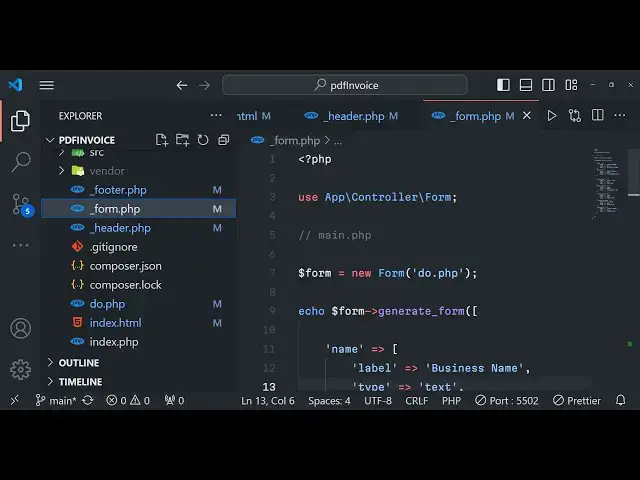
invoice document so inside form.php you
7:35
can actually control which fields that
7:37
you need so in this we will actually put
7:41
this code here which is use app
7:46
controller and then form put a
7:50
semicolon and then we will actually have
7:53
the form new
7:55
form and uh do. PHP so we have written
7:59
the code for this in a separate file do.
8:01
PHP so we can basically
8:06
have basically generate a form this
8:08
actually is a method you can basically
8:11
pass some options here so in order to
8:13
generate a method sorry
8:15
form so the there are some properties
8:18
that we can have first is a name
8:19
property
8:22
so this name property will have a label
8:26
attached to
8:28
it this will be predefined values
8:31
basically if you want to predefine fill
8:33
out the fields by some default value
8:36
then you can do this like this this type
8:39
will be of text field this is a text
8:42
field and the value will be basically if
8:45
you want to predefine the value so we
8:47
can simply say my business name so this
8:52
is a placeholder value basically it will
8:54
actually tell you which thing you you
8:56
need to fill out
8:58
here
9:02
so it is saying that
9:05
Echo form generate
9:16
for uh just wait so basically uh here
9:20
actually you can control which things
9:22
you need to do I will simply paste this
9:25
code here right just show you just
9:28
wait
9:35
so if you just reload now there will
9:37
only be a single field out there if you
9:39
just refresh you will see there is only
9:41
a single field my business name so you
9:43
can see that so there is only a single
9:47
name and this is predefined filled out
9:49
here because you can even change this as
9:52
well uh if you want to do
9:55
it just change it to predefined Value
9:59
let's post coding seure so if you just
10:01
reload the application this will be fill
10:03
out coding seure so you just need to
10:06
edit this so totally depends upon you
10:09
so so I'm just telling you how I build
10:12
this so you should have know before
10:14
purchasing it how it typically works so
10:17
that you can modify it according to your
10:19
own needs as well and then if you want
10:21
to add additional Fields you can even
10:23
add that let's suppose for email
10:25
address you can give out a label three
10:28
things is supported you can basically
10:30
give out a label to the user so here we
10:32
are filling out the email address of the
10:36
company so of your own email address
10:39
this will be a type of email
10:42
field and you can basically fill out the
10:45
value here which
10:47
is my mail at the
10:51
W gmail.com that's
10:55
all so if you just refresh now there
10:57
will be two Fields email add address
10:59
business name so in this way you can add
11:03
guys according to your own business you
11:05
can add some more additional fields in
11:07
this way the process will remain the
11:09
same I showed you the structure which
11:11
file to edit and uh here you give your
11:15
client name so whatever client name that
11:18
you are basically generating the invoice
11:24
for the type here will be text field
11:27
once again and uh
11:31
you can give
11:33
any John do let's
11:38
suppose you can see one more field are
11:40
added uh there there can also be a
11:44
number field as well let's suppose you
11:45
want to take the age of the client which
11:48
is actually I think a number field so
11:52
what you will say
11:55
that Cent age so the type parameter here
12:00
will be a
12:09
number so by default uh 15 will be
12:12
filled out if you refresh now you can
12:14
see it's a number field you can't
12:17
enter basically string characters right
12:20
here it is only supported number here so
12:24
you can also do this as well if you want
12:26
the number Fields if you want to take
12:29
numeric input you can even do that as
12:31
well so it totally depends upon so we
12:34
will change this to invoice
12:37
date so this will be label will be of
12:45
date this type will be of date because
12:48
we are taking date input and you can
12:51
fill out the date so today's date is uh
12:56
2024 I will fill out uh
13:00
03 21 21st March 2024 and then we will
13:06
say invoice due
13:15
date and then we can basically say due
13:23
date this is again a date
13:28
field
13:32
sorry this you can change this to uh
13:34
sorry this is a date field sorry date
13:37
field and uh you can basically fill out
13:40
the value in future date so whatever
13:43
date that you have entered right here in
13:45
the invoice date so this can be a future
13:47
date so I can say the invoice date is uh
13:50
29th March
13:51
2020 24 so incoming date the
13:55
invoice so put a comma and then the
13:58
invoice ID so this will be automatically
14:01
generated if you have a database but you
14:02
can even hard code as well so this will
14:05
be a invoice
14:14
number so it will be a text and uh this
14:19
value can be anything so you can say
14:21
that uh
14:23
one3 this is the invoice number and uh
14:27
the user can addit the invoice number
14:29
accordingly this is a due date if you
14:31
you can see calendar will open you can
14:33
just fill out these details based upon
14:36
that and then you can add the products
14:37
as well so this is actual form that we
14:41
can make it will automatically generate
14:43
this HTML form we have we have different
14:45
files here for form.php you will see
14:48
this is actual form.php we are actually
14:51
using Dom PDF if you see we are using
14:53
these Dom PDF actual Base Library we are
14:56
using load HTML which we are basically
14:59
passing the template which is HTML
15:00
template to actually render out HTML to
15:03
PDF and then we are setting this A4 size
15:06
Port rate all this you can modify after
15:08
you purchase it you can according to
15:12
your application you can do this and
15:14
then we are converting the HTML to PDF
15:16
by passing the HTML right here and con
15:19
instantiating a new instance of Dom PDF
15:22
and loading this HTML again setting the
15:24
paper to a for size rendering it and
15:26
streaming it to the browser so yeah
15:29
actually using Dom PDF this is our
15:32
JavaScript code these are different
15:34
images and this is a footer file
15:37
form.php and this is a simple header
15:40
menu that we
15:42
have and this is a full project guys I'm
15:45
giving you uh the link is given you can
15:47
directly purchase it and
15:50
uh I think you will definitely enjoy
15:53
it you can
15:56
basically in the currency side suppose
15:59
you are from a different country if you
16:01
don't want USD you can even change that
16:03
as well let's
16:07
suppose you don't want USD to show right
16:10
here if I just
16:18
wait just fill out these
16:27
details
16:33
this is form.php if you
16:37
see so I will basically show you one
16:40
thing guys if you don't want to use the
16:43
currency USD United State dollar then
16:46
how you can basically change that to
16:48
your own native currency which is very
16:50
important task because in an invoice
16:52
document you don't need
16:57
to
17:09
so let's suppose you don't want this USD
17:12
this uh if you want to change to your
17:16
native currency how you can do that
17:18
there is a trick right here you can go
17:20
to your code right here wherever you are
17:23
basically you can basically go to this
17:26
one this template I think
17:38
this is the HTML template that we are
17:50
using just wait I'm just telling you how
17:53
you can
17:57
basically
18:06
yes I think I was having
18:11
this you can find out basically guys the
18:14
code is written for the currency as well
18:16
if you just here in this this file you
18:18
need to basically go to this file modify
18:20
this file do. thp if you are from a
18:23
different country you can modify the
18:24
currency right here if you just see
18:27
right here
18:31
just search for
18:36
dollar USD you can see price in USD
18:40
let's suppose you are from a different
18:42
country you don't want in USD let's
18:44
suppose you are want to in Euro if
18:47
you're from Europe so in Europe
18:49
countries Euro basically is a currency
18:53
so right here you
18:55
can this is a template here
19:16
uh right
19:18
here yeah this is actually the thing
19:21
that you need to replace guys this is a
19:23
dollar symbol instead of dollar symbol
19:26
you need to
19:27
basically
19:30
you can basically go to
19:34
Google Euro to USD just type in this and
19:39
then you
19:41
will Euro
19:45
symbol just copy this symbol and paste
19:48
it right here so all the currencies are
19:51
supported simply paste it right
19:57
here you can see now it simply changes
20:01
to
20:06
Euro so if you basically uh
20:11
now
20:14
refresh fill out
20:25
this so now you can see that guys it now
20:28
changes to
20:30
Euro you can basically change to any
20:33
currency guys in total also you can
20:35
change that it ises very
20:57
easy
21:00
so right here also you can replace it
21:03
your own native currency
21:11
so so now you can see total is $240 euro
21:16
dollar 240 Euro so you can see guys it's
21:21
very easy I giving you this three if you
21:23
are interested you can go to the
21:24
description and purchase the full source
21:26
code uh it's a complete project and uh
21:30
thank you very much please hit that like
21:32
button subscribe the channel and I will
21:34
be seeing you guys in the next live
21:37
stream until then thank you very
21:45
much
#E-Commerce Services
#Programming
#Billing & Invoicing