live_tv
Livestream Starting Soon
00
Hours
:
00
Minutes
:
00
Seconds
Up next in 10

Build a Node.js Express Instagram GraphQL API to Download Posts and Videos Using Puppeteer in JS
Jan 9, 2025

Buy the full source code of the application here:
https://procodestore.com/index.php/product/build-a-node-js-express-instagram-graphql-api-to-download-posts-and-videos-using-puppeteer-in-js/
Buy Premium Scripts and Apps Here:
https://procodestore.com/
Show More Show Less View Video Transcript
0:02
uh hello guys welcome to this uh video
0:04
so in this video we will actually be
0:06
building an application which allows you
0:08
to actually download Instagram post or
0:11
images or videos from URL so for this
0:14
specific purpose we are actually using
0:16
the puppet a library in nodejs Express
0:18
which is a specific web scraping library
0:22
and for this purpose we are actually
0:23
using the Instagram graphql API to
0:27
actually uh grab the link
0:30
of the media so let's suppose if you go
0:33
to Instagram and if you go to any
0:35
profile and if you want to specifically
0:38
uh download any picture you need to
0:40
Simply copy this address if you see
0:42
simply copy this and go to this
0:45
application that I developed and let me
0:47
show you the live demo that I'm showing
0:49
you here so here you need to paste the
0:51
Instagram URL in this input field so as
0:55
I paste it right here so what will
0:57
happen basically uh Puppeteer will do
1:00
the task in the background it
1:02
will communicate with the Instagram
1:05
graph Q API you will see that it opens
1:07
automatically and closes automatically
1:10
as well so you will basically see in
1:12
various qualities the photographs which
1:14
is this quality 1080p 1440 750 640 480
1:21
and there is a download button for each
1:23
quality right here you can simply click
1:25
it and you can simply download this
1:27
image inside your machine like this you
1:31
can see that so now this has been
1:33
successfully downloaded so this is
1:36
having various qualities guys you will
1:37
see that this is 1080P and as you click
1:42
all the qualities are there so you can
1:45
basically view this image in all the
1:47
sizes and all the qualities right here
1:49
so for each quality we have this
1:51
download button right here that we are
1:52
displaying it so it's a fully nodejs
1:55
express application you can simply
1:57
deploy this application as well actually
2:00
make a simple Instagram downloader kind
2:02
of a tool website and rank it on Google
2:04
as well and same goes for the video as
2:07
well let's suppose if you want to
2:08
download a video if you go to a let's
2:11
suppose I pick this video Simply copy
2:13
the link address and now I change it
2:16
paste this address click on download
2:18
Media so once again it will fetch this
2:21
process you will see 720 by 1 82 you
2:24
will see that 480 480 so for each video
2:28
uh quality we have a Down down button so
2:30
if you click it you will basically see
2:32
the video will play and now you can
2:34
simply download this as a mp4 file and
2:37
now it is saved inside your machine you
2:39
will see that so the video is saved guys
2:42
you will see that inside your machine so
2:45
various qualities are there now this is
2:47
a 480p quality video you will see for
2:51
each
2:53
quality so it basically list outs all
2:56
the qualities which are available for
2:58
this particular video so you can just
3:01
change this accordingly you can see that
3:04
if you want to do this you can simply
3:06
copy this paste
3:10
it again it will repeat the same
3:20
process so you can see that guys what it
3:22
is returning it is returning a simple
3:24
Json response that you see right here so
3:27
this basically we are actually fetching
3:30
these uh
3:32
uh inside this Json response we are
3:35
actually be getting this uh right here
3:39
so we are actually doing this so we can
3:42
simply run this application by invoking
3:44
this command node index. GS so your
3:46
application will start you need to
3:48
Simply paste the URL and uh then it will
3:51
actually do you can see that so this is
3:55
your video file and you can see that you
3:57
can simply download this can see
4:02
that so in this way guys you we will be
4:05
developing this Instagram post
4:08
downloader using graphql API in puppet a
4:11
in nodejs Express in this live video so
4:13
please hit that like button subscribe
4:15
the channel as well and uh let me show
4:18
you the dependency here if you don't
4:20
know about Puppeteer it's a web scraping
4:22
Library which allows you to automate
4:24
your Chromium browser and we are
4:26
actually using this as a node module so
4:30
if you go to npmjs.com uh if you just
4:32
search for this module we are actually
4:36
using this just puppet here so it's a
4:40
chrome automation web scraping library
4:42
for specifically for nodejs developers
4:45
so almost 3 million downloads are there
4:47
and if you want to purchase the full
4:49
source code guys of this application the
4:51
link is given in the description you can
4:54
purchase it from procore.com of of my
4:57
website the link is given and you will
5:00
actually get a zip file automatically
5:03
after the payment you will be redirected
5:04
to Google Drive where you can actually
5:06
get the zip file which will actually get
5:08
this directory structure and here you
5:13
need your Instagram account guys
5:16
username and password you should have a
5:18
basic Instagram account for doing this
5:21
process so in for doing this you not
5:25
just go to the EnV file and replace your
5:28
username and pass password and this is
5:31
the actual nodejs code right here this
5:34
is the HTML code right here it's a full
5:36
project and once you log in basically we
5:39
are storing your login information
5:41
inside this file cookies. Json so all
5:44
the CRS token all this files so once you
5:47
log in this file will get automatically
5:50
created yes this is cookies. Json so
5:52
once you replace your username password
5:55
this file will only be created for the
5:57
very first time whenever you run the
5:58
application after after it creates now
6:01
we don't need this file it will
6:02
automatically login you using this file
6:05
cookies. Json so we have put a condition
6:07
right here if the cookies are already
6:09
present right here we should
6:10
automatically log in the user so we are
6:12
using this Puppeteer logic which
6:14
automatically logs you the user if the
6:16
cookies file are present and then this
6:19
Instagram data Json file is created for
6:21
every result that you see guys so you
6:24
can see we are having this URL which is
6:26
the actual video URL that you are seeing
6:28
right here if you copy this URL you can
6:31
simply paste it in the directly in the
6:33
browser and this is actual URL of the
6:36
video that we are downloading it so
6:39
programmatically this file automatically
6:41
gets created after we get the Json
6:43
response we are storing this file right
6:44
here and then returning it to the client
6:46
so now let's get started guys for bu by
6:49
building this application so what I will
6:52
do is that I will simply delete this and
6:55
start from scratch
6:58
so uh as I already told you guys you
7:01
need to install uh Express and uh the
7:05
second Library you need to install is
7:07
puppet a so just install these two
7:09
packages and then start your application
7:11
node
7:12
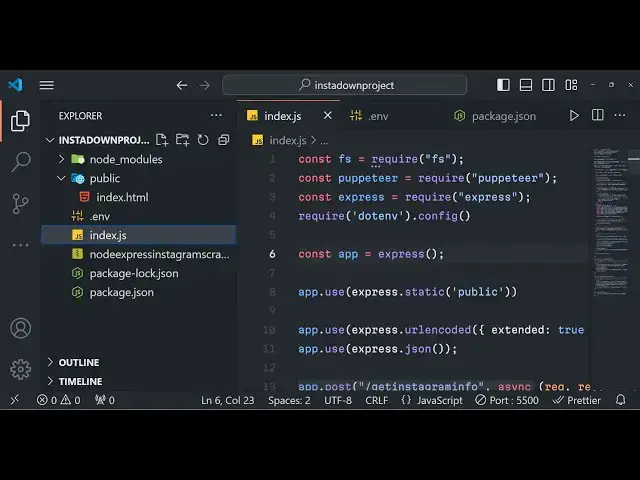
index.js this is your file here index.js
7:16
so first of all what I will do is that I
7:18
will start my basic Express
7:21
server and then here we will simply say
7:25
requiring the fs module and also we will
7:28
also be using using our
7:34
Puppeteer we need to requiring this
7:37
puppeter
7:39
library and also we will be requiring
7:42
our
7:45
Express and we will make make a simple
7:48
Express app and start this application
7:50
on Port 5000 so we can simply tell to
7:54
the user that your application is
7:56
running app is listening on Port 5,000
8:01
so right here guys we will be making our
8:04
static directory which is the public
8:06
directory where all the static files
8:08
will be stored which is HTML file so we
8:10
are simply making it a static and also
8:13
we need to include the body passor
8:16
Middle where Express URL encoded
8:18
extended to false and express Json so
8:22
these two lines you need to write right
8:24
here because we are getting the data
8:26
from the forms so right here guys by
8:30
using this puppet a library we actually
8:33
need to first of all make the interface
8:35
right here of the
8:40
application
8:42
so first of all let me show you
8:44
Puppeteer Library what it can do so
8:48
puppet a library guys if you want to
8:50
open a specific browser in the window so
8:53
this library is very much useful so you
8:56
can initialize your browser by simply be
8:59
typ typing here we can basically make a
9:02
simple get request so whenever someone
9:05
goes to hello world we will need to open
9:08
our browser so this will be a Asing
9:16
function like this and we will basically
9:20
making a
9:23
browser variable and here we will be
9:25
simply be saying await puppet a and
9:28
there is a launch function right here
9:30
and this is the Headless if you want to
9:33
do this in the background if you don't
9:34
want the browser to be opened if you
9:36
want don't want to be the user to see
9:39
the browser opening you can put this
9:41
value as false but we want the browser
9:43
to be open we need to see it so we will
9:46
put it headless to
9:48
false
9:50
so now we can navigate to any URL in the
9:54
you can simply navigate to any page in
9:56
the Internet by using this browser do
9:59
new page
10:00
method and then we can simply uh
10:05
navigate to any URL let's suppose if you
10:08
want to navigate to page. this is actual
10:11
method go to in puppet a if you want to
10:13
go to any URL let's suppose I want to go
10:16
to
10:17
google.com and
10:19
then what will happen right here if you
10:23
open this application go to Local Host
10:26
5,000 hello world so you will see guys
10:29
basically your browser will open it will
10:32
automatically go to google.com and it
10:34
will basically stay there so it is
10:36
happening automatically guys using
10:37
puppet here we will using the same
10:40
concept here we will first of all log to
10:42
Instagram by using their uh username and
10:45
password so for doing this guys it's
10:47
very
10:50
simple now after this we will be first
10:54
of all be comparing if the cookie files
10:57
are already available in that case
10:59
so this cookie file you will basically
11:02
make a f simple function get cookies so
11:05
we will Define this function so this get
11:08
cookies function uh this file which is
11:11
we cookies. Json it will automatically
11:13
get created whenever you first of all
11:15
login with Instagram using this code so
11:19
we will simply be comparing it in inside
11:22
this if condition that if the cookies
11:25
are already available in that case we
11:27
need to automatically log in the user
11:30
we'll Define this function right here
11:32
just Define a async function which is
11:34
get
11:36
cookies so inside this function guys
11:39
inside the try catch block we just need
11:47
to so we just need to say here cookie
11:50
string and we need to use a file system
11:53
we need to read this file which is
11:56
called as cookies. Json which is present
11:58
in the same directory and we need to
12:00
read this cookie as
12:07
utf8 and uh which is the encoding type
12:11
and then we will simply convert this
12:13
into Json so json. pars and cookie
12:16
string that's all and then we just need
12:19
to return this cookies from this
12:21
function that's all so this function is
12:23
responsible for fetching the cookies
12:25
which are present inside the Json file
12:27
and we are simply returning this from
12:29
this function which is returning cookies
12:31
that's all so if any sort of error take
12:34
place then we need to return null from
12:36
this function that's all this function
12:38
simply returns your cookies so right
12:42
here inside this we will have a simple
12:44
if condition if this save cookies exist
12:48
if the cookies
12:50
already are there then we know that the
12:53
user is already logged in so in that
12:58
case what we need to to do we need to
13:00
load the cookies so we can simply say
13:02
page. set cookie so this is actually a
13:05
function inside uh puppet a which allows
13:08
you to load your cookie using this we
13:11
can simply load the cookies like this
13:14
dot dot dot saved cookies and then we
13:17
can simply navigate to the page which is
13:20
uh the URL that we have we will this URL
13:25
we will be receiving
13:27
guys uh uh just I need to change this to
13:31
post request and I just need to change
13:33
this to get Instagram
13:36
info so this URL we will be fetching it
13:38
from the HTML form so we can get this
13:40
URL using request. body.
13:44
URL so whenever I will write the HTML
13:47
file you will simply get we are getting
13:49
the URL dynamically and then we are
13:51
passing this Dynamic URL right here and
13:53
here we need to put a prefix guys this
13:56
prefix I have stored this inside our
14:00
EnV file and uh this prefix I have
14:03
developed guys it's a pretty long file
14:06
and it is used for the graphql API to
14:08
actually fetch the Json Json data
14:12
without this prefix you will not be
14:13
getting the data so you need to purchase
14:15
the full source code then you will
14:17
actually get this EnV file all this
14:19
directory structure file so after you do
14:22
this guys what we need to do is
14:24
that we need to write a function that is
14:28
logged in
14:29
this function will be responsible for
14:32
actually be checking the details of this
14:34
cookie file if the cookie is valid or
14:37
not so inside this function you will
14:39
simply be returning that document. cury
14:42
selector and a
14:47
HF
14:48
accounts log
14:57
out so I think
15:07
yeah
15:08
uh this is a line that you need to write
15:11
guys so just write this line you copy
15:13
this line paste it little bit
15:16
complicated Line This essentially what
15:18
it is doing guys it is checking it if
15:20
the user is logged in or not if the
15:22
cookie is correct or not after this we
15:25
will be simply be checking if this value
15:28
is true or false depending upon that if
15:31
the value is true then we will simply
15:33
say user is already logged
15:37
in and then we will proceed we can
15:40
basically wait for the time
15:47
out wait for time out I think this is a
15:52
function or wait for
15:59
time out we'll be waiting it for 5
16:03
seconds 5,000 milliseconds which is
16:05
equal to 5 seconds and then you will
16:08
close the browser and simply return this
16:10
simply means that the user is already
16:12
logged in so you don't need to log in
16:15
once again that's all so in the else
16:17
condition guys what we will do basically
16:19
in the else condition we will simply log
16:21
the user you can simply print out a
16:24
message that login in this will be valid
16:27
for the very first time whenever you run
16:29
the application for the very first time
16:31
we will go to the login screen right
16:32
here instagram.com slac
16:37
accounts
16:38
login slash so when you go to this page
16:42
you need to enter
16:43
the wait for selector and this selector
16:47
will be the
16:50
input
16:52
uh these selectors guys this is very
16:54
basic code of puppet here we are simply
16:56
checking for all these selectors for
16:58
username password and then we it will
17:01
automatically write the username
17:03
password here you need to replace it you
17:05
can replace it directly also right here
17:07
guys the best practice is replacing
17:10
directory or you can save it in a EnV
17:13
file if you're deploying it you can
17:15
replace your username password here and
17:18
it will login it for the very first time
17:19
and store create this cookies. Json this
17:22
file will be different for you guys so
17:24
this file contains the login information
17:26
about you once you log in all the
17:29
information will be stored inside this
17:30
cookies. Json file so after this guys we
17:34
now need to
17:36
actually create the cookie file so what
17:39
we will do is that we'll get the cookies
17:41
from page. cookies this function will
17:43
return the cookies for us now we need to
17:46
store this you can define a function
17:48
which is save cookies which will
17:51
actually uh save these cookies in a Json
17:54
file
17:56
so what I will do is that
18:02
that so we just need to define a similar
18:06
function this time this function will be
18:09
responsible for saving the cookies so
18:12
we'll say save
18:13
cookies and here we will simply again
18:16
write the code in TR catch Block it's a
18:19
very good practice you should write your
18:22
code in TR catch so that if any sort of
18:25
error take place we can simply get the
18:27
error so we you can simply convert this
18:30
to a string from Json by using Json
18:34
stringify and pass the cookies right
18:37
here null as a second argument and third
18:39
is two you will basically write this
18:43
write file synchronize and you can name
18:46
it cookies. Json and cookie string
18:49
that's
18:50
all so you can print out a message that
18:53
cookie saved successfully so you you
18:57
don't just need to run it for the very
19:00
first time guys once it is saved it is
19:02
permanent that's all so we just need to
19:06
actually call this function save cookies
19:08
I think save
19:16
cookies this function we are calling I
19:21
think save
19:23
cookies okay so we are calling this
19:26
function right here guys you will see
19:28
that
19:29
that's all that we need to do and
19:33
uh after this you will basically see
19:36
guys inside this file after we do this
19:41
we need to get the Json
19:44
data and store it in a
19:49
file so for getting the Json data guys
19:52
you will Define a function right here
19:54
page. evaluate and this it will read
19:57
basically the data right here json. pars
20:01
and uh we will actually be using the
20:04
document. query selector method of
20:06
puppet here to actually search for the
20:08
preag and we only need the text content
20:11
of it that's all and then we can
20:17
simply save that in a
20:23
file so we can say FS right synchronize
20:26
and we can call this as Instagram post.
20:29
Json so Json do stringify and pass the
20:34
Json
20:35
data null two that's
20:40
all so you can B basically put a message
20:44
after it that your
20:46
Json
20:48
Instagram data
20:51
saved successfully that's
20:55
all so that's all that we need to do
20:58
guys right right here and uh after you
21:01
save it we also need to return this data
21:04
to the client we need to
21:06
return this Json to the client for
21:10
returning it we need to read this data
21:11
so we need to Simply say Instagram data
21:16
and you can simply again need to Json
21:18
pars and uh this time we need to read
21:21
this so file system. read file sync and
21:24
this will again be Instagram whatever
21:26
that you call the file which is in store
21:30
poost Json and you need to say
21:36
utf8 and uh like this and then we need
21:40
to return this back to the client as
21:42
Json so response. Json Instagram data
21:45
that's
21:46
all so we are returning this back to the
21:49
client guys now we need to Simply call
21:51
this post request and pass it a URL this
21:55
is our backend API which is pretty much
21:57
ready it is using Puppeteer as a
22:00
solution to actually get the Instagram
22:03
graphql API result and we are sending it
22:06
back to the client so we will simply be
22:09
making our front end in the
22:11
HTML it will be a very basic solution we
22:14
will be including bootstrap just after
22:16
the title so this bootstrap will be
22:19
responsible for
22:22
having to actually
22:24
format our user interface
22:34
so this uh user interfaces guys is very
22:37
simple so I will not waste the time in
22:39
writing it you will get this code right
22:42
in the description it's very simple it's
22:45
not too
22:47
hard so once I refresh
22:52
it and rerun the application right here
22:55
let me see the video will be pretty long
22:58
that that's why I'm not writing the full
22:59
code you will see that if I refresh it
23:02
this is actual interface it is using
23:04
bootstrap Instagram downloader you need
23:06
to enter the URL so let's suppose if I
23:09
enter the video URL so paste it click on
23:12
download Media so it will open it this
23:14
you will see that guys once it opens uh
23:17
I think it's uh
23:20
taking no element found for selector
23:23
input name is equal to username let me
23:25
check guys what is happening right here
23:32
sometimes in a long code guys there can
23:34
be mistakes so what I will do is that I
23:37
will simply paste this code right
23:54
here uh
24:05
F
24:14
this why right click is not happening
24:29
so you can see that we actually paste it
24:32
so now it will work so if I refresh it
24:35
just need to restart the server once you
24:37
make the changes so again if you refresh
24:46
it so you will see that guys in various
24:48
qualities your video file will uh be
24:51
there you can download this file you can
24:53
open it in various qualities every
24:55
quality there will be a download button
24:58
and same goes for the photograph as well
24:59
if you if your post is a photograph
25:02
again copy the link right here paste it
25:06
and again the browser will automatically
25:08
open it will fetch the uh photographs in
25:11
various qualities
25:12
1440 108p you will see
25:16
that this is a full Instagram graphql
25:19
API downloader it doesn't require API
25:22
key guys it just uses the web scraping
25:25
using Puppeteer which automatically
25:27
scrapes all the URLs of the photographs
25:30
and the videos it doesn't require API
25:32
key but it is just using the Instagram
25:33
graph Q ql API in the background if you
25:37
need the full source code you can
25:38
directly purchase the full source code
25:40
the link is given in the description
25:41
from my website Pro Cod store.com you
25:43
can get a zip file after you make the
25:46
payment from automatically from Google
25:48
Drive this is actual source code you
25:50
just need to replace your Instagram
25:52
username password inside this code you
25:55
just need a basic account and it's a
25:57
permanent solution you
25:59
will you will allow us to you can deploy
26:02
this application as well it's very
26:04
simple so thank you very much for
26:06
watching this and I will be seeing you
26:07
in the next video
#Social Network Apps & Add-Ons
#Video Sharing