live_tv
Livestream Starting Soon
00
Hours
:
00
Minutes
:
00
Seconds
Up next in 10

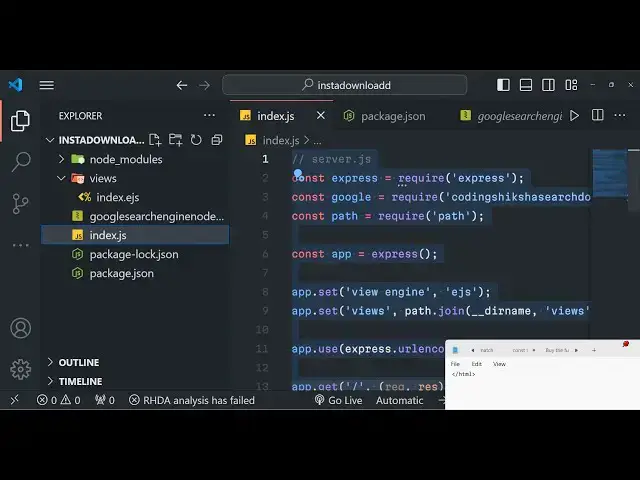
Build a Node.js Express Google Search Engine to Web Scrape Wikipedia API Results in Browser Using JS
Jan 9, 2025

Buy the full source code of the application here:
https://procodestore.com/index.php/product/build-a-node-js-express-google-search-engine-to-web-scrape-wikipedia-api-results-in-browser-using-js/
Official Website:
https://freemediatools.com
Show More Show Less View Video Transcript
0:03
uh hello guys welcome to this video so
0:05
in this video we will actually talk
0:06
about that how to build out a Google
0:09
search engine and a Wikipedia API tool
0:12
inside nodejs and express this tool from
0:15
the name itself it actually allow us to
0:18
actually fetch the Google search engine
0:21
snippet and the
0:23
Wikipedia details of a particular person
0:26
or a particular topic so here this is
0:28
actually the application that you're
0:30
seeing right here on your screen so we
0:32
have this nice little UI here where we
0:35
allow the user to enter is any
0:38
topic so let's suppose you can search
0:41
for any
0:43
person and then you can search for the
0:45
language of the Google search result so
0:48
by default you can see all these
0:51
languages are
0:52
there so you can select your own
0:55
language so let me select for now
0:58
English here I want the results to be
1:01
returned in English language and then I
1:03
just simply click the search option so
1:06
as I click the search button so it will
1:07
fetch the details about this specific
1:09
person here it will tell you this nice
1:12
little formatted detail title
1:14
description this is actually the URL of
1:16
the person right here it will redirect
1:18
you to this then all such information
1:22
Bor current teams date join number of
1:24
centuries siblings so this all this
1:26
information is basically we are scraping
1:28
it guys using the Google Google search
1:31
API so it's a mini Google search engine
1:33
you can search for any topics person and
1:36
it will return you these details in
1:37
certain table like structure and uh all
1:40
these details we are fetching it if you
1:42
see from the Google page if you just
1:45
search for this topic on Google and on
1:48
the right hand side here you will see we
1:50
are fetching all these details so this
1:52
is the description this is the bond
1:54
details current teams State join number
1:57
of centuries siblings parents you can
1:59
see we are basically searching all this
2:01
section right here and displaying it
2:03
inside the table like structure inside
2:05
our website so we are just scraping this
2:08
using uh Google search API and also
2:12
Wikipedia API it's a tool you can change
2:14
the name here let's
2:17
suppose I give here this
2:23
one so what I can do is that by default
2:27
the language should be English
2:31
so what I can do I can make it selected
2:34
so that if you reload the Page by
2:36
default the language will be selected as
2:38
English so if I reload the page now so
2:42
The Language by default is selected is
2:44
English here you can see that so now you
2:46
can search for the topic or any person
2:48
that you want to search for click on
2:50
search it will take some time and it
2:52
will return those details in a table
2:54
like structure you will see that
2:58
so you can see that so again if you
3:02
search for this topic by manually going
3:04
to Google and search for this again you
3:07
will see all these things that you see
3:09
right here it is script right
3:12
here so it's a mini Google search guys
3:15
you can search for any topic and it will
3:17
retain uh return all the details about
3:19
that particular topic you can change
3:24
this so let's suppose if you want the
3:27
details to be returned in your language
3:30
so what you can do is that you can
3:32
change it to your own language let's
3:38
suppose so now
3:41
the the description all these details
3:43
will be converted to that specific
3:46
language you will see
3:49
that you can select any language Chinese
4:01
so all languages are supported guys you
4:03
will see that
4:06
so you can go to that Wikipedia page of
4:09
Chinese you will see that so it makes it
4:12
very much easy to view results in
4:14
various languages at the same time you
4:16
are getting information so it makes it
4:18
very much easy
4:21
so all the languages are there in the
4:23
dropdown you will see that so you can
4:25
select any
4:27
language so if you need the source code
4:30
of this project guys I basically
4:32
developed a specific module for this
4:34
project which allows you to do this web
4:36
scraping process in different languages
4:38
from Google and uh you can directly
4:41
purchase the full source code the link
4:43
is given in the description of my
4:45
website Pro cod.com you can purchase it
4:48
after purchasing it you will actually be
4:50
redirected to Google Drive where you
4:52
will actually get the zip file of this
4:54
project we just need to extract the zip
4:57
file and simply run the command node
5:00
modon just run the node index for GS
5:03
file so I have node modon installed so I
5:06
can simply start this the app is servers
5:10
server is listening on Port 5000 so it
5:12
is coded in Express EGS ejs is a
5:16
template engine so this is the express
5:18
code this is the ejs code which is
5:20
holding the HTML code so now I will
5:22
simply start this application and write
5:24
it from
5:25
scratch so first of all guys what we
5:28
need to do is that we need to simply
5:30
make a simple Express
5:33
server backend server so we will simply
5:35
require the express
5:40
module then we will simply make a
5:43
Express app right here and we will
5:45
actually start this express application
5:47
at Port for
5:49
5,000 so we will simply say that app is
5:52
listening on Port
5:56
5,000 and uh also we need to set the
5:59
view engine which is EGS in this case
6:04
embedded JavaScript template and also we
6:07
need to import the body passer
6:08
middleware so express. URL encoded this
6:11
is very much useful while we are working
6:13
with forms so these two lines are very
6:15
much important express. Json if you
6:17
don't write it you will get an error so
6:20
we have included these two middle wees
6:22
now we just need to set
6:26
sorry whenever we go to the homepage we
6:28
need to load the
6:30
template index ejs so response.
6:34
render index that's all so here we are
6:38
actually loading this template which is
6:39
present in the inside the views folder
6:42
so just create a views folder in the
6:44
root directory and just create this file
6:46
index. EGS and here we will be writing
6:49
the HTML code right here and just change
6:52
the title of it Google search engine and
6:55
Wikipedia API tool
7:00
so for styling this application we will
7:02
actually be needing bootstrap CDN so
7:05
simply include the bootstrap CDN right
7:14
here so now we will be having the
7:16
container Class M margin top five so all
7:21
these classes are
7:24
bootstrap and inside this we will be
7:26
having a simple heading in the center
7:29
position
7:39
and so if you want to now run this
7:41
application in the browser you can
7:43
simply just go to Local Host 5,000 and
7:47
you will actually see this
7:51
heading you can see that in the center
7:53
position
7:55
so after doing this we just now need to
7:59
add a simple form here on the screen
8:02
this form will actually make a post
8:04
request to/ search
8:07
route and inside
8:11
this we will have a simple label where
8:14
we will actually be allowing the user to
8:16
enter any
8:18
topic to actually fetch the Google
8:22
results so here we will simply be
8:27
saying we will simply be having a input
8:30
field where the user will write input
8:32
type
8:34
text and name here will be topic and
8:37
should be
8:40
required we will be giving that Sol so
8:44
if you reload the application you will
8:46
see this input field will be added we
8:48
just need to add our bootstrap class
8:50
which is form
8:52
control so if you refresh now there will
8:55
be this input field added right here and
8:57
here the user will enter the topic and
9:00
after doing this we just need to have a
9:02
button to actually submit the form but
9:05
before that we also need to have a
9:08
select field where we need to allow the
9:10
user to select in which language the
9:13
Google results must return so here the
9:16
user will select the language the
9:19
respective
9:21
language
9:23
so now we will have the select list
9:26
which will include all the countries
9:28
language quots so for English it is en
9:32
for Spanish it is es for Hindi it is hi
9:36
for Africans this is AF so I will simply
9:39
copy this list so you will get all the
9:42
source code in the description whenever
9:44
you purchase it so I will simply
9:48
now paste it here it's a very long list
9:52
I don't want to waste the time in
9:53
writing this so I will simply copy this
9:56
list right here
10:03
I will just paste it so you will now see
10:06
now it has having all the languages
10:10
Cotes alongside with the description of
10:13
the language a frequen Albanian Arabic
10:16
Armenia you can see all
10:19
these select list is there so after you
10:22
do this there will be the select list
10:24
added with all the
10:26
languages so lastly we just have to have
10:28
a button but to actually allow the user
10:30
to submit the form so just after this we
10:34
will have a simple
10:36
button it will say search
10:39
topic you will be giving a bootstrap
10:42
class here which is BTN BTN primary a
10:46
red blue color button will be added so
10:49
here button type submit so just refresh
10:52
here you will see that so button is
10:54
added now we just need to add this uh
10:57
post request in the backend server which
10:59
is/ search so go to your index.js file
11:03
and just make this endpoint which is/
11:07
search request response and uh we will
11:11
be getting the topic which is entered by
11:14
the user so request body. topic so after
11:17
you get the topic it is very easy you
11:20
will import my special module which I
11:22
written guys so you will get this module
11:26
after you make the payment so it is
11:28
automatically there in the node modules
11:30
folder so we will simply fetch it coding
11:34
sixa search downloader this is the name
11:36
of the module that I developed
11:40
so now this module contains a simple
11:43
method we also need to fetch the
11:45
language as well which is submitted by
11:47
the
11:49
user so request. body.
11:53
language and then we will simply be
11:55
having an options which is actually a
11:58
Json object
12:00
so here we will provide some default
12:02
options page will be Zero Save you don't
12:06
need to change these options
12:08
just stick to these
12:14
options if you change the options the
12:17
application will not work so just don't
12:19
change the these options so here we need
12:21
to replace the language here so whatever
12:23
language you want to search the results
12:25
in so it is will be dynamically placed
12:28
right here after you do this now we just
12:30
need
12:33
to call this method it needs to be a
12:37
async function so just make this as
12:39
async because we are using a weight
12:41
keyword right here and here you use the
12:43
module and it contains
12:45
uh the method here which is
12:50
search and if you search for this topic
12:53
name pass it in options as well and then
12:58
you can basically make a variable
13:00
knowledge panel response do knowledge
13:05
panel and then we need to render
13:08
this index template and pass it the
13:12
variable knowledge panel by default this
13:15
knowledge will panel will be
13:18
undefined just make
13:20
it so if you just console log it you
13:24
will actually see a Json response will
13:26
be returned to you in the console
13:29
if I search for any topic right
13:35
here click on search topic so what will
13:38
happen in the
13:39
console so it is saying that name is not
13:45
defined sorry here we need to replace
13:48
topic not name
13:59
so you will basically see uh this uh all
14:03
this data will be returned to us you can
14:06
see that this is a title description
14:08
this is actually the metadata all these
14:10
things we need to display it in the
14:12
browser using ejs so how we can do that
14:16
it's very easy we are rendering the
14:18
template passing this variable knowledge
14:20
panel so we just need to go to this
14:23
template index. ejs just after the form
14:26
is ending right after that we will add a
14:29
simple if condition of
14:32
EGS so we will write some EGS right here
14:36
this is actually the syntax we will be
14:39
having the variable right
14:44
here and we will close
14:49
this so now we are simply saying that if
14:52
this variable exist then only execute
14:54
this code and here we will be
14:57
having this head heading which is
15:00
knowledge
15:02
panel just have two Brak tags right
15:08
here so he'll have this
15:23
table so it will be first of all be
15:25
holding the title and then it will be
15:28
holding
15:32
the actual data
15:34
so this will be knowledge panel.
15:44
title so if you just refresh
15:49
now so you will basically see it will
15:52
actually show you the title right here
15:55
this is actual title which is showing
15:57
you
16:04
so you can see that we are passing this
16:06
variable and it basically contains a
16:08
property which is called as title so we
16:10
are displaying this what I can do is
16:13
that I can simply copy the rest of the
16:16
properties right
16:27
here just to save time
16:29
some time here so I will simply paste it
16:33
so here we are simply fetching all these
16:36
properties and displaying it you will
16:37
see that we are running a for each Loop
16:39
for metadata for displaying the title
16:42
value so for all the properties present
16:46
in the metadata we are displaying it so
16:48
once again if you do
16:52
this click on search
16:55
topic
16:57
so here you will basically now see the
17:00
title description the URL if you see it
17:04
will be redirected to that specific
17:06
thing this is born
17:08
here Hide parents you will see all this
17:11
thing will be displayed you can also
17:12
change the language here to any
17:18
language so it will be converted to that
17:20
specific language that you
17:26
select let's wait
17:36
let me change this language to this
17:47
language uh I think some kind of error
17:50
is there because language is not
17:52
changing because let me see if the
17:54
language is console log language request
17:58
or body do
18:01
language Let me see if I give a name
18:04
attribute is not name is equal to sorry
18:07
this is the spelling is wrong so just
18:09
change it to language so this name
18:12
parameter needs to be the same here so
18:14
whatever that you put right here in the
18:17
it needs to be the same
18:21
so now it should work so if I enter the
18:24
topic and if you want the result to be
18:26
in Chinese language
18:30
click on search so now the results will
18:37
come let me see console log
18:49
it so
18:54
zh let me change this to this language
19:04
uh I think I guys I'm just messing up
19:07
some code right here so what I will do
19:09
is that I will simply copy the original
19:11
code because I think some typo mistake
19:14
is happening
19:16
so I will revert back to the original
19:19
code in both the files so that I don't
19:22
waste some time
19:25
so copy this and also inside index text
19:28
or
19:40
JS so now it should work because I
19:44
changed it to the original codes so if I
19:47
change the language to this language
19:49
click on
19:51
search so you will basically see the
19:53
return return results are in that
19:56
specific language so it's first just a
19:58
typo mistake happening and
20:00
uh can go to any language search
20:04
it this is actually the application that
20:07
we built guys a mini Google search clone
20:10
which actually scrapes all the Wikipedia
20:12
information about a certain topic you
20:15
can search for any topic right
20:19
here so if you're interested the link is
20:21
given in the
20:24
description and you can purchase this
20:26
full pro project we'll give you will get
20:29
a specific module that I prep prepared
20:31
for you which is coding S search
20:33
downloader so thank you very much for
20:36
watching this video and I will be seeing
20:38
you in the
20:39
next live stream
#Programming
#Search Engine Optimization & Marketing
#Computer Education
#Search Engines