live_tv
Livestream Starting Soon
00
Hours
:
00
Minutes
:
00
Seconds
Up next in 10

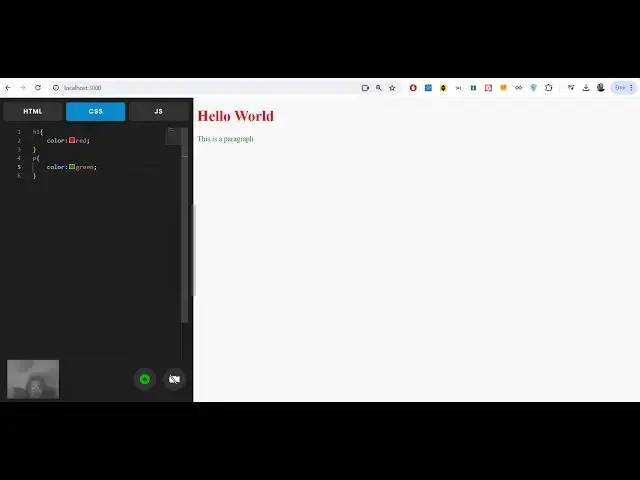
Build a Next.js WebRTC Video Recorder With Live Visual Studio Code Editor in Browser Using JS
Jan 9, 2025

Buy the full source code of the application here:
https://procodestore.com/index.php/product/build-a-next-js-webrtc-video-recorder-with-live-visual-studio-code-editor-in-browser-using-js/
Buy Premium Scripts and Apps Here:
https://procodestore.com/
Show More Show Less View Video Transcript
0:04
uh hello guys welcome to this video
0:07
so in this video I will show you a
0:10
nextjs project that I developed inside
0:13
browser which allows you to record your
0:15
video as well as uh do coding as well
0:20
inside this vs code editor so it has a
0:23
built-in syntax highlighting editor
0:25
where you can actually do coding as well
0:28
as record yourself into a video MP4
0:31
video or a webm video you can have your
0:33
web camera right here recording whatever
0:36
you are doing coding right here so I'm
0:39
whatever you can actually record this so
0:42
what I can do you can see my web camera
0:44
is showing right here you can see the
0:46
picture is showing right here in the
0:49
bottom left corner and I can basically
0:53
record this so now it will basically
0:55
tell me the entire screen so I can
0:58
simply say I want to in record the
1:01
entire screen click on share so now
1:04
whatever I will type right here it will
1:07
get
1:11
a so basically you will see I'm coding
1:14
I'm just recording
1:20
myself so everything it is basically
1:24
recording
1:25
it we can basically Define this function
1:28
function
1:30
the JavaScript section so automatically
1:33
live preview is there as you are
1:34
basically writing the content it is
1:37
automatically saving it time if I test
1:40
it out this alert statement will take
1:44
place click I will basically stop the
1:46
recording and now it will actually save
1:49
this recording if I basically see a
1:50
download button if you click the
1:52
download button your video will be saved
1:55
you can see you can play it as a mp4
1:57
file and if I try to open this file
2:01
can
2:02
see audio is also being recorded and if
2:05
I show you this
2:11
video so basically you will see I'm
2:13
coding I'm just recording
2:19
myself so you can see that guys the
2:22
audio from the microphone has also been
2:24
recorded successfully and you can just
2:26
see how beautiful it has recorded your
2:29
it is very useful if you are doing
2:31
something taking interview it is very
2:34
much useful you can record your
2:35
interview just it has a built-in web
2:38
camera recorder built in inside the
2:41
syntax highlighter code editor in the
2:43
browser if you're taking an interview
2:45
you can record it in a mp4 file so later
2:48
on play everything it is basically
2:51
recording your web camera is also
2:53
showing Define this function audio is
2:56
also been recorded JavaScript section so
2:59
automatically live preview is there as
3:01
you are basically writing the content it
3:04
is automatically saving it and if I test
3:07
it out this alert statement will so you
3:11
can see that guys it is very easy you
3:13
can toggle your web camera by pressing
3:15
this button if I don't want to show the
3:18
web camera only want to record my voice
3:20
you can even do that as well this is the
3:23
stop recording and start recording
3:25
screen recording if I also want to share
3:28
the web camera simply click this button
3:30
it will also allow the permission to
3:31
actually show the web camera this is
3:34
entirely built in next CH guys if you
3:36
need the full source code of this
3:38
project that I developed the link is
3:39
given in the description of the video
3:42
you will actually get a zip file guys
3:44
after you purchase it from Google Drive
3:47
automatically your zip file will be
3:48
downloaded you just need to go to Google
3:50
Drive after the payment will be done you
3:52
will be redirected to Google Drive where
3:54
you will actually get the zip file for
3:56
this project and then you need to Simply
3:58
extract the D zip file this will
4:00
actually get your directory structure
4:03
which will actually contain this
4:04
different components which are available
4:07
for different editor it's a CSS HTML
4:10
JavaScript editor live preview is also
4:13
available so it's a next year's project
4:16
and
4:17
uh you can just see here it is also
4:20
having this nice little video recorder
4:22
as well built in inside this text editor
4:24
so if you're taking an interview with
4:26
your fellow programmers you can record
4:28
your interview just type your code and
4:31
uh you can
4:34
basically scroll down scroll up and
4:37
navigate to
4:39
CSS you can see live preview let me show
4:42
you if I want to change the background
4:45
color you can just see as I'm writing
4:47
the code here automatically the
4:49
suggestions are also coming something
4:50
like vs code so if you basically go to
4:53
any code editor these syntax
4:54
highlighting and code suggestions comes
4:57
but it also have its inside this
5:00
so we can change the background
5:03
color like
5:05
this so all the JavaScript highlighting
5:09
is also supported we can declare
5:21
variables so we can write any valid HTML
5:24
here
5:36
can see
5:50
that so you can see that guys we are
5:53
writing the
5:54
code and
5:56
uh automatically the preview view is
6:00
happening on the right hand side and
6:05
uh this is valid HTML code right here we
6:09
have given this form which has two input
6:11
fields we have a button as well so we
6:14
can give a required parameter to
6:18
it so that these two fields are
6:21
necessary the user must submit the value
6:24
you will get error please fill out this
6:25
field like this
6:31
you can b
6:33
a event listener to the form as well so
6:37
all these things are available guys you
6:39
can uh record your video you can write
6:42
code in this text editor with live
6:44
preview is also available it's simpler
6:47
to code pen and w3schools.com they have
6:50
their own EO editor so it's very easy
6:53
guys to build this applications the link
6:56
is given you can directly purchase it it
6:58
entirely built in client site no server
7:01
site code is involved it is built inside
7:03
react and next CH and uh this will be
7:07
the actual source code you will get
7:09
after you purchase it simply you just
7:11
need to npm run Dev to actually start
7:14
this application first of all you will
7:16
need to install modules first of all if
7:18
you're doing it for the very first time
7:20
just need to install the modules simply
7:23
execute this command npmi and then just
7:26
write npm run Dev this will start this
7:28
development server on Local Host 3000
7:31
where your application will start in
7:34
recite so this will just take 5 seconds
7:38
if you're doing it for the very first
7:39
time and this will actually start your
7:43
application your web
7:46
camera just toggle the web camera right
7:52
here so you can basically record your
7:56
screen with system audio and
8:00
right here you will
8:03
see as you writing the
8:26
code can basically stop your recording
8:28
and Save it in a video file and later on
8:31
play it if you're doing it right here
8:35
you can see
8:37
that as you writing the
8:44
code so you can see that the video has
8:47
been successfully recorded all the key
8:49
strokes all the coding that you have
8:51
done you can actually record it I
8:54
basically record the video in the
8:56
browser itself don't require any third
8:58
party software here and it will record
9:01
all your programming that you have done
9:03
into a video and save it as a mp4 file
9:06
so if you are interested guys
9:08
for you can directly purchase this
9:11
source code the link is given in the
9:13
description it's entirely next Chase
9:15
project and you will actually get this
9:18
directory structure inside the zip file
9:20
then you will extract this uh project
9:23
it's having live preview and it's a HTML
9:27
CSS and JavaScript code editor with
9:30
built-in support for actually recording
9:33
the full session if you're doing a code
9:36
interview session with your fellow
9:38
developers or if you're working in a
9:40
company or if you want to basically
9:42
record your coding into a video files so
9:46
that you can share it with your friends
9:48
in all those situations this will be a
9:50
very good project and it is a must that
9:53
you will buy and you will get to
9:56
understand how I develop this project by
9:58
looking at the code and possibly
10:00
modifying it to fit your own personal
10:02
leads so all in all guys it's a very
10:05
good project you should definitely try
10:07
it the link is given in the description
10:09
I showed you the demo and uh basically
10:13
it's a really good project it works in
10:14
the browser and uh it doesn't require
10:17
internet connection that's the most
10:19
important thing guys it works in the
10:21
browser and it doesn't require internet
10:23
connection because it runs in the
10:25
browser and it's a web RTC web webcam
10:31
recorder support comes within this nice
10:34
little code editor with syntax
10:36
highlighting and automatically code
10:38
suggestions for CSS code JavaScript code
10:42
all these suggestions are there whenever
10:44
you define any
10:46
statements automatically it will provide
10:49
syntax highlighting and automatically if
10:51
you
10:52
write all the CSS
10:55
properties suggestions are there you
10:57
will see automatically suggestions
11:00
so the link is given guys you can
11:01
directly purchase this for source code
11:03
and I will be seeing you in the next
11:05
live stream please hit that like button
11:06
subscribe the channel as well
#Programming
#Software
#Multimedia Software
#Voice & Video Chat
#Clip Art & Animated GIFs
#Photo & Video Sharing
#Animated Films
#Computer Education
#Video Sharing