Up next in 10

Build a Next.js PDF Editor & Viewer to Compress & Merge PDF Using jsPDF & PDF-LIB in Browser
Jan 9, 2025

Buy the full source code of the application here:
https://procodestore.com/index.php/product/build-a-next-js-pdf-editor-viewer-to-compress-merge-pdf-using-jspdf-pdf-lib-in-browser/
Hi Join the official discord server to resolve doubts here:
https://discord.gg/cRnjhk6nzW
Visit my Online Free Media Tool Website
https://freemediatools.com/
Buy Premium Scripts and Apps Here:
https://procodestore.com/
Show More Show Less View Video Transcript
0:00
uh hello guys welcome to this video so
0:02
in this video I basically uh build out
0:05
an application in next CHS which is a
0:08
mini PDF editor which allows two
0:10
operations if you want to merge multiple
0:13
PDF documents it allows you to do that
0:16
and here you need to select your PDF
0:18
documents whichever PDF documents you
0:20
want to merge let me select any other
0:24
two documents let me select this
0:26
document and this document as I select
0:29
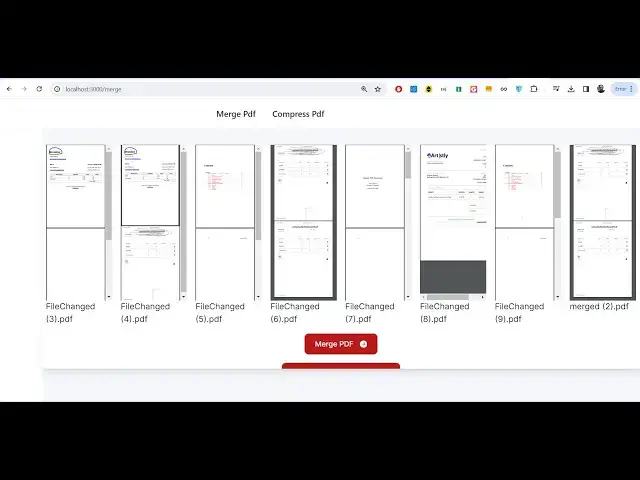
these two do doucment it will show you
0:31
the live preview of these two documents
0:33
which you are merging so the first
0:35
document actually contains uh three four
0:38
four pages and the second document
0:42
contains three
0:44
pages so four + 3 and now the if I click
0:48
the button right here merge PDF it will
0:50
actually merge concatenate or join these
0:53
two PDF documents and now the output
0:54
will be seven pages so click on this
0:57
button and uh you will basically see it
0:59
is sh to me that PDF document is
1:01
encrypted so you just need to make sure
1:03
that you don't select your document
1:05
which contains a password you don't need
1:07
to select those documents so if you
1:09
don't have
1:10
password you only need to select those
1:13
documents which are not password
1:15
protected and now you can see that this
1:17
document contain 10 pages this also
1:20
contain 10 pages so let me click on
1:22
merch so now you will see both these PDF
1:25
documents have been successfully merged
1:27
and now it contains 20 pages so both
1:30
these documents have been successfully
1:31
merged out there so it's a mini PDF
1:34
editor guys which I actually developed
1:36
inside uh next chairs and we actually
1:39
use the jspdf and PDF lib library for
1:43
doing this process and
1:45
uh we also have the second feature which
1:48
is compress PDF and here you need to
1:50
select any PDF file that you want to do
1:53
so this is you can see it is having five
1:56
megabytes
1:57
file so it Con stand Pages let me see if
2:02
I click compress so how much compression
2:05
it will do so you will see it will
2:07
compress your PDF file and it will
2:09
download this as a zip
2:14
file so exactly it will contain 20 pages
2:18
but it has now uh compressed the size of
2:22
it slightly compressed so it depends
2:25
upon if which whichever images are
2:28
present inside your PDF docent it
2:30
depends upon document to document if
2:32
your document is compressible then it
2:33
will compress the size and do this it's
2:36
a mini application you deploy this on
2:38
the server side on your own server it
2:41
works 100% on the client side no uh
2:45
server side code is there so we have
2:46
developed this inside next chairs this
2:48
is actually the directory structure if
2:49
you need the source code I've given the
2:51
link in the description you can directly
2:52
purchase the full source code after you
2:54
purchase the source code you will
2:55
actually get a zip file and then you can
2:58
actually extract the content of the the
2:59
zip file this will actually contain this
3:01
directory structure and here this is the
3:04
dependency structure of my project guys
3:06
so we are using this jspdf Library which
3:08
is a automation uh open source library
3:11
in JavaScript to actually make PDF
3:13
documents and we are using PDF flip
3:16
which is actually a library responsible
3:19
for if you want to modify the content of
3:22
PDF document or actually want to merge
3:25
compress anything you can do this with
3:27
li with this Library we also using PDF
3:31
merger JS PDF viewer to actually show
3:33
the live preview of the document so
3:35
quite a few libraries that we using for
3:37
the project so first of all we are
3:40
actually using JS PDF if you see uh it's
3:45
a opensource library for building uh PDF
3:49
documents in JavaScript then we are
3:51
actually
3:53
using uh PDF
3:56
lip this is also a library for modifying
4:00
creating PDF documents in JavaScript it
4:03
can also be used in a server s side
4:05
environment as well as a nodejs package
4:08
we actually using it as a note package
4:10
inside our next JS application and this
4:14
is actually the package PDF merger we
4:17
are using it to actually merge the two
4:20
documents
4:22
together just need to go to npmjs search
4:24
for this package so we are actually
4:27
using this package it merges multip mple
4:30
PDF documents or parts of them into a
4:32
new document 59,000 weekly downloads a
4:35
very good uh package so we are using it
4:39
and uh we are also using PDF viewer
4:42
react PDF
4:44
viewer there is two packages out there
4:46
first is PDF
4:49
viewer so it basically using uh Mozilla
4:53
PDF JS in the background this
4:56
package and for the react
5:00
specifically next years we are using
5:02
this package react PDF viewer which
5:05
actually encapsulates react CH code for
5:08
exactly doing this purpose we using this
5:11
package as well so I basically showed
5:14
you all the dependencies that we used
5:16
guys and JS zip is actually the library
5:20
for compressing everything into a zip
5:23
file to actually download it as an
5:25
attachment so these are Dev scripts
5:27
after you actually
5:30
extract the content after you make the
5:31
payment you'll actually get a zip file
5:33
you need to extract the content and
5:36
after that you just need to install the
5:37
modules first of
5:39
all npmi so it will install all the
5:44
modules and after you do this I've
5:46
already done that so just start your npm
5:48
run Dev this will start the development
5:51
server on Local Host
5:53
3000 you'll see that and uh just open
5:58
this
6:02
we'll open this simply select your PDF
6:04
files
6:09
here you can select as many PDF
6:12
documents as you
6:14
want so you can see three three files
6:16
are there three PDF documents simply
6:18
click merge PDF it will merge all the
6:21
three documents together so it's a very
6:23
good application guys it runs to the
6:25
browser it uses next CHS which is very
6:28
good framework very good service side uh
6:30
full stack framework for building
6:32
applications and uh also we have
6:35
compress PDF you can select as many PDF
6:38
files three PDF files that you
6:41
selected compress and it will basically
6:45
download a compressed file here and it
6:48
will now contain your PDF document so it
6:50
will compress the size and compress it
6:53
as zip file so if you're interested guys
6:55
in this project the link is given in the
6:58
description and let me walk you through
7:00
with the code guys so we have different
7:01
components available inside of our next
7:03
year's application we have the footer we
7:06
have the layout inside the NAB bar we
7:10
have the NAB bar as well which you see
7:13
basically in the NAB bar we have
7:15
actually having these
7:17
two this is merge PDF we have this link
7:20
which goes to/ merge and then we have
7:23
the SL compress which compress PDF so
7:25
that you see right here in the
7:27
navigation bar that you when you launch
7:29
the app app ation these two things are
7:30
appearing right here then we got
7:33
our
7:35
different this one this is actual file
7:38
which allows you to compress the file
7:40
and we are using this here PDF lip from
7:43
this actual we are using PDF document
7:47
method and uh we using some states
7:53
here so we are basically using two State
7:56
variables selected file SE we show also
7:59
showing the live preview for this we are
8:01
actually using U state for managing the
8:03
state for managing the data whichever
8:06
file user selects and actually we are
8:07
showing the live preview by using these
8:09
two State U State hook and then in the
8:14
compressing if you want to compress the
8:16
PDF file you're actually first of all
8:18
loading the PDF file by using this load
8:20
method that you see right here passing
8:23
the array buffer so first of all we
8:27
actually convert our PDF document that
8:29
the user selects into a array buffer and
8:32
then basically we pass it to the PDF lib
8:35
by using this load method we actually
8:37
pass this file data and then we actually
8:40
save that into the bytes so we basically
8:44
compress it by using
8:47
jsip type is equal to blob right here if
8:49
you
8:50
see
8:53
so this is actual thing right here and
8:56
same goes with the merging functionality
8:58
as well so here we are actually using
9:02
PDF merger if you
9:04
see so for this we are actually using
9:06
four state variables which is merged PDF
9:10
URL file set files dragging set dragging
9:13
and here also we are showing the live
9:16
preview so again we are using the same
9:19
object PDF
9:23
document a very awesome application guys
9:26
you should definitely invest time and uh
9:29
purchase the source code the link is
9:30
given you can
9:35
basically select as many files will show
9:39
you the live preview like
9:43
this it will merge automatically the
9:46
speed of the process that you see guys
9:48
it
9:50
will efficiently merge the files and in
9:54
no time as you see guys nextjs is very
9:57
good framework
10:00
it's a top
10:02
framework
10:03
and please hit that like button
10:05
subscribe the channel as well guys and
10:07
also you can check out my website freem
10:09
mediat tools.com guys so here I have a
10:12
lot of tools available free tools where
10:15
you can try out this is my own website I
10:17
develop this website using
10:19
fmpg and Library so lots of tools that
10:24
you can try out if you have any fac any
10:28
problem so related to video audio and
10:32
PDF any online tool this is my free
10:36
mediat tools.com
10:37
website so this is actual project guys
10:42
and if you are interested the link is
10:43
given and you will actually get this
10:46
source code
10:50
and if you see next
10:56
CH we are actually using this framework
10:59
if you don't know about next CH guys
11:01
it's the react framework for the web and
11:05
before you know next CH you should have
11:07
a very basic thorough understanding of
11:10
react chairs before you dive into next
11:13
chairs it says react is the parent of
11:17
next CH next chair is the children so
11:20
before knowing next chair you should
11:21
have basic fundamentals of react CH
11:24
something as props what are props what
11:26
are components these are some of the
11:28
things that you should previously know
11:32
before you dive into this application
11:34
but as a beginner I basically developed
11:36
this application as a beginner you
11:38
should be able to understand the code if
11:40
you are a beginner in next next years I
11:44
designed this application in such a way
11:46
and if you still face any issue I you
11:49
can contact me at my email address and
11:51
phone number I can help you
11:54
so you can comment which project that I
11:58
should make in the future future related
12:00
to PDF processing or video processing I
12:02
can make that
12:04
project
12:05
so these are different files if you see
12:08
here
12:11
and so PDF bytes so aray buffer that you
12:17
see it loads
12:20
here compressed zip it converts into AR
12:23
compress zip we we download handle file
12:26
change event that you see right here so
12:30
e Target
12:37
files this is a thing here and for the
12:41
interface that we developed right here
12:42
guys if you see the interface we are
12:45
actually using Tailwind CSS for the
12:47
classes if you see the interface that we
12:50
used for this application we are using
12:52
Tailwind
12:53
CS for all the things that you're
12:56
displaying for the live preview this is
12:58
actually interface that you see we are
13:01
using Tailwind CSS to show the grid like
13:04
structure whenever you do
13:10
this so you can see that we have
13:13
basically the scroll bar
13:17
available so it can take as many files
13:20
as you want it can take at one time you
13:22
can merge thousands of files in the
13:25
browser thousand you can compress
13:27
thousands of files in the browser it's
13:29
itself it's a great alternative to a
13:32
paid software that you will use Adobe
13:33
Acrobat you just don't need to you can
13:36
use this
13:39
application just make sure that your uh
13:42
PDF file is not encrypted with the
13:44
password in that case it will not work
13:47
this error message will come that is
13:48
input document is encrypted so just make
13:52
sure that your PDF file is not encrypted
13:55
make sure it is decrypted
14:00
not encrypted and
14:04
uh this is the application thank you
14:06
very much guys for watching this and
14:09
please hit that like button subscribe
14:10
the channel and I will be seeing you in
14:12
the next video