live_tv
Livestream Starting Soon
00
Hours
:
00
Minutes
:
00
Seconds
Up next in 10

Build a Next.js FFMPEG WASM Video to GIF Editor to Create GIF From Videos in Browser Using JS
Jan 9, 2025

Buy the full source code of the application here:
https://procodestore.com/index.php/product/build-a-next-js-ffmpeg-wasm-video-to-gif-editor-to-create-gif-from-videos-in-browser-using-js/
Buy Premium Scripts and Apps Here:
https://procodestore.com/
Show More Show Less View Video Transcript
0:02
uh Hello friends welcome to this live
0:05
stream so in this live stream guys we
0:08
will actually be I will be showing you a
0:10
project that I developed inside next
0:13
year which is basically a online GIF
0:18
maker so it allows you to actually
0:21
create the GIF
0:24
animations from MP4 video files and this
0:28
is actually the interface face of the
0:31
application that you are seeing there is
0:34
a choose file button so there is also
0:37
this nice little effect if you want the
0:40
dark mode or if you want the light mode
0:44
this off you will see
0:46
that
0:49
so the internet connection is back guys
0:51
so that's why it was little bit
0:54
disconnected you can toggle it on guys
0:56
if you are in light if you are dark mode
0:58
so dark mode like it so I can simply so
1:02
the how to use this application it's
1:04
very simple you need to first of all
1:06
select any video file all extensions are
1:09
supported MP4 Avi mov so you can
1:14
basically select all extensions and
1:17
first of all choose your file let me
1:18
choose my file here let me choose this
1:21
video file
1:22
MP4 so as the video file is selected
1:25
guys there will be you can play this
1:27
file in with the help of this video
1:30
player so in this you can this you can
1:34
see you can play this audio you can play
1:37
this video like in the video
1:40
player and
1:45
uh so there is this second uh viget out
1:50
there the starting time and the end time
1:53
this is really important guys so here
1:56
you you can provide uh if you want to
1:59
create a GIF animation you can provide
2:02
the starting and the ending time you can
2:04
cut the video and create a gif of
2:08
Animation to it so let's suppose I want
2:09
to trim the first 5 Seconds of the video
2:13
so I will simply provide 0 0 so it will
2:17
be starting duration and this end
2:19
duration 005 so this is in seconds guys
2:23
this value this value is in minutes this
2:25
value in hours so the total length of
2:28
the video is 21 second so we are
2:30
actually providing the starting duration
2:32
to be zero and the ending duration to be
2:34
5 Seconds there is this convert button
2:38
right here as you click the convert
2:39
button the conversion will start you
2:42
will see that the GIF animation will you
2:45
will see that it automatically made the
2:48
GIF animation so GIF animation as you
2:50
all know Guys these are special images
2:53
which keep on repeating forever and uh
2:56
we actually made this GIF animation from
2:58
an video file we just need to provide
3:01
the starting time and the ending time
3:02
and then click the convert button so now
3:05
we can simply download this GIF
3:07
animation as a image file as you can see
3:10
that now we can open that gif animation
3:12
and it will now play it an endless
3:15
number of times so this is the thing
3:18
application guys that I developed very
3:20
simple application but yet it is very
3:23
powerful and very good application in
3:27
fmpg web assembly like
3:30
in next CH so if you need if
3:33
you next CH is a framework guys as you
3:37
all know it's a full stack
3:40
framework and
3:43
uh it's a very popular framework for the
3:46
building full stack
3:48
applications so we are using this and
3:52
for building fmpg web assembly which
3:55
allows you to execute fmpg library right
3:59
in the browser so we are also using this
4:02
package as well as the source Library as
4:05
you all know fmpg is a open source audio
4:08
and video processing
4:10
Library it has its
4:12
own official documentation so it's a FM
4:17
pg. org their official website so this
4:20
this is the thing that we are using so
4:22
if you need the full source code of this
4:24
project guys the link is given in the
4:26
description and I just coded this
4:29
application in next years in JavaScript
4:32
the link will be given in the
4:33
description you will actually will be
4:36
redirected to Google Drive after
4:39
successful payment at my website
4:41
procore.com the link is given in the
4:43
description
4:45
so at Google Drive you can download the
4:48
zip file so after you download the zip
4:51
file you just need to extract it this uh
4:55
component this directory structure and
4:58
these are the different component which
5:00
are there that you see animated button
5:02
container controls gradient button input
5:05
loading logo JS preview theme Toggler
5:09
these are different components which
5:11
consist of the next year's application
5:14
and this is actual library for executing
5:21
time and this is actual project you can
5:23
change the file if you want to change it
5:26
you can change to any file right here
5:33
so it's a very good application guys you
5:35
can try it and by default it will be in
5:39
light mode you can toggle to dark mode
5:43
all these things you can
5:46
change you can see
5:48
that let's suppose I want
5:52
to change this to 50 and then 21 so the
5:58
6 seconds anim will take place so it is
6:01
converting so you will see that so now
6:04
it has created this GIF animation and
6:08
uh you can take as long as video guys
6:11
there is no restriction on the size of
6:13
the of the video just need to extract uh
6:17
whatever portion that you want to create
6:19
the GIF animation in that portion the
6:21
GIF animation will get created and will
6:24
be a download button you can simply
6:25
click the download button to actually
6:27
download the GIF animation so it's a
6:30
very good application if you are
6:32
basically applying for interview or if
6:35
you're a student then in both the cases
6:38
it will be a great project to actually
6:39
show to the teacher or any sort of
6:43
interviewer that you have made this
6:44
project after you purchase it full uh
6:48
commercial license will be provided you
6:51
will can use this
6:52
code as yourself and it's a very good
6:57
project that you can you can see that
7:00
all these components are there coming
7:02
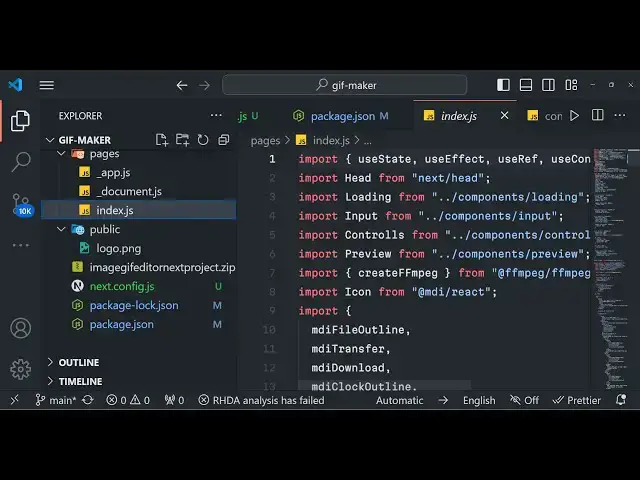
back to the code if you go to
7:03
package.json we are using these fg- core
7:08
Library fmpg package so these are fmpg
7:13
web assembly packages that we are using
7:16
these two packages that you see the
7:18
third one is the MDI JS package react
7:22
and you can see that next CH so it is
7:25
compatible with the latest version as
7:27
well so no need to worry about it so I
7:32
just made it in in a way that it is
7:34
compatible with all the versions so you
7:36
can run this so the link is given and
7:40
you will basically get all this source
7:43
code with all the version numbers that
7:45
I'm
7:46
using it will be there in the zip file
7:48
you will get the zip file after you make
7:50
the payment and you can actually
7:53
download the zip file from Google Drive
7:55
automatically so coming back to the code
7:57
guys so these are different kinds of
7:59
files that you see JavaScript files this
8:02
is if I show you basically first of all
8:05
we load the fmpg library if you don't
8:10
know about it so here we are actually
8:12
this is really important in next year's
8:15
next. config.js in the configuration of
8:18
the nextjs project you do need to
8:21
require these two headers which is cross
8:23
origin opener policy same origin and
8:26
cross origin embedder policy require cor
8:29
so with without these without adding
8:31
these headers you can't execute fmpg web
8:33
assembly Library you will be getting an
8:36
error course error or Shar aray buffer
8:38
is not defined so you just need to add
8:41
these headers inside your next config.js
8:44
to actually allow the fmpg web assembly
8:47
library to work so now coming back to
8:50
the main thing you will see that we are
8:52
actually requiring
8:54
the fmpg library create
8:57
fmpg and then we are actually loading
8:59
cing
9:00
it these are all the CSS that we are
9:02
doing it so these we are also using
9:06
react CH concept as well so this is
9:08
actually a client side component as you
9:10
see on
9:11
the we are also showing a live preview
9:14
once the GI animation is controlled so
9:17
we are having these controls so once you
9:20
make the animation we are showing it in
9:22
live preview of whatever animation GIF
9:26
which is Created from the video that you
9:28
made start time in the end time so you
9:31
can just see so once you write
9:35
it click on convert so automatically
9:39
once the conversion is completed your
9:41
GIF animation will show you'll see
9:55
that you can see that so once you just
9:59
change these values automatically
10:01
whenever you click the convert button
10:02
the conversion will start if you see in
10:05
the console fmpg is doing its process
10:09
you can see that it is reading the file
10:11
outputting the file in the memory fmpg
10:14
web assembly is responsible for doing
10:17
this so it's a complete project guys if
10:19
you are interested the link is given in
10:21
the description and thank you very much
10:24
for watching this video and I will be
10:26
seeing you in the next live stream until
10:28
then thank you very much
#Fun & Trivia
#Flash-Based Entertainment
#Movies
#Online Media
#Online Video
#Software
#Multimedia Software
#Online Goodies
#Clip Art & Animated GIFs
#Animated Films
#Video Sharing