live_tv
Livestream Starting Soon
00
Hours
:
00
Minutes
:
00
Seconds
Up next in 10

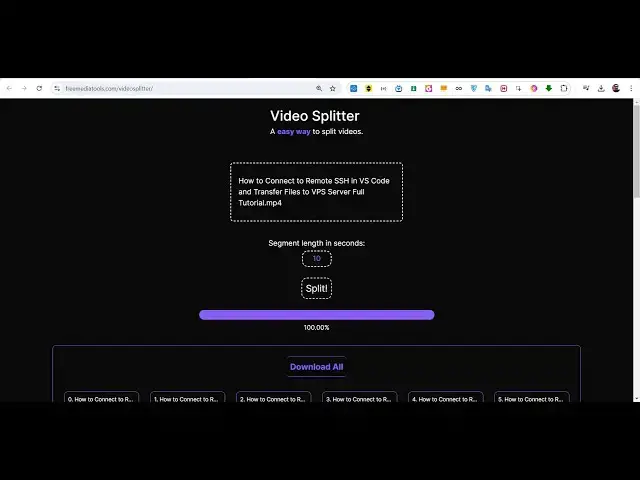
Build a Next.js FFMPEG WASM Video Editor to Split Videos With Progressbar in Browser Using TS
Jan 9, 2025

Buy the full source code of application here:
https://procodestore.com/index.php/product/build-a-next-js-ffmpeg-wasm-video-editor-to-split-videos-with-progressbar-in-browser-using-ts/
Hi Join the official discord server to resolve doubts here:
https://discord.gg/cRnjhk6nzW
Visit my Online Free Media Tool Website
https://freemediatools.com/
Buy Premium Scripts and Apps Here:
https://procodestore.com/
Show More Show Less View Video Transcript
0:00
so in this live stream we will actually
0:02
show you a application that I developed
0:05
which is actually video
0:07
splitter uh the name of the application
0:09
allows you to actually split a long
0:13
video into multiple short little videos
0:15
so if you have a really long video if
0:17
you want to split that video into
0:19
multiple short little videos so this
0:22
tool will be really useful for this
0:23
purport we developed this tool inside
0:26
next CH and we use Tailwind CSS for the
0:28
user interface so you can just see the
0:30
live demo on my website free mediat
0:33
tools.com I just deployed this tool
0:35
right here if you go to my website free
0:38
media tools you will see this nice
0:39
little tool that I developed video
0:41
splitter editor and it uses fmpg in the
0:44
background and there is this interface
0:47
right here and you can browse you want
0:50
to how to connect let's suppose this is
0:53
a video MP4 video we have 410 megabytes
1:00
and we basically select this video this
1:02
is the MP4 video and uh after that uh
1:06
you can actually have a button right
1:08
here to actually split this and then
1:11
this thing is segment length in seconds
1:15
so here you need to provide how many
1:17
seconds each video will contain so
1:20
default value is 10 second you can
1:22
change it to any second let's suppose I
1:25
want to contain each video to be 20
1:28
seconds long so what what will happen if
1:30
you click the split button you will see
1:32
this nice little progress bar and it
1:34
will actually split this long video into
1:37
multiple parts and each video that it
1:40
has splitted if you see it has various
1:42
parts right here almost 82 parts and
1:46
each part is of 20 second long so if you
1:49
try to click any individual video right
1:53
here open
1:56
it you can see it has 17 second long
1:59
video sorry
2:00
so here you need to change whichever
2:03
second you want you can change it to 20
2:05
click
2:09
split so now you can see each video is
2:12
uh 20 second long exactly so you can
2:15
individually click any of these videos
2:18
to actually download them so what I can
2:21
do I can turn on the volume as well
2:23
soome to this video Studio or if you
2:25
have so this was a long video and this
2:28
is the first part which actually
2:30
contains 20 second exactly now this will
2:32
be the second part which will actually
2:34
contain the next 20 seconds connect to
2:36
that server puty this is really useful
2:40
if you have a very long video and if you
2:42
want to cut or split them into multiple
2:44
short little highlights or videos you
2:47
can even download them all all at once
2:50
using this download all button and it
2:52
will
2:53
actually just make a zip file and
2:57
uh actually download them all at once
3:01
you will see this is actually a zip
3:04
file so this ZIP file you can extract
3:10
it so all these parts will be contained
3:13
so you will see so it has been
3:15
extracting so you will see all these
3:17
parts will be contained inside this
3:23
folder so this is actually the folder
3:25
and you will see all these parts a to2
3:27
parts will be there each part is 20
3:30
seconds long and you can just control
3:32
the seconds how many seconds you want
3:33
let's suppose if you want to contain 60
3:35
second each video must have 1 minute
3:38
long so again you click the split button
3:42
again fmpg will do the magic and you
3:44
will basically see your videos is split
3:47
now this time it is 1 minute long video
3:49
each video is 1 minute long see that
3:52
this is a really nice application and uh
3:54
the link is given in the description if
3:56
you want the full source code of this
3:58
application you can directly purchase it
4:00
from my website trod store.com and we
4:03
have used fmpg web assembly to actually
4:07
allow this application to use fmpg right
4:09
in the browser itself so if you don't
4:12
know about fmpg it's a open source video
4:15
and audio processing Library cross
4:17
platform and for actually using it in
4:20
the browser we are using fmpg web
4:22
assembly which allows you to actually
4:24
use fmpg right in the browser itself we
4:27
first of all download and load the fmpg
4:30
and then use it in the browser so this
4:31
is fmpg web assembly which enables us to
4:36
use fmpg right in the browser itself and
4:39
for the actual library or framework we
4:42
are using next chairs if you see the
4:44
package.json file these are the
4:46
different types of dependency we are
4:47
using fmpg we are using uh next year's
4:50
latest version 13.4 at this time jszip
4:54
which is used to actually zip all the
4:56
files into a single file to download as
5:00
a zip file then we are using react 18
5:02
version it is compatible with all the
5:04
versions We also using Tailwind CSS for
5:06
the user interface so these are the
5:09
different scripts if you want to run it
5:10
locally you just like npm run Dev if you
5:14
want to build this application into a
5:15
single page application you can just
5:17
write the script npm run built and this
5:20
will build your application if you want
5:22
to deploy it on a any hosting plan if
5:25
you want to deploy on digital ocean
5:26
versal you can even do that as well so
5:29
this is a complete project guys it will
5:31
be very good for you if you have a
5:33
student if you are looking forward to
5:35
use fmpg library right in a framework
5:38
such as next chairs this application
5:41
really
5:42
useful so this is a layout file this is
5:44
the actual page file which contains all
5:47
this code right here we have just this
5:51
single file which is a really you can
5:53
see how much code is there about 347
5:57
lines of code is there so first of all
5:59
we are using the fmpg loading this it's
6:01
a client Side
6:02
Library and we are loading
6:06
this so the link is given guys you can
6:08
directly purchase it from my website Pro
6:10
Cod
6:11
store.com and uh before purchasing it at
6:15
the checkout page you will find this
6:16
live demo before purchasing it you can
6:19
use this tool online just to make sure
6:21
that you are purchasing a correct
6:23
product just purchase it and at the
6:26
checkout page you will see this live
6:28
demo link where you can check out the
6:30
live application demo you can pick any
6:33
file and just change it the split length
6:36
35 second and it will also show you a
6:38
nice little progress bar and uh then you
6:41
can see your file s it's a single page
6:43
application and you will see uh it uses
6:46
fmpg uh it's a video splitter and you
6:49
can even deploy this application on
6:51
Google as well and you can rank for
6:53
these keywords so video splitter online
6:56
so you will see these tools online a lot
6:59
various websites are there something
7:01
like this so which splits your long
7:04
video into multiple parts so it's a
7:06
really good uh tool that you can
7:09
actually deploy this and you can put
7:11
advertisements and earn a lot of good
7:13
revenue from AdSense and ISO as well so
7:16
if you have a large user base users
7:19
comes to your website so you can also
7:22
modify this code as well after
7:23
purchasing it you can add some more
7:25
features to it as well so the
7:27
possibilities are endless you can and if
7:30
you are applying for a job if you are a
7:32
student then it will be a really good
7:34
starting point to actually start using
7:36
fmpg in a major framework such as nextjs
7:40
so this is coding in inside typescript
7:43
you'll see that the language is
7:45
typescript which is a super set of
7:46
JavaScript with additional features and
7:49
we have coded in typescript so this is
7:51
actually the thing guys and uh we have
7:54
also used Tailwind for The Styling
7:56
purposes as well so very simple
7:58
application hope hopefully you will like
8:00
this video guys please hit that like
8:01
button subscribe the channel as well and
8:04
I will be seeing you guys in the next
8:06
video
#Music Videos
#Online Video
#Multimedia Software
#Online Goodies
#Clip Art & Animated GIFs
#Photo & Video Sharing
#Video Sharing