live_tv
Livestream Starting Soon
00
Hours
:
00
Minutes
:
00
Seconds
Up next in 10

Build a Next.js FFMPEG WASM Video & Audio Converter With Progressbar in Browser Using TypeScript
Jan 9, 2025

Buy the full source code of application here:
https://procodestore.com/index.php/product/build-a-next-js-ffmpeg-wasm-video-audio-converter-with-progressbar-in-browser-using-typescript/
Hi Join the official discord server to resolve doubts here:
https://discord.gg/cRnjhk6nzW
Visit my Online Free Media Tool Website
https://freemediatools.com/
Buy Premium Scripts and Apps Here:
https://procodestore.com/
Show More Show Less View Video Transcript
0:01
uh hello guys welcome to this video so
0:03
in this video I will actually show you a
0:06
fmpg media converter that I developed
0:09
inside next CH which allows you to
0:11
convert your video and audio from one
0:13
format to another this is actually the
0:16
landing page of this application I'm
0:18
just running this on Local Host 3000 and
0:22
this is the next year's project you you
0:23
see we are running this on Local Host
0:25
3000 I've also deployed this project on
0:27
wal.com as well you can check out the
0:30
link is given in the description and uh
0:33
first of all let me show you the
0:35
functionality of this fmpg media
0:37
converter so if you click this button
0:39
open converter so it will actually load
0:42
the necessary fmpg libraries which are
0:47
there so if you see it is running it is
0:49
downloading those libraries in the
0:51
background so once it is downloaded you
0:55
can see currently loading this and you
0:58
will now see this interface here you can
1:00
drag and drop your media files such as
1:03
images or videos so you can choose any
1:06
media file that you have inside your
1:08
computer so first of all let me show you
1:10
an example of uh
1:14
a mp4 file this is actually a video file
1:18
so you can see the file has been
1:19
successfully added in the application
1:22
and uh this is actually you can play the
1:25
video as well if you play
1:28
the if I turn on the volume be showing a
1:31
visual studio so it's it also comes with
1:34
the video player as well you can just
1:35
check uh play the video as well right
1:38
here you don't need
1:40
to and then there is an convert to file
1:43
type there is an drop down here and you
1:45
can basically convert the video into MP3
1:48
wave you can extract the audio which is
1:50
there in the video to MP3 so if I click
1:53
MP3 there is also a progress bar so if I
1:56
click the convert button you will also
1:58
see a nice little progress bar which
2:00
will actually show the user how much
2:02
time is remaining so you will see that
2:04
we are actually calculating how much
2:07
time how much progress have been made so
2:09
it runs from 0 to 100% so when it
2:13
completes your video will successfully
2:15
converted into MP3 and you will be able
2:18
to download the output file this is a
2:21
fully fleshed single page application
2:24
guys in next years that I developed fmpg
2:26
media video and image converter if you
2:30
need the full source code the link is
2:31
given in the description you can
2:32
directly purchase the full source code
2:34
of this project from my website proc Cod
2:37
store.com after you purchase it you will
2:39
actually get a zip file from Google
2:40
Drive you can see that after downloading
2:43
it after completing the progress by you
2:45
will simply get a download button right
2:48
here if you click it
2:51
your video has been successfully
2:54
converted M3
2:56
file so all the audio has been saved in
2:59
mp 35 and you can click Start over to
3:02
start again you can drag your video or
3:06
if you have some MP3 file that you want
3:09
to convert you can even do that as
3:13
well so if you see if you have a MP3
3:16
file as well you can even do that as
3:20
well so you will see this is actually a
3:22
MP3
3:23
file you can see that so you can play
3:26
this in the audio player as well so
3:30
after you can select whichever format
3:32
that you want to convert this audio file
3:34
MP3 wave OG m4a FC double AC click
3:40
convert so again the same process it
3:42
will actually show us nice little
3:44
progress part when it reaches 100% you
3:47
will see this download
3:49
button so the link is given guys you can
3:53
also at the checkout page you can see
3:55
the live demo link which I deployed on
3:58
versel you can basically first of all
4:00
check out the application before
4:01
purchasing it so I deployed this on
4:04
worel so this line you will find out on
4:07
the product checkout page so you can
4:09
visit the demo before purchasing it so
4:12
you if you're watching it for the very
4:14
first time please hit that like button
4:16
subscribe the channel as well you can
4:18
see our audio file has been converted
4:20
and it has been downloaded so this is
4:23
the overall project guys it is coded
4:25
inside next CHS in typescript you'll see
4:27
that all these components is typescript
4:31
based you will see that converting
4:34
progress download output drops on file
4:37
type selection metadata it also comes
4:40
with this own little video player which
4:42
you can play audio files and video files
4:44
as well and it is under the hood it is
4:46
using fmpg if you don't know about fmpg
4:50
it's a open source video and audio
4:52
processing Library this is their
4:54
official website and we are actually
4:58
executing fmpg in the browser using web
5:01
assembly fmpg web assembly is actually a
5:05
tool which allows you to execute fmpg
5:08
Library without having to install it as
5:11
a dependency inside your
5:13
computer so you don't need to have fmpg
5:16
installed for this application it will
5:18
directly download fmpg and execute it in
5:20
the browser using fmpg web assembly so
5:23
we are actually using this
5:25
package in the as a base to actually
5:28
build this application so all these
5:30
conversions that you see if you select
5:32
the file all this thing is happening due
5:34
to fmpg it is actually converting these
5:38
videos from One format to another so if
5:40
I want to convert this video to FV I
5:43
will simply click convert and all these
5:45
progress bar that you see right here it
5:47
is
5:48
actually calculating we are calculating
5:50
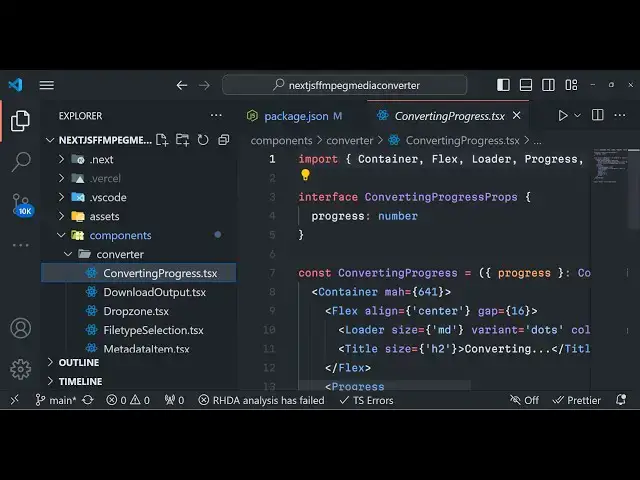
how much time is remaining inside this
5:52
component that you see converting
5:54
progress this is actual overall
5:57
component responsible for showing the
5:59
progress path bar and you can see that
6:01
so we have this progress bar which
6:03
progress multiplied by 100 so it is
6:05
giving this value label color is green
6:08
you can also change the progress bar
6:10
color as well so if you don't need the
6:12
green color you can change the blue so
6:15
now the progress bar color will change
6:18
you will see it will change to blue
6:20
color so you can in real time you can
6:23
change it just if you have the code you
6:26
will see you can make these slight
6:27
little modifications in the user
6:29
interface as well so that's why I'm
6:32
telling you the link is given if you
6:33
need this uh source code it's a very
6:36
good project if you are applying for a
6:38
job if you have any sort of uh school or
6:41
college related project it would be a
6:43
good starting point to understand fmpg
6:46
web assembly library and how to
6:48
integrate them inside the modern
6:50
technology such as next CH and if you
6:53
see the pages we have this app level
6:56
component which is the overall component
6:58
right here this this is a convert page
7:00
which is the main file right here and
7:03
inside this we are actually loading
7:04
these all these three libraries which is
7:07
the core fmpg Library this is the web
7:09
assembly Library if you go to these over
7:12
overall
7:14
links so here we are using this we are
7:18
loading these libraries if you paste the
7:20
link you will see this gifs of the fmpg
7:23
it's a 23 megabyte file so in this way
7:30
these are different files that we are
7:32
loading so you can copy paste the link
7:34
right here in the browser it will give
7:36
you these minified code so it's say fmpg
7:39
web assembly Library so here we are
7:41
simply loading them whenever we start
7:43
the application right here and then we
7:45
are creating this fmpg instance
7:49
so all the browsers support fmpg web
7:52
assembly Chrome Firefox Opera Internet
7:56
Explorer so all the modern browsers
7:57
support it so no problem will be there
8:00
if you deploy this you can even deploy
8:02
this application to versal digital ocean
8:06
anything and you can even rank this
8:08
website on Google as well and on a lot
8:10
of Revenue as well this is actually the
8:12
overall website the link is given guys
8:15
you can go to my website procore.com and
8:17
purchase the full source code of this
8:19
project so for longer files it will take
8:22
some more time because it totally
8:23
depends upon the size of their video
8:25
file so it totally depends upon the
8:28
length of the video how much length of
8:31
the video is there so I think maximum
8:34
amount of video it supports is 2
8:37
gigabyte because fmpg web assembly if
8:40
you see if you just write the limit it
8:45
supports maximum file size it can
8:48
support it can supports up to 2 gigabyte
8:51
of file so if you have a video or audio
8:54
file up to 2 gb you can actually convert
8:56
this using this application files above
8:59
that it is not supported and uh in the
9:01
near future it will but at the at this
9:04
moment it is not supported so you'll see
9:06
it's 410 megabytes file is there so
9:10
depending upon that it basically do that
9:15
so it's a video and audio converter and
9:23
uh so you can see that this is MP3 you
9:26
can basically select any format which is
9:28
OG G click convert and you will see that
9:32
so for audio files it will not take a
9:34
lot of time because their size is very
9:37
low so if you go to the package.json
9:40
basically we are using these fmpg core
9:43
fmpg and we are using the next year's
9:46
latest version which is
9:47
13.3 at this moment it is 14 but it will
9:50
compatible with all the next year's
9:52
versions We are using react 18 right
9:54
there so we're using the latest
9:56
Technologies for building this project
9:58
so the link is given guys uh at the
10:00
checkout page you will also find a live
10:02
demo link as well where you can actually
10:04
try this application before purchasing
10:06
it
10:07
so uh in my opinion it's a very good
10:10
application if you need to get
10:13
started by building some kind of real
10:16
application so you will see that the
10:18
file you selected is already in the
10:19
selected codec
10:25
so so if I want to convert to double AC
10:28
we'll see that so it's a real time
10:31
application and if you like this video
10:33
guys please hit that like button
10:35
subscribe the channel as well and I will
10:37
be seeing you guys in the next video the
10:39
link is given you can directly purchase
10:40
the full source code of this application
#Fun & Trivia
#Flash-Based Entertainment
#Online Media
#Programming
#Software
#Multimedia Software
#Media Streaming Devices