Up next in 10

Build a Next.js FFMPEG WASM Audacity Editor Clone to Change Speed & Reverb Sound in Browser
Jan 9, 2025

Buy the full source code of application here:
https://procodestore.com/index.php/product/build-a-next-js-ffmpeg-wasm-audacity-audio-editor-clone-to-change-speed-reverb-sound-in-browser/
Hi Join the official discord server to resolve doubts here:
https://discord.gg/cRnjhk6nzW
Visit my Online Free Media Tool Website
https://freemediatools.com/
Buy Premium Scripts and Apps Here:
https://procodestore.com/
Show More Show Less View Video Transcript
0:00
uh hello guys welcome to this live
0:02
stream so in this live stream I will
0:04
actually show you a tool that I
0:06
developed on my free media tools website
0:09
it is actually audacity sound editor
0:13
which is developed using fmpg web
0:15
assembly library and next CHS which is a
0:18
full stack framework for JavaScript this
0:20
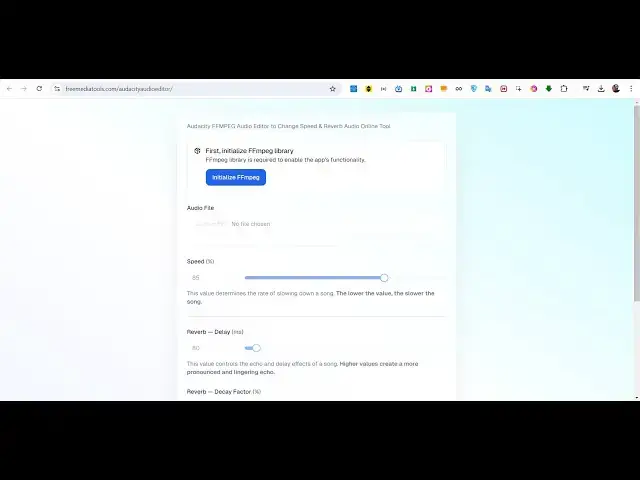
is a tool that I added if you land on
0:22
this Tool uh the this will be the
0:25
interface that you will see so here you
0:26
need to upload your select your MP3 file
0:30
wave file oug file so all the extensions
0:32
are supported of audio or sound file if
0:36
you have a sound if you want to remove
0:38
the if you just want to apply some
0:41
effects to the sound something like
0:42
audacity which is a software for
0:44
applying effects so spe specifically
0:47
changing the speed of the of your sound
0:49
and also the slow re RB effect which is
0:54
used in songs if you are into songs and
0:57
instruments then you will like the
0:58
software very much so first of all you
1:00
need to click this button to actually
1:02
initialize the fmpg web assembly library
1:05
in the browser so you will see this
1:07
notification that fmpg is successfully
1:09
loaded inside your browser now there
1:12
will be choose file button so here you
1:14
need to choose your audio file so you
1:16
can choose any audio file that you want
1:19
let me choose this audio file let me
1:21
open this and show you a live preview of
1:23
this audio file hello guys welcome to
1:25
this video so not required of your so
1:28
you can see that guys this this is my
1:30
audio original audio and I will now
1:33
apply some effects to it using this tool
1:36
that I developed inside fmpg web
1:38
assembly library in next CH this let me
1:41
show usern name rest of the so this is
1:44
the original tool that you see this is
1:46
the original sound so you can see that
1:49
now if I just select this audio and
1:52
there is this interface out there guys
1:55
speed percentage so let me just uh
2:00
open Zoom it so that I can zoom in on
2:02
particular elements and show to you
2:04
clearly what the software is all about
2:07
so now you can see that as we selected
2:10
our MP3 file in this now we have these
2:14
speed parameter so here you can actually
2:17
control uh the value determines the rate
2:20
of slowing down as sound so if you lower
2:23
this value the song will become slower
2:26
or if you're basically having some kind
2:29
of audio if you have your own audio if
2:31
you have a song as it works like this so
2:34
using the slider you can control the
2:36
speed of the sound so let me control
2:39
this let me slow it up so if I just say
2:43
70% and click on generate you will
2:47
basically see the sound will process and
2:50
now depending upon the length of the
2:52
audio file it will take some more time
2:55
so if you have it this is a very long
2:58
file if you see the size of the file is
3:01
pretty large so in this case for the
3:03
larger files it will take some more time
3:06
so you can see that the processing is
3:08
going on in the background if you see in
3:11
the console fmpg is doing its processing
3:14
it is applying these settings that we
3:16
applied the speed percentage that you
3:18
see right here it's
3:20
70% so let me take a very simple example
3:24
sample audio file just to
3:28
see samp audio
3:34
files so this is a basic file which you
3:41
see so let me see it is still processing
3:45
I think it's done or it is still
3:48
processing it because if you see guys
3:50
the size of the file is pretty large if
3:54
I show you what file that I
3:57
selected yeah so you can see that the
4:00
size of the file that I selected is 21
4:03
megabytes so it's a very large file and
4:07
if I try to open this
4:11
MP3 uh so you can see that it's almost
4:15
23 minutes long audio file so it also
4:18
depends upon how long is your audio file
4:21
so what I can do uh you can see it has
4:24
generated this and it has downloaded it
4:26
so size has become 35 megabytes because
4:30
we slow slow down the uh speed of the
4:32
audio so if I now open this just listen
4:35
the effect it has made to the
4:38
sound uh
4:40
hello
4:42
Explorer and also we
4:45
need so
4:48
that so you can see that guys how it has
4:51
actually slowed down the audio and it
4:54
has created a cool little effect but you
4:58
can also play with the sound of a song I
5:00
can't just upload a song because of
5:02
copyright issues so I I can take example
5:05
of my own audio so if you have a body
5:07
boot song Hollywood song you can just
5:09
use this tool to actually it's built in
5:12
in browser no need to actually download
5:15
any software on your computer it's built
5:16
in and it's coded inside next chairs I
5:19
will show you all the effects the main
5:22
effect is Reverb effect this is actually
5:24
coded inside next Chas it's a full
5:26
project in typescript if you see all
5:28
these things are written right here and
5:31
uh if you are interested guys the link
5:32
is given in the description you will see
5:34
the package for Json file you can
5:37
purchase the full source code after you
5:38
purchase it you will be actually be
5:40
getting a zip file from Google Drive
5:42
where you can actually uh extract all
5:45
this content and if you want to start
5:48
this application just navigate to the
5:50
directory and just type npmi so this
5:53
will install all the modules which are
5:55
used inside your next year application
5:58
after that just run npm run Dev so this
6:00
will actually start your development
6:02
server of next years on Local Host 3,000
6:06
so you will be able to run this
6:07
application locally so it's a great
6:10
software guys it's a great tool if you
6:12
are starting out on next years if you
6:14
want to use fmpg web assembly library to
6:17
actually make these cool little projects
6:18
for your University or college as well
6:21
if you're applying for a job it's a very
6:23
good project you can see we are using
6:25
fmpg library and we have used Tailwind
6:28
CSS shadow
6:30
CSS as well you can see these are the
6:32
fmpg library we have used radius
6:35
UI so what I can do uh basically
6:40
uh I can cut cut the
6:45
audio let me just cut this long audio to
6:49
short so that uh I don't want
6:54
to there is some kind of tool also
6:57
available on my website if you visit pre
6:59
media tools if I want to trim my
7:05
audio uh audio
7:09
cutter so what I can do audio editor
7:16
say I can trim trim that audio to a I
7:20
can use this tool basically uh what I
7:23
need to do uh this is actually the tool
7:26
right here uh how to
7:30
remotely uh hello guys welcome to this
7:33
so what I can do I can trim this portion
7:36
right here just to show you for clarity
7:38
purposes uh for FTP which is part of let
7:42
me just crop the
7:50
starting uh it is
7:54
still I can just say fmpg command to cut
7:57
audio by start and time because it will
8:01
take a lot of time so I don't have much
8:03
time in video so I can just use fmpg
8:06
Simple command to actually do this
8:08
process
8:10
so okay so this is actually the command
8:13
so what I will do I will navigate inside
8:16
this folder I
8:18
will rename this to 1 Mp3 I will open
8:24
fmpg and actually execute this command
8:28
it's named as 1. MP3 and I just need to
8:32
cut the portion from 20 second to 40
8:35
second and in coding setting I will
8:37
apply copy it so
8:40
output I will say
8:43
Gotham
8:48
MP3 so what this command will do it will
8:51
cut the audio from 202nd to 40 seconds
8:53
so now we have a audio
8:58
generated uh uh where is this
9:06
audio so this is actually the audio is
9:09
created now I can show you all the
9:10
effects so if I navigate to The Tool
9:13
right here this is my tool I can locally
9:16
also run it on Local Host 3000 if you
9:18
see we running it locally as well Local
9:22
Host
9:23
3000 it will also run locally because we
9:26
are running this application I think so
9:29
it is compiling it so it will run
9:31
locally as you basically install it
9:34
after you extract the content from the
9:37
zip file you will be initialized like
9:39
this so you need to click this button to
9:41
initialize the fmpg so it will get this
9:43
notification that fmpg is successfully
9:45
initialized now you can actually choose
9:48
your audio file let's suppose I choose
9:50
this Gotham MP3 file and now I can
9:53
adjust the slider to actually slow down
9:55
a song or increase the song Speed let me
9:58
just set you to normal site and now I
10:00
show you this these effects which is
10:03
Reverb effect let me just go to this
10:06
website it is actually Reverb effect
10:08
guys which is very popular among
10:11
developers or among people so if you
10:14
have a song if you want to change the
10:16
Reverb delay let me just change it just
10:20
change it as well right here change all
10:23
these values so what will happen if I
10:26
click generate you will see the output
10:28
file will
10:36
ches fil so you can see that guys it is
10:40
a very cool little
10:42
effect it is called a slow Reverb effect
10:45
if you basically don't understand uh it
10:49
will better be understand if you take
10:51
example of a song If you just just enter
10:55
any song Let's suppose I enter
11:00
any Bollywood song here so if I search
11:02
for YouTube kabi slow reverbed so
11:06
basically people use very complex sound
11:09
editor such as audacity to actually make
11:12
these kabi the actual song and it
11:14
basically makes the slow RB version of
11:17
it so this exactly tool does the same
11:19
thing and it actually make you the slow
11:21
RB song which is very good to listen as
11:24
compared to the original so this is
11:26
actually the re functionality which is
11:28
built in inside this audacity sound
11:30
editor you can adjust these values this
11:33
will be more comfortable when you are
11:35
working with songs because this is
11:37
actually a very simple audio file of me
11:40
uh just speaking those words so it will
11:42
not understand but when this will be in
11:46
the music then you will better
11:48
understand if you have a music file or
11:54
body you can see that your voice is just
11:58
uh R wiing so that's the cool little
12:01
effect that I'm talking about so if you
12:04
have still if you have knowledge about
12:06
sounds you will see you will basically
12:09
understand all these factors what is
12:11
Reverb what is the delay so what sort
12:13
you can play with this tool guys before
12:15
purchasing it in the checkout page I
12:17
have given the link directly so before
12:20
purchasing this tool you can actually
12:22
try this tool on your own end if you
12:24
like it then only purchase it and you
12:27
will actually get the source code right
12:28
here and all these components are coded
12:31
this is a layout file that you see this
12:33
is a page. TSX we have used fmpg web
12:37
assembly Library so these are different
12:39
modules which are there the UI
12:42
module so it's a fully fledged project
12:44
guys so if you want to actually build
12:47
this project there is a build command
12:50
also available so just write npm run
12:52
build so this will actually build the
12:54
minified version of this project so that
12:57
you can deploy this project if you you
12:59
are having a domain name so you can even
13:02
earn a lot of Revenue as well guys
13:04
people will come to your website you can
13:05
place advertisements from Google AdSense
13:07
or ISO can earn a lot of money as well
13:10
by ranking this tool on Google so this
13:13
is really good and uh you can see the
13:15
live preview on my website free media
13:18
tools before purchasing it you just need
13:20
to click this button so fmpg web
13:22
assembly will be initialized now you
13:24
need to select your audio file original
13:27
audio file you can change the speed you
13:29
can change the RVE effect right here
13:31
play with this tool it's a very good
13:33
tool guys and you will get to understand
13:37
if you want to do some cool little sound
13:39
editing this tool is a must you no need
13:42
to install any
13:45
[Music]
13:46
software you can see that so you will
13:49
not understand guys because uh this is
13:52
simple audio file recording of me but if
13:56
you take an example of a song such as
13:58
Bollywood song Hollywood song I can't do
14:00
it because of copyright issues so that's
14:02
why if you take an example of a song you
14:05
will better understand this editor so
14:07
it's a powerful editor it allows you to
14:10
make these awesome song remix that you
14:13
see in
14:14
DJ so in online so you will be able to
14:16
do this process it's completely free uh
14:19
to try out and once you are interested
14:23
the link is given on my website
14:24
procore.com and you can directly
14:27
purchase the full source code you can
14:29
extend the functionality if you have
14:31
knowledge about typescript or next years
14:34
you can see the code right here how I
14:36
written it step by step and if you still
14:39
face some problem you can contact me on
14:41
my email address and phone number if you
14:43
still want to actually face any problem
14:47
after purchasing it you can contact me
14:50
so you can see all these components are
14:52
actually coded inside typescript which
14:54
is a super set of JavaScript if you
14:56
still know don't know about fmpg guides
14:59
open source library of sound and
15:01
processing fmpg RG this their this is
15:05
their official website and fmpg web
15:08
assembly allows developers to actually
15:11
execute fmpg right in the browser itself
15:15
you don't need to install fmpg on your
15:17
machine you can directly execute it to
15:20
actually make these cool little sound
15:22
editors video editors with the help of
15:24
this Library so this is the same library
15:27
that I use to actually make this project
15:30
and uh you can see that it's a very
15:31
awesome project you just need to select
15:33
your original file apply these effects
15:36
and click on generate and depending upon
15:39
your audio file size generally songs are
15:43
not much larger they are just 5 to Six
15:45
Minutes song so it will be processed
15:47
pretty quickly and you will be
15:51
see so this was the tutorial guys thank
15:54
you very much and uh I will be seeing
15:57
you guys in the next video
#Music Equipment & Technology
#Programming
#Multimedia Software