live_tv
Livestream Starting Soon
00
Hours
:
00
Minutes
:
00
Seconds
Up next in 10

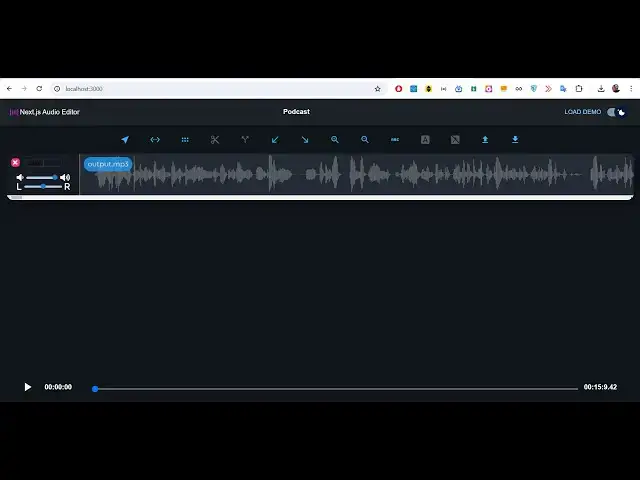
Build a Next.js FFMPEG MP3 Audio Timeline Editor to Split & Trim Sound in Browser Using JS
Jan 9, 2025

Buy the full source code of the application here:
https://procodestore.com/index.php/product/build-a-next-js-ffmpeg-mp3-audio-timeline-editor-to-split-trim-sound-in-browser-using-in-js/
Buy Premium Scripts and Apps Here:
https://procodestore.com/
Show More Show Less View Video Transcript
0:04
uh hello guys welcome to this live
0:06
stream so in this live stream I will
0:07
basically introduced to a audio editor
0:12
that I developed using fmpg and it is
0:15
actually developed inside nextjs which
0:18
is a very trendy framework among web
0:22
developers so it's a fully fleshed
0:24
client application client side
0:25
application works in the browser itself
0:28
it's very fast and efficient and
0:30
it doesn't require server side code it's
0:32
a fully client side coded application in
0:34
next year so you will basically see I'm
0:36
running this on Local Host to 3,000 and
0:39
this is basically a timeline editor we
0:42
have various options we can basically
0:44
cut the video split the video sorry
0:47
split the audio file that you will
0:49
actually select there is this uh upload
0:51
option you will simply select your audio
0:53
file all extensions are supported it
0:56
just navigate to the directory wherever
0:58
your file is present
1:02
so this is basically I'm selecting This
1:04
MP3 file which is a simple audio file
1:07
extension all extensions are supported
1:10
wave file a AMR
1:12
MP3 just make sure that it is a uh audio
1:16
file so I will simply select this and
1:19
after this guys this software will
1:21
actually create this uh waveform of this
1:24
audio file you can play this audio in
1:26
the audio player you will see the live
1:27
preview will be there if I play it uh
1:29
hello guys welcome to this video so in
1:31
this video I just want to show you a
1:33
brand new so you basically see guys the
1:37
audio is playing in this nice little
1:39
audio player and also it is highlighting
1:41
this waveform so it has constructed this
1:44
waveform using a very simple Library
1:47
called as wave surfer. JS so we are
1:50
actually using that open source library
1:52
to actually construct this wave form so
1:54
if you need the full source code guys of
1:56
this project the link is given in the
1:58
description you can directly purchase it
2:01
from my website after that you will
2:03
actually get this ZIP file you will see
2:05
that you will get the zip file and it
2:07
will actually contain this directory
2:09
structure so after you make the payment
2:11
you will be redirected to Google Drive
2:13
where you can actually download the zip
2:14
file and this will actually contain all
2:16
this code so simply after you extract it
2:19
you just need to run this command which
2:22
is npm run Dev this will start the
2:24
development server on Local Host 3000
2:27
your application next CH will start
2:30
if I basically show you the code go to
2:33
package.json file we are actually using
2:36
next CH you will see that 14 version it
2:39
is compatible with the latest version as
2:41
well as of recording this video I think
2:43
next 15 16 is also released so it is
2:46
compatible with all the latest version
2:48
of next CH so don't worry about it and
2:51
you will basically run this application
2:53
in the
2:54
browser once it is compiled it is
2:57
compiling the page it will start your
2:59
application on Local Host 3000 and now
3:02
let me show you some of the operations
3:04
you can perform in this audio editor the
3:07
very first operation is to actually cut
3:11
or split your audio
3:14
file so once you select your audio file
3:17
that you want to cut or split so after
3:20
it create this waveform we have the
3:23
simple audio player where we can play
3:26
this you can just control it with the
3:29
mouse just navigate to whichever
3:32
location you want to go into the audio
3:34
file you will see it is 15 minute long
3:39
audio so you can go to any location
3:42
right
3:43
here using
3:45
this
3:48
slider and there is this option called
3:51
as
3:52
region or you can simply it is you need
3:56
to
3:58
select the region
4:00
highlight the region where you want to
4:02
do this
4:06
simply I will select this region so now
4:11
by this region the audio will be
4:13
splitted into two files so it's it's a
4:16
multitrack so I have this option called
4:18
as split so I will simply press this
4:21
option press this button so what will
4:23
happen it will use the F of MPG and
4:25
basically this audio will be divided
4:28
into two parts
4:30
so we have basically made inside this
4:32
timeline editor we actually splitted
4:35
this audio into two different parts this
4:37
is one part this is the second part so
4:40
now you can actually you can see that
4:43
this output. MP3 file you can basically
4:46
edit the properties you can control the
4:48
volume of this you can basically
4:51
decrease it increase it these are two
4:54
different tracks now because we have
4:55
splitted these files into two different
4:58
files so each property have its own
5:00
property right here you
5:08
see so what we can do is that
5:13
here if you don't want this section
5:16
simply you can delete this you can
5:18
remove this track so now only this will
5:21
be remaining so the total length of this
5:23
will be 4
5:26
minutes so we can basically download
5:30
after uh splitting the audio file you
5:32
can click the download button and uh it
5:35
will actually download this you will see
5:37
41 megabytes the size it is converted
5:40
into wave file and we can actually play
5:43
our wave file which is hello guys
5:45
welcome to this video so in this video I
5:48
so it is exactly 4 minutes long audio
5:51
file so in this way guys you can
5:53
basically cut or split any unwanted
5:56
section inside your audio file using
5:58
this awesome little application that I
6:00
developed in browser using next it's
6:03
fully client side application no files
6:06
are uploaded to the server it is fully
6:08
happening in the browser using fmpg web
6:11
assembly Library so once you select your
6:13
audio file guys it is processed by fmpg
6:17
a open source Library if you don't know
6:19
about fmpg it's an open source audio
6:22
video processing Library it is also
6:24
crossplatform
6:26
by default it comes as a command line
6:28
Library but you can even use it in the
6:31
browser by using this Library called as
6:34
fmpg web assembly this is their official
6:37
giab repo you can read more about their
6:40
documentation it allows you to actually
6:42
use
6:43
fmpg in the browser instead of uh in the
6:47
computer so here we are actually using
6:49
it in the browser to actually construct
6:51
this audio cutting and splitting
6:53
application so here you will actually
6:55
select whatever region that you want to
6:57
select let's suppose I want delete the
7:00
section so what I will do I will simply
7:02
click this cut option cut
7:05
button a scissor option that you see
7:07
click on cut so that portion will be
7:10
removed and also it is reflected back in
7:12
the UI interface as well so as I
7:14
basically click that button that part
7:16
was removed
7:18
automatically instantly you can again
7:21
select this portion I don't want and
7:23
click on this cut so you will basically
7:26
see so it makes audio editing very easy
7:29
guys because many of times when you
7:31
record audio some background noise will
7:34
come some silence will come so it is
7:36
very helpful for by removing those
7:39
silences and background noises and it is
7:42
very much similar to audacity which is
7:44
actually a sound editor program which is
7:46
a desktop software but this is the
7:50
Webb web app which is coded in nextjs it
7:54
works in the browser and you will
7:56
basically get all this source code guys
7:58
plus this application the link is given
8:00
in the description if you are interested
8:03
in this source code you can directly go
8:06
and purchase the full source code please
8:07
hit that like button guys subscribe the
8:09
channel as well if you are liking the
8:11
content you can even zoom in if you want
8:14
to zoom in or zoom out these two things
8:17
are there you can see that either you
8:19
can zoom in or zoom out and also you can
8:23
highlight any section and you can apply
8:26
effects first is fading you can apply
8:29
the fade in filter or Fade Out filter so
8:32
these are two filters you can
8:42
apply and one more thing is that a shift
8:45
operator is also present so inside audio
8:48
editor you will basically see this
8:50
shift is present right here so if you
8:54
want
8:55
to shift this let's suppose if you want
8:58
to
9:02
rearrange the audio in such a way that
9:06
uh let's
9:10
suppose I
9:12
basically click this and split this into
9:16
two
9:18
parts so here what I will do is that
9:26
[Music]
9:30
so it is divided into multiple parts
9:33
right here you will see you can remove
9:36
it turn on the volume decrease it and
9:46
then
9:49
split you can split it into multiple
9:51
files guys you can see
9:54
that so whichever part that you want you
9:56
can control the volume of each part
9:59
so it's a very Advanced editor guys with
10:02
timeline functionalities in next years
10:04
it uses fmpg web assembly Library if you
10:07
are interested the link is given in the
10:09
description you can directly purchase
10:11
the full source code you can also deploy
10:13
this after purchase you will get full
10:15
commercial rights to actually use this
10:16
software or deploy it on your own
10:19
website and
10:21
uh the link is given in the description
10:24
if you are interested you can go to the
10:25
description and purchase the full source
10:27
code
10:29
and uh you will actually basically this
10:32
is a select operator cursor
10:35
operator where you can navigate to any
10:38
location in the
10:43
audio so coming to the code you will see
10:46
every component every functionality has
10:48
a certain component attached to it which
10:50
is dialogue box it is coded in inside
10:53
typescript you will see that context
10:55
menu all these things are there
10:57
navigation M settings hooks these are
11:00
different CSS properties which are there
11:03
so it's a complete project in next year
11:05
so if you are interested guys the link
11:06
is given in the description you can
11:08
directly purchase it thank you very much
11:10
for watching this live stream
#Music & Audio
#Music Streams & Downloads
#Multimedia Software