Up next in 10

Build a Instagram GraphQL API Video & Image Post Downloader in Node.js & Express Using JS
Jan 9, 2025

Buy the full source code of application here:
https://procodestore.com/index.php/product/build-a-instagram-graphql-api-video-image-post-downloader-in-node-js-express-using-js/
Official Website:
https://freemediatools.com
Show More Show Less View Video Transcript
0:00
uh hello guys welcome to this video so
0:03
in this video we will actually be
0:05
building a Instagram post image and
0:08
video downloader inside nodejs and
0:10
express and we will be using the
0:13
Instagram graphql API and for this
0:16
purpose we will not be using any API key
0:19
and uh it is completely free unlimited
0:22
number of times you can do that and here
0:24
you just need to Simply type the
0:26
Instagram URL so if you go to any
0:29
account in Instagram
0:30
and
0:32
uh let's suppose if I pick this account
0:35
here and this this application allows
0:39
you to here you need to Simply paste the
0:41
URL of your favorite Instagram post
0:44
let's suppose I paste this link and you
0:46
can see that it's a image post it
0:48
contains multiple images and uh if I
0:51
just paste this link right here so it
0:54
will show me the links of all the images
0:58
and one by one I can download them so if
1:00
I just click this button so instantly it
1:03
will tell me that there are six host
1:05
available in this URL you can just cross
1:08
check there are six images this is a
1:11
first image second image third Image
1:13
Fourth image fifth image sixth image so
1:16
six images are there and the application
1:19
is also showing uh six images so one by
1:23
one there is a download button available
1:26
if you click download your image will
1:28
get downloaded this is actual first
1:29
first image similarly we have the second
1:33
image and uh this is a second image this
1:36
is a third image so it is essentially
1:39
guys it is communicating with a graphql
1:41
API and these API return the all these
1:45
links that you are seeing it in the
1:46
browser so one by one you can actually
1:49
download all these images so it supports
1:52
multiple images if present inside the
1:54
Instagram post then it will list one by
1:57
one so it also supports videos as well
2:00
let's suppose your post contains a video
2:03
you again need to Simply copy the link
2:05
of that post simply paste it inside this
2:08
tool click on get links so there will be
2:10
a single post available which is actual
2:13
video file so if you click this your
2:15
video will get download it so as a mp4
2:18
file so you just need to play this
2:20
video you can see the video is now
2:24
playing so in this way guys you can
2:27
instantly download your favorite
2:29
Instagram post post by simply plugging
2:31
the URL and uh I also deployed this
2:34
application on my website freem mediat
2:36
tools.com the official website of this
2:39
YouTube channel so I have this tool
2:41
based website and I recently added this
2:44
tool on my website Instagram image and
2:46
video post downloader you can test out
2:48
this tool by going to my website and
2:51
simply plugging the
2:54
URL
2:57
so just check from yourself
3:01
you can see that so if you click it the
3:03
video will get downloaded so you can
3:05
basically check this live tool which is
3:07
there on my website and uh I will now
3:11
code this application step by step and
3:13
uh if you need the full source code of
3:15
this application plus the full
3:17
application the link is given in the
3:19
description you can purchase this source
3:22
code after purchasing it you will
3:24
actually be redirected to Google Drive
3:26
where you can actually get the full zip
3:28
file of this project which will contain
3:30
the full directory structure and if you
3:32
are interested the link is given you can
3:34
purchase it from my website procore.com
3:37
and after purchase you will get full
3:39
commercial right and for the specific
3:42
purpose I made a specific module coding
3:44
sixa insta downloader which you will
3:46
only get after you make the payment
3:48
because this module I have made by
3:50
myself I have done research and
3:54
basically build this module which
3:55
actually contains method to actually
3:58
list out all the downloadable links when
4:00
you once you submit the Instagram post
4:02
URL so this module that I defined which
4:05
is coding s insta downloader it will
4:07
only be get once you purchase it and
4:10
this will be the full directory
4:11
structure so now let me just uh restart
4:14
this application so server is listening
4:16
on Port 3000 so I will just uh make this
4:20
application from scratch so apart from
4:24
this module you will need two more
4:26
modules which is npmi Express
4:30
and uh ejs Express will be the web
4:33
server for nodejs and E ejs will be the
4:35
template engine so simply install these
4:37
as well and I will simply start my node
4:40
more index.js file so right here guys
4:43
first of all what we need to do right
4:45
here we will actually be starting our
4:52
application so what I will do I will
4:55
initialize my express application so
4:58
simply I will require
5:02
it I will make a new app Express
5:05
app and what I will do I will listen
5:08
this application on Port 5,000 so I will
5:12
simply be having a console log message
5:15
that uh app is
5:17
listing on
5:19
Port
5:21
5,000 so here what I will do I will
5:25
simply set the view engine which is EGS
5:30
that we installed embedded JavaScript
5:33
template and also we will be passing two
5:35
more middleware for body passer this is
5:39
really important while you are working
5:40
with forms so these two lines are very
5:43
much important Express Json so once you
5:46
are working with
5:48
forms in order to get the data from what
5:52
whatever the data which is submitted by
5:53
the user in the form in expressjs you
5:56
need these two middleware lines so just
5:58
write this and now we will Define our
6:02
home route so whenever someone goes to
6:04
the homepage we will be showing this
6:10
template index we don't need to write
6:13
extension right here and by default all
6:16
the templates are stored inside index.
6:18
views folder so just make the views
6:20
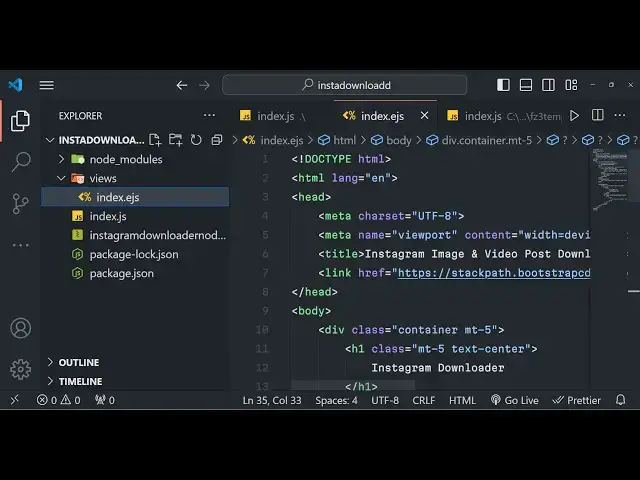
folder and right here inside index. ejs
6:24
file we will actually be writing our
6:27
HTML code so here we you can change the
6:30
title which is
6:32
Instagram image and
6:34
video post downloader you can give any
6:38
title of your choice and after this guys
6:41
we also need to give it a CDN for the
6:45
bootstrap so just paste
6:48
it so after this guys we will be using
6:51
the container class of Bo bootstrap
7:05
so mt5 stands for margin top five and we
7:09
need to align this heading in the center
7:11
position so we will simply say Instagram
7:19
downloader so after this guys if you
7:22
just want to run this application what
7:24
you need to go Local Host 5,000
7:31
so you can see that now it is
7:35
simply printing out this after this guys
7:38
we just need the simple
7:40
form the action will go to get links and
7:45
here the method here will be
7:47
post and inside
7:50
this we will be having the form group
7:53
class of bootstrap and here we'll be
7:56
allowing the user to actually submit the
7:58
URL of the Instagram post so we will
8:03
simply typ to the user that please enter
8:05
the Instagram post
8:07
URL and here input type will be text and
8:12
name parameter we should be giving it so
8:15
that we can Target an Express GS
8:18
required form control class of
8:22
bootstrap and the placeholder we will
8:25
simply enter Instagram
8:29
post URL so if you just refresh now
8:33
there will be this field added right
8:34
here where the user will actually write
8:37
the Instagram post URL so after this
8:40
guys what we need to do we need to have
8:43
a simple button right here to
8:47
actually get all the
8:50
links so once
8:52
you so here button type will be submit
8:56
class is BTN BTN Das
9:00
primary so there will be this button
9:02
added if you
9:04
see
9:06
so now we just need to make this post
9:09
request right here so we will simply say
9:12
app.
9:14
poost so get links and
9:18
uh we need to make this function as
9:25
async so first of all we will read the
9:28
URL of the user us whatever URL
9:31
submitted by request. Body header and it
9:33
contains the name property which is we
9:35
have
9:36
defined clearly if right here if you see
9:40
name is equal to URL so we are getting
9:42
the URL which is submitted by the user
9:45
and then what we need to
9:46
do we need to include the special module
9:49
that we created specifically guys for
9:51
this application coding sixa Instagram
9:55
let me just give it this name
10:02
coding six
10:05
Instagram coding sixa insta download
10:10
sorry this is the name of the module
10:16
and now after including it we will
10:20
simply write all this code in a try
10:22
catch block so that if any sort of error
10:25
take place
10:33
so in the tri block guys we will
10:35
basically await we will use this
10:38
function
10:41
Instagram so whatever variable that we
10:44
called which is coding s insta
10:48
downloader sorry change this name sorry
10:51
let me call it coding SE
10:57
downloader and basically it takes the
10:59
URL as a parameter what whatever is
11:02
passed and response or render so if you
11:06
just console log it just to check the
11:08
response console log lenss so what will
11:12
happen guys if you submit the
11:16
Instagram URL so what will happen right
11:19
here if you see if I paste it click on
11:23
the get links option so in the console
11:26
guys you will basically see this the URL
11:29
will be returned to me and total number
11:32
of results is one because it's a video
11:34
post if I take an example of this post
11:38
so this post contain a lot of images so
11:41
if I now paste this link so what should
11:46
happen again
11:50
refresh so there are a lot of post right
11:53
there so you will see total number of
11:55
post is six so each image is returned as
11:58
a Json response so so now we just need
12:00
to uh par this response which is coming
12:02
from the special module that I written
12:04
specifically for you guys so if you want
12:08
this module you need to pay for it so
12:10
the link is given you can directly
12:12
purchase it so after
12:15
I get the links we can render out the
12:18
template once again index template this
12:21
time we will pass some variables links
12:24
here will be links. URL list and the
12:29
second parameter is the total number of
12:32
results this is equal to Links do
12:35
results
12:36
number so we are just passing the Json
12:39
guys we can access this object by dot
12:42
symbol that's why we are doing it this
12:44
is an actual array this is a special
12:46
property results number and uh we are
12:52
simply reentering this template by
12:55
default we now need to Define these two
12:57
variables links and results
13:00
so whenever we open for a very first
13:02
time these functions sorry this variable
13:05
will be undefined
13:09
links and
13:14
results so now coming back to index. ejs
13:18
file so now to display this
13:22
thing so now to display this we do need
13:25
to write uh
13:30
a just after the form a if condition in
13:33
the EGS style so if the results exist in
13:36
that case we can simply say
13:43
here this is ejs syntax guys and if the
13:47
links exist and we will basically
13:51
show H3 tag little text
13:57
Center uh there
13:59
and then you will embed the variable
14:01
which is results so in this way you can
14:04
embed variables dynamically so post
14:09
there so download
14:11
them it will tell you the exact number
14:14
of post which are available then we will
14:15
simply Loop through it each post at a
14:18
time which is first of all we will check
14:20
if the links are available then only run
14:23
this for Loop
14:30
so inside this we will actually be
14:33
having a
14:38
table so inside the table guys what we
14:41
need to
14:48
do
14:51
so we have the table right here and uh
14:54
table
14:56
head and
15:00
we will actually Define a row and this
15:03
time there will be link the First Column
15:07
and the second column will be action so
15:10
link will be the URL of the actual post
15:14
URL and then we will have
15:17
a simple for Loop for this to actually
15:21
Loop through all the
15:22
results so we will use the for each
15:27
Loop function link
15:39
just close
15:43
it so inside this
15:49
uh so a HF and here you will define
15:53
basically our variable of
15:55
EGS link
16:05
so we just need to say Target is blank
16:08
so that it open in a different
16:15
window so the label of this will also be
16:18
the same
16:27
link and lastly we will basically have a
16:30
second download button as well just
16:32
after this so just to allow the user to
16:35
actually download
16:36
that so whatever I did
17:03
you can also just you don't need the
17:05
download button because we are already
17:07
showing the link so it is more than
17:11
enough so if you just see now I think
17:14
our application is almost complete if I
17:17
again paste this link go to Local Host
17:20
5,000 paste the link right here click on
17:23
get links is saying that links for each
17:26
function is not a function
17:30
links sorry guys this needs to be not
17:33
capital F for each sorry just make this
17:38
change now you can see that guys it will
17:41
actually show all the links of this
17:42
photographs one by one you can download
17:45
them you can take any post for
17:48
example it works for all the post so it
17:52
contains a total of three post out there
17:55
first second third so again if I paste
17:58
it right here at my
18:01
application there are three post
18:04
available so download them if you click
18:07
it you can see that same goes with the
18:11
video as well guys and this is a really
18:13
nice application if you're interested
18:15
guys this will be a very huge project
18:18
for if you are a student if you are
18:21
aspired to get a job then it will be a
18:23
good project to show to
18:26
the interviewer that yeah you have
18:30
developed this application you will get
18:32
full commercial right after you purchase
18:34
it you will
18:36
actually get my module which I developed
18:40
to actually fetch these download links
18:42
for particular Instagram post and video
18:45
once before you purchase you can try out
18:47
my live demo on the checkout page I have
18:49
given the live demo link where you can
18:51
actually go to my website and try this
18:53
before purchasing it so thank you very
18:55
much guys for watching this video please
18:57
hit that like button share sh my Channel
18:59
with your friends and subscribe the
19:00
channel as well and I will be seeing you
19:03
in the next video
#Online Goodies
#Social Network Apps & Add-Ons
#Photo & Video Sharing
#Photo & Image Sharing
#Other
#Other
#Other
#Video Sharing