Up next in 10

Build a FFMPEG Audio Timeline Editor & Recorder in Browser Using Lame.js & Wavesurferjs in JS
Jan 9, 2025

Buy the full source code of the application here:
https://procodestore.com/index.php/product/build-a-ffmpeg-audio-timeline-editor-to-trim-cut-mp3-in-browser-using-lame-js-wavesurferjs-in-js/
Buy Premium Scripts and Apps Here:
https://procodestore.com/
Show More Show Less View Video Transcript
0:03
uh hello guys welcome to this video so
0:05
in this uh live stream I will basically
0:08
introduced to a new application audio
0:10
editor and voice recorder that I
0:12
developed inside the browser and
0:14
basically guys it works right in the
0:16
browser it's a fully client side
0:18
application that I developed it's a
0:19
onepage application and all the features
0:22
are bundled into a single app and which
0:24
works in the browser it doesn't require
0:25
internet connection and it uses vanilla
0:28
JavaScript HTML and CSS and we are using
0:30
three open source libraries for this we
0:32
are using fmpg web assembly Library wave
0:35
surfer. JS and thirdly we are using the
0:38
MP3 encoder Library which is ljs we are
0:40
using three open source libraries for
0:43
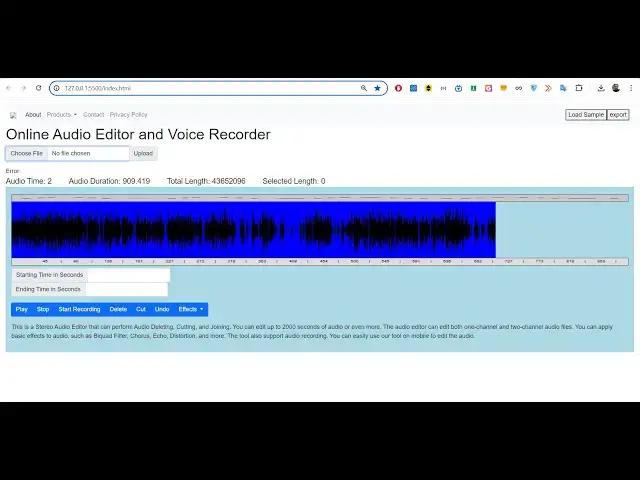
this project and you can see this is
0:45
actual interface of the application so
0:46
we have basically running this code
0:48
right here we are basically opening with
0:51
live server you can simp like this you
0:54
will uh see the interface it will look
0:57
something like this whenever you open
0:58
the application we it on Local Host
1:01
index.html is opening it it doesn't
1:04
require server guys it only works in the
1:07
client s if you basically select your
1:10
audio file you need to choose your audio
1:12
file all extensions are supported so if
1:15
I click choose file and here you need to
1:17
navigate to the directory wherever your
1:19
audio file is present so this I will
1:21
take this example which is MP3 file
1:23
which is 15 seconds 32 15 minutes 32
1:27
second long video sorry audio file if I
1:30
select this now it will now process it
1:32
and it will actually generate the wave
1:34
form of this hello guys welcome to this
1:36
video so in this I can stop this play
1:38
this audio file so first of all this is
1:42
actually timeline basically it is
1:44
showing you automatically it created the
1:46
wave form for you of this audio file and
1:49
it created this awesome little timeline
1:51
which actually is generated by wave
1:53
surfer. jsk SK which is open source
1:55
library that we using for this
1:57
application and for actually generating
2:00
the waveform of the audio file and if
2:02
you are interested on this project guys
2:04
the link is given in the description you
2:05
can directly purchase the full source
2:07
code the link is given in the
2:09
description you will actually get this
2:11
full directory structure it will
2:12
actually contain the index.html code the
2:15
JavaScript code and the CSS code so once
2:18
you purchase it you will be
2:19
automatically redirect redirected to my
2:22
uh Google Drive where you will actually
2:25
download the zip file and after that
2:27
just extract the zip file and you will
2:29
get this directory structure simply open
2:31
the index. HTML file right in the
2:33
browser you can easily deploy this
2:36
application if you are having a domain
2:38
name simply deploy this after purchase
2:40
guide you will get full commercial right
2:41
to use this software you can resell this
2:44
also
2:45
and now you just need to choose the
2:47
output file sorry audio file it will
2:51
processes and generate uh hello guys
2:53
welcome to this video so in this this
2:56
and now there is very simple you can
2:59
control it using Mouse simply select the
3:01
portion if you want to delete this
3:04
portion so basically you can click on
3:06
the delete button to actually delete
3:08
this portion from this recording so once
3:10
you click this delete option that
3:12
recording that portion will be deleted
3:14
from the audio file so this makes it
3:16
really useful guys if you are a content
3:19
creator if you want to basically remove
3:21
the background noise from your audio
3:23
file so this software makes it really
3:24
easy it's a great alternative to
3:27
something like audacity which is a
3:28
desktop software which is a very complex
3:30
software but this is a really good
3:32
alternative to this it's a web
3:34
application the advantage is that it
3:36
doesn't require internet it really works
3:38
in the browser and it is really fast
3:41
application simply select the
3:43
portion using the mouse it is
3:45
highlighted right here if you want to
3:48
delete this simply click on the delete
3:50
portion so that portion will be deleted
3:52
and again you can converted let's
3:54
suppose I want all my images to convert
3:57
so if you don't want all this portion
4:00
simply select this portion click on
4:02
delete so you just need to select this
4:05
portion click on delete that portion
4:07
will be deleted so now you can see uh
4:11
audio duration will become only
4:14
321 Ed
4:17
the if you want to delete this all
4:20
delete you can see
4:24
2011 so in this way guys if you don't
4:27
want any portion just select the portion
4:30
and uh delete
4:33
this so now the total duration of the
4:36
file is 8 Second and now if you want to
4:39
export this there is a export button
4:40
available right at the top corner right
4:44
here top right corner export button is
4:47
there simply click that and it will
4:49
export your audio file and your MP3 file
4:51
will be downloaded so after you make all
4:53
all the modified changes your file will
4:55
be downloaded hello guys welcome to this
4:57
videos thank you very much for watching
4:59
this so you can see that it contains uh
5:02
the trimmed portion which only contain 8
5:05
seconds
5:06
so very good application guys it's audio
5:09
trimmer editor cutter you may say or you
5:12
may have seen these applications online
5:14
also guys uh hello guys welcome to this
5:16
video so I'm giving you the code for the
5:20
link is given you can directly purchase
5:22
this Full Source Code full application
5:25
and let me show you one more thing so
5:27
let's suppose if you want to cut or trim
5:29
the portion this portion that you want
5:31
only this portion you want in the audio
5:33
there's a second option of cut so if you
5:35
click on cut right here the total
5:38
length whatever you will basically see
5:41
starting time as you basically select
5:43
here starting time and ending if you
5:45
want to decrease the quality of the so
5:47
basically as I'm selecting right here
5:49
starting time is 2 290 second and the
5:51
ending time is increasing as you
5:53
basically select this portion so let's
5:56
suppose the I want this portion only so
6:00
this correspond to 19 second recording
6:03
so I will simply click cut the duration
6:05
will be 19 second you can see that so
6:08
now we can export this also so your
6:12
video sorry audio file will be
6:14
downloaded it will contain all 19 second
6:17
so you will degrade from control all
6:20
these one more thing guys it also is a
6:24
audio recorder as well if you don't want
6:26
to edit your audio files if you just
6:28
want to record your there is a start
6:30
recording but button if you click it
6:32
Grant your permission from the
6:33
microphone so whatever you are speaking
6:35
right here whatever I speaking through
6:37
my microphone it is being recorded by
6:39
this application automatically it is
6:40
creating this waveform you can see that
6:43
automatically it is creating the
6:44
waveform that I speaking inside my
6:47
microphone and uh automatically this is
6:50
live right here guys and audio time you
6:52
can see it is also increasing 22 second
6:55
23 Second and once you are done you can
6:58
click on the stop recording button to
7:00
actually save this as MP3 file click on
7:04
this
7:05
button from the microphone you can see
7:07
here what time I speaking through my
7:09
microphone it is being recorded by this
7:11
application automatically it is creating
7:13
this waveform you can see that
7:15
automatically it is creating the
7:16
waveform that I'm speaking inside my
7:19
microphone and uh automatically this is
7:22
so now you can even edit the portion
7:23
that you don't want click on that
7:25
portion you can basically delete this
7:28
portion and once you done basically you
7:30
can export the recording that you
7:31
recorded as a MP3 file so it's a fully
7:35
fleshed audio recorder audio editor you
7:37
may want to sayic you can see that
7:39
automatically this is once you are done
7:41
you can click on the stop recording
7:43
button to actually sa so you can see
7:45
that guys uh it's a very awesome
7:47
application one single page application
7:49
but it's a very powerful powerful audio
7:52
editor and audio sound recorder it works
7:55
entirely in the browser it's a very good
7:57
application it built using HT CSS and
8:00
JavaScript if you are interested guys
8:02
the link is given in the description of
8:04
the video you can basically purchase the
8:07
full source code you will actually get
8:08
this
8:09
index.html this is actual JavaScript
8:12
code you will see that all this code
8:14
will be
8:15
there this will be the CSS
8:18
code so you will actually get a zip file
8:21
you just need to extract the zip file
8:23
which will actually get this directory
8:25
structure which will contain the CSS
8:26
JavaScript and the this is a worker code
8:30
and we are using three open source
8:32
libraries guys for this project we are
8:34
actually using fmpg or uh which is a
8:38
command line audio processing library
8:41
and for executing it in the browser we
8:44
are using fmpg web assembly which is a
8:46
actual package open source package which
8:48
allows you to actually use fmpg right in
8:51
the browser itself to actually make
8:53
these awesome applications secondly we
8:55
are using our wave surfer Library wave
8:59
surfer. JS it's a JavaScript waveform
9:03
library to actually create these audio
9:05
visualizations when whenever you create
9:08
select your audio file it will
9:10
automatically create these a awesome
9:13
looking waveforms that you basically are
9:15
seeing right here these
9:17
waveforms in the timeline that you
9:20
seeing right here it is created using
9:21
wav surfer. JS you can read more about
9:24
this it's open source library and
9:26
thirdly we are using ljs which is a MP3
9:29
coder so whenever we click this export
9:32
button we are actually using uh whatever
9:35
changes that you have done we are
9:37
exporting it to MP3 file or wave file
9:39
for that we are using this MP3 encoder
9:42
Library which is ljs so this is also a
9:45
open source Library so we are using
9:47
these three open- Source libraries for
9:49
this awesome project the link is given
9:51
in the description if you are interested
9:53
guys the source code you can directly
9:56
purchase it and uh
10:02
uh so if you are interested guys the
10:03
link is given in the
10:07
description you can directly purchase
10:17
it so if you are interested
10:22
guys so the link is given guys in the
10:25
description you can directly purchase it
10:27
it's a very awesome software guys
10:30
which is
10:32
there so if you have some questions guys
10:34
you can
10:45
basically so it's a very awesome
10:47
application uh audio editor and voice
10:50
recorder it basically forms the wave
10:53
form and you can basically cut or trim
10:55
any portion of the audio and there's
10:57
also one more thing guys there is the
10:59
effects a variable so let's suppose if
11:01
you want to apply some special effects
11:04
to your audio files you can basically
11:06
select your audio file first of all it
11:08
will actually create the wave form uh
11:10
hello guys welcome to this video there
11:12
is this uh effects option also available
11:14
to you simply select the portion that
11:17
you want to apply the effect simply
11:19
click on
11:21
the effect this is the playback Reverb
11:25
Reverb you can basically provide a value
11:32
welcome to this video so in this video I
11:34
just want to show you a brand new uh
11:36
Photoshop C edit software in the browser
11:39
which
11:40
works you can see that you can basically
11:42
play with these effects audio effects
11:45
you will see all these effects are there
11:46
gain bio code filter chorus Distortion
11:49
compression Eco playback Reverb pingpong
11:51
delay overdrive so if you're interested
11:54
guys the link is given in the
11:55
description you can directly purchase it
11:57
and uh thank you very much much guys for
11:59
watching this uh video and I will be
12:02
seeing you guys in the next live stream
12:05
until then thank you very much
#Music Streams & Downloads
#Software
#Multimedia Software
#Open Source