Up next in 10

Build a Canvas Image Watermark Editor to Add Text & Graphics Using Fabric.js in Browser Using JS
Jan 9, 2025

Buy the full source code of the application here:
https://procodestore.com/index.php/product/build-a-canvas-image-watermark-editor-to-add-text-graphics-using-fabric-js-in-browser-using-js/
Buy Premium Scripts and Apps Here:
https://procodestore.com/
Show More Show Less View Video Transcript
0:03
uh Hello friends welcome to this live
0:06
stream guys so in this live stream I
0:08
basically build out this image canvas
0:12
Watermark editor application in the
0:14
browser so it's a fully client side
0:17
application guys so this will be the
0:19
actual interface when you open this
0:21
application it is entirely coded in HTML
0:24
CSS and JavaScript it's a static
0:27
application image editor something like
0:30
canva and here you will simply click and
0:33
it will open the image picker from the
0:35
computer and you will be able to select
0:37
your local image file whichever image
0:40
file you want to modify so let's suppose
0:43
I pick this image you can pick any PNG
0:46
or jpg image so you will see I have
0:48
already picked this image and the image
0:50
is showing the live preview so we have
0:53
this Color Picker guys you can easily
0:55
pick any color of your choice various
0:58
colors schemes are present pick your
1:00
favorite color let's suppose I pick the
1:03
white color and this is you can control
1:05
the brush size with this slider so if
1:08
you want to write something in the image
1:10
you can write here basically any
1:13
Watermark or text you want to write
1:17
here you can basically
1:22
write add the water mark at any location
1:30
so after you basically modify the image
1:34
with these slider it's very good you can
1:36
control the size of it if you do it it
1:39
will look something like this it will
1:41
now become bigger you can control the
1:44
size using the slider pick the color
1:46
using this Color Picker we also have
1:49
eraser so if you click the Eraser it
1:51
will basically uh remove the thing if
1:55
you don't want this one it will remove
1:57
it you can see that so it we'll remove
2:00
it anything that you have added right
2:02
here so you can see that so this is the
2:05
actual eraser and then you can do this
2:09
like this so after you modify the image
2:12
after you have added your watermark you
2:15
can basically add your watermark company
2:17
logo anything you can add this using
2:19
this uh simple uh application and there
2:22
is a download button available click on
2:24
download and after it modified all these
2:27
changes it will actually download the
2:29
out image and if you open this image you
2:31
will see all the modified changes that
2:33
we took using the pencil using the brush
2:38
the image is modified you will see that
2:40
so we are actually using fabricjs this
2:42
is the actual code of this application
2:45
if you are interested guys the link is
2:47
given in the description of the video
2:48
you will actually purchase it the link
2:51
is given from my website after you
2:53
purchase it you will actually get a zip
2:54
file from the Google drive automatically
2:59
after purchase you will be redirected to
3:00
Google Drive here you will get the zip
3:02
file you will simply extract it and this
3:05
will the directory structure simply you
3:07
need to open this index HTML file this
3:09
will actually open in a live server in
3:12
vs C it's a static application so no no
3:15
need of server side application simply
3:17
select your image the image will open
3:19
and then you will be able to edit your
3:21
image so simply modify any right here
3:24
you can change the Color Picker pick
3:26
your favorite color add your watermark
3:29
modify the image you can control the
3:31
size using the slider and after
3:33
modifying the image you can simply
3:35
download this you will see all the image
3:37
will be having this modified changes and
3:39
we are actually using this open-source
3:41
Library called as fabric JS guys I have
3:44
made numerous tutorials about this on my
3:47
channel fabric JS it's open source
3:49
canvas library of JavaScript which makes
3:51
it easy to actually make these text and
3:54
Graphics related applications in browser
3:57
using JavaScript so fabricjs is open
4:00
source canvas library and it is
4:02
available for free and we are actually
4:04
using this open source library to
4:06
actually construct this application
4:08
which is a very awesome application
4:10
which allows you to edit your images
4:12
simply select whatever image that you
4:14
want to
4:16
edit you can see that so the image will
4:19
be
4:19
shown you can basically pick any big
4:23
image it you can see now this is a
4:25
actual Big Image and now you can
4:28
actually select your color
4:34
just write anything or this let me show
4:39
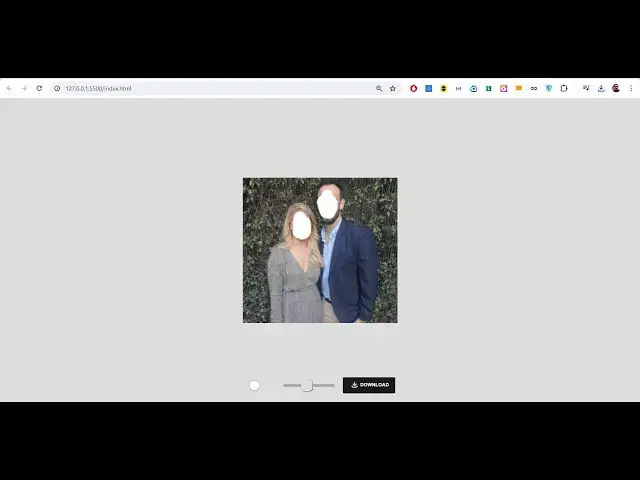
you the basic usage of this if you want
4:42
to hide faces guys in the picture this
4:44
is a very good application let's suppose
4:46
if you are developing such kind of uh if
4:49
you want to hide faces then it's a very
4:52
good application simply select hide the
4:55
face this will actually hide the face if
4:58
you want to do it it can be used in
5:00
numerous number of ways if you want to
5:02
add Watermark to the image or if you
5:04
want to hide faces now you can simply
5:08
download the image so the face is hidden
5:11
so many of times you have seen pictures
5:13
on social media where the face is not
5:15
revealed or fa is hidden by these they
5:18
use these applications simply to
5:20
actually hide the face by using this
5:22
slider these graphic brushes so you will
5:26
not require any third party image editor
5:28
you can use this appc appliation which
5:30
is built using HTML CSS and JavaScript
5:32
which allows you to actually carry out
5:34
this process to actually hide the faces
5:36
or you can actually add watermark on the
5:38
images so the link is given in the
5:40
description of the video guys you can
5:42
purchase this application from my
5:44
website the link is given after
5:46
purchasing it you will actually get a
5:47
zip file which will actually contain
5:49
this directory structure and uh this
5:52
application actually uses this Index
5:55
this is HTML code and in the disc folder
5:58
all the minified code will be there the
6:00
source folder you can basically see we
6:03
are actually using our pallet JS model
6:07
all these are JavaScript files and in
6:10
the background we are actually using
6:11
fabricjs to actually construct this
6:13
application you just need to open this
6:16
file which is
6:17
index.html and directly the application
6:20
will open you don't need to do anything
6:22
simply after you extract the zip file
6:24
you just need to open this uh index.html
6:27
it will open this application and the
6:29
deployment process is really simple if
6:31
you want to deploy this application you
6:34
can deploy it into a real domain name
6:36
and you can earn a lot of Revenue as
6:38
well after purchasing you will get full
6:40
commercial rights to actually sell this
6:42
application or on revenue from it so the
6:45
link is given in the description it's a
6:46
very awesome application you can you can
6:49
see how beautifully it basically hide
6:52
the
6:53
face you can edit the image and
6:57
just there's a download but to actually
7:00
save your work after you modify the
7:02
changes so it will reflect you can pick
7:04
your favorite color like this modify the
7:07
image you can adjust a slider if you
7:09
want the if you write if you want to add
7:12
some Watermark you can draw text on the
7:16
images draw any Watermark text that you
7:20
want to add so it is very useful you can
7:23
even draw something like this it's a
7:25
very good application guys if you are
7:28
interested the link is given in the the
7:29
description you can directly purchase it
7:31
it can be used in both the ways it can
7:33
be used to actually add watermark on top
7:35
of the images you can draw text on the
7:38
images draw Graphics there is a simple
7:41
image you can basically draw color draw
7:44
text so it becomes very easy choose your
7:48
favorite color and
7:53
uh you can see that
7:56
how it becomes a pencil right here
8:03
so here you can add your watermark of
8:05
your company it totally depends upon
8:06
your design skills you can adjust the
8:10
slider and it can even be used to
8:13
actually hide the faces as well so it
8:16
can both be used in numerous ways guys
8:19
you can use this application the link is
8:22
given in the description you
8:25
can actually purchase it's a very good
8:28
alternative to
8:30
any uh image editor that you will use
8:33
guys third party website it's a great
8:36
alternative and the best thing is that
8:38
it it doesn't require internet
8:40
connection it works on the client side
8:42
no server side code is involved so it's
8:44
a static application and anyone can use
8:48
this application if you have don't have
8:51
Internet it's totally fine it works in
8:53
the browser and it's really fast and
8:56
efficient and it actually uses fabric JS
8:59
and and to actually export the canvas to
9:02
the image you will see we are exporting
9:04
the canvas we selecting the images
9:06
modifying it adding colors watermarks
9:09
text and pencil and then later on we are
9:12
exporting this to a actual PNG or jpg
9:14
image exporting the canvas so we have
9:17
this Color Picker we also have eraser
9:20
let's suppose if you have done something
9:21
wrong you can can erase something like
9:24
this you can erase it very easily by
9:28
using this eraser that is provided to
9:30
you and then add something right
9:33
here so it becomes very easy guys to
9:36
actually design the thumbnails in a very
9:38
proficient way it uses HTML CSS and
9:41
JavaScript code the link is given you
9:43
can directly purchase it guys the link
9:45
is given in the
9:47
description you can see that's how
9:49
easily it can be do you will get this
9:52
directory structure the this ZIP file
9:54
you will get after you purchase it the
9:56
link is given in the description all the
9:58
source is there you will see all the
10:00
source code files are there and
10:04
uh if you are interested the link is
10:06
given in the description so some
10:09
comments are there in the live stream so
10:11
if you're watching it for the very first
10:12
time guys please hit that like button
10:14
subscribe the channel as well and thank
10:16
you very much guys the link is given you
10:18
can directly purchase it that's
10:20
application and thank you very much for
10:22
watching this video and I will be seeing
10:24
you in the next video
#Online Media
#Online Video
#Programming