Up next in 10

Build a Canva Clone PDF Invoice Ultimate Editor in Browser Using HTML & JavaScript
Jun 26, 2025

Buy the full source code of the application here:
https://procodestore.com/index.php/product/build-a-canva-clone-pdf-invoice-ultimate-editor-in-browser-using-html-javascript/
Official Website:
https://freemediatools.com
Show More Show Less View Video Transcript
0:00
inside the browser it's similar to canv
0:02
so if you visit my website
0:04
freemediatools.com
0:05
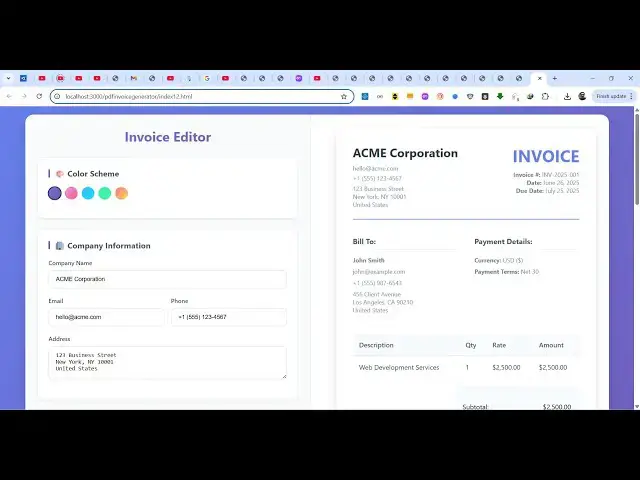
this latest tool that I developed which
0:07
is PDF invoice ultimate editor
0:10
so the tool looks like this we have
0:13
various themes here you can select this
0:15
from these color scheme and then we can
0:18
edit the information on the right hand
0:19
side with live preview you will see the
0:21
changes so you can give a company name
0:23
here let's suppose I give here free
0:25
media tools so as you as I'm making the
0:28
changes you will see on the right hand
0:30
side
0:31
the changes are reflected back
0:35
you can also provide a phone number
0:40
then you can provide your address then
0:42
this is client information you can edit
0:44
client information these are invoice
0:46
details so by default one item is
0:49
selected here you can add multiple items
0:51
in the invoice here so we have the
0:54
button here of add item so you click the
0:57
second laptop here you can change the
1:00
quantity set a price here automatically
1:03
the price will be calculated
1:06
can see that in this easy way you can
1:09
construct the invoice here
1:15
so we put you can even put a tax rate
1:18
you can apply it discount let's suppose
1:20
I am giving 2% discount you can apply
1:22
this and now you will see the invoice
1:26
You can see that now we have either we
1:28
can print it out if you click the print
1:30
button the automatically the print
1:33
window will open and now you can able to
1:36
print your invoice using the printer or
1:38
you can click generate PDF so now it
1:41
will basically download everything as a
1:43
PDF file and your invoice you can see
1:46
that it is generated successfully so I
1:49
developed this application entirely in
1:51
the browser using HTML CSS and
1:53
JavaScript if you need the full source
1:55
code of this application the link is
1:57
given in the description you will get a
1:59
full index html file here after the
2:02
payment is done from Google Drive
2:05
automatically so this is the overall
2:07
source code of this application it's
2:09
almost about uh 1,00 lines of code so I
2:13
developed it from scratch so you will
2:15
get to know how I developed this you can
2:17
even modify the source code as well once
2:19
you get this file here after the payment
2:22
the link is given in the description so
2:24
for building this we have used two
2:26
open-source packages JSPDF and HTML to
2:29
canvas if you don't know about JSPDF
2:32
it's a JavaScript PDF generation library
2:36
and secondly we also used HTML to canvas
2:39
which is used to take the screenshots in
2:41
the browser
2:43
so we have used these two libraries for
2:46
building this so before purchasing the
2:48
application you can try this tool i have
2:49
given the link on my freemediatools.com
2:52
website you can try this invoice PDF
2:55
generator you can basically change your
2:58
company name email address everything
2:59
after making the changes you can add the
3:02
items and then click generate PDF very
3:06
simple application static web
3:08
application which runs entirely in the
3:09
browser so if you are interested you can
3:13
directly purchase it and uh after that
3:17
it's very easy to deploy this as well
3:19
because it's single file index HTML CSS
3:22
and JavaScript no serverside code is
3:24
involved and the speed is also
3:26
tremendous so it's completely responsive
3:29
as well so can
3:33
purchase it so thank you very much for
3:35
watching this video and I will be seeing
3:37
you in the next one
#Business & Industrial
#Computers & Electronics