live_tv
Livestream Starting Soon
00
Hours
:
00
Minutes
:
00
Seconds
Up next in 10

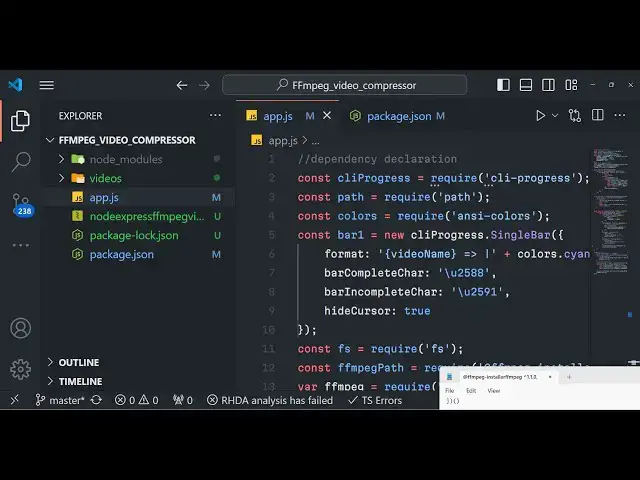
Build a Bulk Video Compressor in Terminal Using Fluent-FFMPEG With Progressbar in Node.js
Jan 9, 2025

Buy the full source code of the application here:
https://procodestore.com/index.php/product/build-a-bulk-video-compressor-in-terminal-using-fluent-ffmpeg-in-node-js/
Official Website:
https://freemediatools.com
Show More Show Less View Video Transcript
0:07
uh hello guys welcome to this live
0:09
stream so in this live stream we will
0:11
actually build a video compressor inside
0:15
fluent fmpg in in
0:18
nodejs so which will automatically
0:20
compress all your videos which are
0:23
present in the videos folder so it will
0:26
one by one process each video and it
0:29
will compress
0:30
the size of the video so we have a
0:33
folder here which is videos folder and
0:37
in this folder we actually store all the
0:39
videos which needs to be compressed you
0:42
can see all these videos are MP4 you can
0:45
take any extension Avi MP4 any extension
0:49
you can take it supports all the
0:51
extensions and you can see the sizes of
0:54
these videos 44 megabytes 47 24 31 31 25
0:59
25 30 90 megabytes respectively so one
1:03
by one if I run the script now you will
1:06
actually see with progress part it will
1:10
actually create a
1:12
folder inside the root directory of the
1:15
project so now let me just start my
1:19
application node uh node app.js so as I
1:23
do this you will see that it will create
1:25
this compressed uncore output folder and
1:28
it is processing the first video video
1:30
and it is also showing the progress bar
1:32
which starts from 0% and reaches 100% so
1:36
when it reaches 100% your video will be
1:38
compressed and you can see the process
1:41
is really fast it is now completed the
1:44
first video and now it has shifted to
1:47
the second video and again it is showing
1:49
the progress part to the user how much
1:52
time is remaining so you can see that it
1:54
is actually using your GPU in my case I
1:57
have a built-in GPU so fmpg is using the
2:00
built-in GPU so I will show you all the
2:02
steps how I develop this awesome looking
2:06
terminal uh video compressor using
2:08
fluent fmpg and if you see it is one by
2:11
one creating these compressed videos and
2:14
you can just see right here so once it
2:16
completes you will see now the video has
2:19
been successfully
2:21
compressed you can see if so now the
2:24
fifth video will be there so one by one
2:27
it is actually batch processing
2:30
it is taking one video at a time and it
2:33
is compressing the video and it is also
2:35
showing the progress bar as well so I
2:37
will show you how to automate this
2:39
process if you have a thousands of
2:41
videos present in the folder if you just
2:43
want to compress those so it's will be a
2:46
very beneficial application you don't
2:48
don't need to do manually each video you
2:51
can run the script and uh run the script
2:54
in the background and it is really
2:56
helpful if you make if you are a content
2:59
creator if you are a YouTuber if you
3:00
want to do this bulk processing of
3:03
compressing of videos so this
3:05
application is will be very useful for
3:07
you so we coded entirely in nodejs I
3:11
written the code in nodejs for this
3:13
Automation and we have used the library
3:16
fluent
3:17
fmpg and now you can see done all the
3:20
videos have been compressed and now if
3:23
you check the difference if you see the
3:26
difference here the size of this video
3:28
has been reduced to 20 megabytes so the
3:31
original size of this video will if you
3:35
it was these sizes 44 47 24 and now the
3:40
reduced size if you check in the
3:44
compress if I view it in a list
3:52
structure if I also show you the details
3:55
as well so you can see that basically
3:58
this is 21 megabytes 18 12 8 9 11 12 9 2
4:04
megabytes so you can see considerably
4:06
the size of the videos have been reduced
4:08
and uh it taken a very short amount of
4:11
time these were the original sizes if
4:13
you see lot of size was there and we
4:17
reduced all these video sizes
4:19
considerably by running the simple
4:21
script and it takes very little time to
4:25
actually encode and compress these
4:27
videos to now you can can actually play
4:30
the video there will not be a quality
4:33
difference you can see that the quality
4:35
of the video Remains the Same these are
4:37
the compressed
4:39
videos so the size have been reduced but
4:43
the quality Remains the Same of the
4:45
video you haven't seen any degression of
4:47
the video the quality Remains the Same
4:50
this was the
4:51
original this is original you will see
4:54
it has lot more size the quality Remains
4:58
the Same yet we have compress the size
5:00
of each video so now I will show you how
5:03
I developed this project so first of
5:06
all if you need the full source code of
5:09
this application at the end of this live
5:12
stream I have given in the description
5:14
to the full source code you can go to my
5:16
website Pro code store and purchase the
5:18
full source code if you still have any
5:20
problems I have given the link you will
5:23
get a zip file after you make the
5:24
payment and you will be redirected to
5:26
Google Drive where you will actually get
5:27
this and right I will show you step by
5:31
step I will write the codes from
5:34
scratch so first of all for the
5:36
libraries we I already told you we are
5:40
using uh fluent fmpg so just write this
5:44
npmi fluent fmpg and we are also using
5:49
fmpg Das installer SL fmpg to actually
5:54
install the binaries of fmpg if you
5:57
don't have fmpg installed this is really
5:59
really useful and this is actual API
6:03
which helps you to execute fmpg fluent
6:07
fmpg and then we have also need to
6:10
install a SI colors to actually show the
6:14
progress bar in the terminal so this is
6:16
required dependency and CLI progress to
6:19
actually calculate the progress this is
6:22
a C- progress it runs in the terminal so
6:26
these four packages are required for
6:29
building this nice little application
6:31
install it so once you install it make a
6:33
simple app.js and make the videos folder
6:37
and write inside the videos folder just
6:39
paste all your videos that needs to be
6:42
compressed that's all now in the app.js
6:45
folder we need to in actually get all
6:48
the dependencies that we have
6:51
installed so we need to require them one
6:53
by
6:57
one then we need to also import the path
7:00
module as
7:05
well and we also need to require the A
7:09
and S colors to actually show different
7:11
colors in terminal and bar one is equal
7:15
to we need to instantiate a new instance
7:17
of
7:18
this to actually create a bar inside our
7:22
CRI PR progress so now to create this
7:25
progress bar in the terminal we will
7:27
actually need to
7:31
this is actually all the properties you
7:33
can control of the
7:36
bar so this is actually the format here
7:40
this is actually the video name followed
7:42
by the color of the bar and with the
7:45
percentage and here we also show the FPS
7:48
as well frame per second here you can
7:50
control the bar color this is actually
7:53
the color code that you can control it
7:55
and uh like this and then we also need
7:59
to import the file system module as
8:03
well and then we also need to require
8:06
the fmpg installer path
8:09
module and then we need to instantiate a
8:12
new instance of fmpg fluent fmpg and
8:16
then we need to set the path so here we
8:18
are using this function which is set
8:20
fmpg part to actually set the path of
8:23
the fmpg library this is all the
8:26
required stuffff we install basically
8:28
required all the packages that we
8:30
installed we instantiated the progress
8:33
bar like this with different colors you
8:35
can change these colors then we require
8:38
the f file system module which is a
8:40
built-in module and we just set the fmpg
8:43
path like this we install this using
8:47
this package and then we require the
8:49
fluent of MPG and then we set the path
8:52
so after this now we need to actually
8:54
create a
8:56
function which will actually
8:58
automatically compress all the videos
9:00
which is present in the folder this will
9:02
be async function we need to call this
9:06
directly this is actually IM in
9:10
immediately it will execute if I just
9:12
write anything right
9:14
here so if you execute your application
9:20
now if I just write node app.js you will
9:23
see the high World statement will be
9:26
printed out so this is a async function
9:28
which will run automatically IC Ally so
9:30
right here we need to create a source
9:32
folder where all
9:34
our videos will be present so we will
9:37
simply say it is present in the videos
9:39
folder so we created the videos folder
9:42
right right here so we are just
9:43
providing it in the script so in which
9:46
folder all the uh videos are located so
9:50
right here we need to first of all get
9:52
all the files we will use await keyword
9:55
right here and we will create a function
9:57
which will actually get all the video
9:59
files in this Source folder we will be
10:01
basically be passing it as an argument
10:04
now we just need to create this function
10:06
which will actually gives the list
10:10
of uh all the files which are present in
10:13
this folder you'll make a new function
10:15
Asing function get video files we will
10:18
pass the directory as an argument right
10:20
here and right here we need to get we
10:24
need to return a promise from this
10:26
function return new promise either it
10:29
can be resolved or it can be rejected
10:32
and right inside this we'll use the file
10:34
system module and here we will be using
10:37
the read directory function which is
10:39
provided by nodejs and we will pass the
10:43
directory name and then we will actually
10:45
have the call back function error
10:49
files so inside this function we will
10:53
get the list of files so if any sort of
10:56
error take place we can reject the
10:57
promix like
10:59
this or else we can simply return the
11:03
list of the
11:05
files so we can simply
11:12
say so reject and
11:16
else we can simply say we can create a
11:20
array here final files which will be
11:22
empty array and then we can simply run a
11:25
simple for each Loop
11:31
and here you simply say for each
11:38
file uh let me see what is the problem
11:41
here I think I made a mistake right
11:44
here
11:46
function sorry this will not be a arrow
11:49
function
11:51
sorry so else let
11:55
final it will be array here and we will
11:58
be looping through basically each file
12:01
here and we'll be having a if condition
12:04
right here so here we only be just
12:10
be getting only the MP4 files so we just
12:14
given a condition right here if uh we
12:17
need to only get the MP4 files so now it
12:20
will give me the list of all the files
12:22
which are present so let's suppose if I
12:25
create a file. txt file so this file
12:28
will not be Pro uh processed by this
12:31
application because it's a txt file it
12:33
will only return all the video files we
12:37
just given this condition right here MP4
12:40
so it will only return the video files
12:42
so at last what we need to do after we
12:45
did this we need to return this
12:54
function so
13:00
this is the actual thing right
13:03
here so here we are actually returning
13:06
it the absolute path file name and the
13:09
extension name so after this we just
13:12
need to resolve the promise and pass the
13:15
final files like this so if you now uh
13:19
console log it the result of this
13:21
function just to cross check if it is
13:24
working or not so if you run this
13:28
application you will actually see it
13:30
will return all the paths it will return
13:32
an object here array of object each
13:36
object will contain three properties
13:38
absolute path this is actual file name
13:41
this is extension so we are returning an
13:43
array of object and you will only see
13:46
the MP4 files you will not see that txt
13:49
file if you see we also have the txt
13:53
file but it has ignored that because we
13:55
have added this condition right here we
13:57
only need the MP4
14:00
files so we only need the MP4 files we
14:03
are actually using this regular
14:05
expression we are only returning the MP4
14:08
files so up till now our app is working
14:12
now in the next thing what we need to do
14:16
after we get this we will simply compare
14:19
in this if condition that if the file
14:24
length that we got
14:29
is zero in that case we can simply
14:32
return no video files found in the
14:34
source folder and then we can simply
14:37
exit process Exit
14:46
Zero so you'll be exiting the
14:50
application so
14:52
now we will actually be saying uh the
14:55
output
14:58
directory so here you'll be creating
15:00
this output directory if it is not exist
15:03
you will simply create a function create
15:08
output we create a function right here
15:11
create
15:14
output
15:16
folder if not exist we'll pass the
15:20
source
15:22
folder not Source folder here we need to
15:27
pass a
15:29
directory name so by default it will
15:32
create this directory compressore output
15:35
if you just don't pass the directory
15:37
name this will take as a default value
15:40
so now if this is doesn't exist if I
15:43
delete this
15:44
now so you will see this directory
15:47
doesn't exist so it will actually create
15:49
this directory
15:54
so for this we need to create this
15:57
function to actually create this so
16:01
again we will just create this function
16:03
async
16:05
function so inside this function we'll
16:07
pass the directory name as an argument
16:09
and right here you will use
16:12
uh you will simply compare that if this
16:16
directory exist already exists using
16:18
this function
16:23
exist
16:24
synchronously we will pass the directory
16:27
name
16:29
and then we will simply say if it is
16:31
exist in that
16:33
case we can say directory already exist
16:37
and we will return the directory if the
16:39
directory doesn't exist in the else
16:44
block we will create the new directory
16:48
using the make directory string function
16:50
right here we will pass the recursive to
16:51
true and then we will return the new
16:53
directory that's all that's all that it
16:56
will do if you run this application now
17:00
so what it will
17:02
do it will return it and then you can
17:04
see it will create this directory if it
17:06
doesn't exist so now the application is
17:08
working up till this point point now
17:11
what we need to do we now need to
17:13
process each file and compress it right
17:17
here we will run a simple for Loop and
17:19
here we will say let I is equal to Zer I
17:24
files length so here we'll be looping
17:26
through each file that we got file do
17:29
length and here it be just
17:32
be uh just extracting that three
17:35
properties absolute path file name and
17:37
the extension name that we got if you
17:39
see each object contains these three
17:41
properties absolute
17:44
path file name and the extension name so
17:47
we are actually extracting from it and
17:50
then we are returning console logging a
17:52
simple message output file
17:55
path and here we'll be creating a
17:58
function
18:02
compress
18:05
video here you need to pass uh inside
18:08
this
18:09
function an object right here and here
18:12
it will contain three properties the
18:14
file path the output file
18:18
path and the actual file
18:21
lay so here in this function we are
18:24
passing an object which contains three
18:26
properties the file path the output file
18:29
path and the file
18:34
name so you can write like this uh so
18:37
again we are using the wait keyword
18:39
because it's aing function so that's why
18:41
we are using this you will see
18:44
that so the file name will be this is
18:48
file name dot the
18:51
extension so now the main business logic
18:56
of this application will be located in
18:58
this for function which is compressed
19:01
video so just create this function
19:05
compress video and it will take these
19:08
three properties in object here you will
19:10
see file path output file path and file
19:13
name as argument and here from this
19:16
function we need to return a promise
19:18
and This
19:20
Promise is very simple either it can
19:23
resolve or
19:27
reject so here there we will simply
19:30
create a new instance of
19:33
fmpg so for that we need to as you can
19:36
see we at the very top we are requiring
19:39
the fluent fmpg and we are storing it in
19:42
a fmpg reference variable so right here
19:45
we need to instantiate a new reference
19:47
of It new fmpg and right here we need to
19:50
pass the source property so which file V
19:53
are processing it so you will be passing
19:55
the file
19:57
path and it contains various functions
20:00
one such function is the on function
20:03
this on function we can
20:06
listen so it will contain various events
20:10
so when the processing starts so this
20:12
function will automatically execute
20:15
start so inside the call back function
20:18
we will have the simple Command right
20:21
here and here we can simply start the
20:24
progress bar from 0 to 100 FPS will
20:27
start from 0 and the video will be the
20:30
actual file name so we also be showing
20:33
the progress part so once the video
20:34
processing starts the user can see the
20:36
progress from 0 to 100%
20:39
so now similarly this is a start
20:43
function now we also have the stop
20:45
function as
20:48
well this is the end one but also we
20:51
need to show the progress as well so for
20:54
the progress we also have the
20:56
progress call back fun function as well
20:59
in fluent fmpg so now to show the
21:01
progress inside
21:03
this we can use this
21:07
function so now to show this we can
21:10
increment the progress part by using the
21:13
increment
21:17
function and then we can update this
21:20
progress part by using the update
21:23
function and here we will have to pass
21:26
the progress do per
21:30
so we'll be showing the progress in
21:31
percentage from 0 to 100 so here we are
21:34
passing the FPS value as well which is
21:37
the current FPS that's all similarly
21:40
when the process is complete we also
21:43
have the end function as well so so when
21:46
the processing ends we just need to stop
21:48
the progress bar we need to print a
21:51
message on the screen that uh the file
21:53
has been successfully compressed and
21:55
then we will resolve the promise to
21:59
True like this and also if any sort of
22:03
error take place we also have the error
22:05
call back as
22:08
well here we'll be stopping the progress
22:11
bar and uh showing the error as well and
22:14
resolving the pro promise and here we'll
22:18
be passing
22:20
uh false
22:24
value and after this we also need to
22:26
chain these methods which is the
22:31
output options so if you want to use
22:34
your GPU if you do have a built-in
22:37
graphical Processing Unit so this will
22:39
actually increase
22:41
the process so it will take less time if
22:44
you use your built-in GPU but if you
22:47
don't have a built-in GPU so don't add
22:49
this option so in my case I do have a
22:51
built-in GPU so Nvidia GPU so now to use
22:55
that GPU you will need to pass this
22:57
option as - c and V and here
23:02
h264 underscore
23:05
NV NC so it will actually use your and
23:10
GPU for processing or compressing the
23:12
video so you will again use the save and
23:16
we will save at that location output
23:19
file path this completes your function
23:21
and now it will process each video which
23:24
is present in the videos folder one by
23:26
one and uh
23:30
that's all that I need to write inside
23:32
this so you can just write a simple
23:34
console
23:36
log message on
23:39
the once all the things are done output
23:43
will be in the following directory
23:44
output directory so that's all so this
23:47
completes the application and now if I
23:50
run this hopefully no error will be
23:54
there just let me delete this folder
23:58
so now you can see nothing is present if
24:01
I run this now node app.js so you will
24:05
see it will create
24:06
this so it is saying that file path is
24:09
not defined on line number 103 let me
24:13
check if I go to line number
24:16
103 it is saying that file
24:22
path okay I think this is absolute path
24:26
that was a problem absolute path
24:29
path that's all so just replace absolute
24:32
path here and then start your
24:34
application again node appjs it is
24:37
saying resolve is not defined on line
24:39
number
24:42
54
24:44
uh okay
24:50
just run this
24:54
again so it is saying uh directory all
24:59
already
25:01
exist cannot read properties of
25:03
undefined a
25:12
stream uh I think guys I made some kind
25:21
of so the full source code is given guys
25:24
in the description so you can see this
25:27
is actual source
25:34
code if I just
25:37
now run
25:39
this so you can see that now the
25:42
processing will start it will one by one
25:44
it will process or compress your videos
25:46
it will also show you the progress far
25:49
as well
25:50
so it was just a typo mistake
25:54
and so the link is given guys if you are
25:56
interested you can purchase
25:58
it so it's a very awesome application
26:01
and it's a free application you don't
26:04
need to go to any third party website
26:06
and compress your videos so you it you
26:09
can you may have thousands and 10
26:12
thousands of videos in the folder you
26:14
can just run this application in the
26:16
background it will compress all your
26:18
videos one by one and uh if you do have
26:21
a GPU as well it will increase the speed
26:25
of this process so you can see it will
26:27
also show you ress bar as well which
26:29
makes it really easy for the user to see
26:32
the progress how much videos have been
26:34
compressed so you can open your folder
26:38
right here and play the video as well so
26:41
these videos have been compressed you
26:42
can open
26:50
them so these videos have been
26:52
compressed
26:55
so so this is the actual application
26:58
guys if you are interested the link is
27:00
given you can go to it and purchase a
27:03
full source
27:04
code and thank you very much for
27:07
watching this live stream if you like
27:09
this video please hit that like button
27:11
subscribe the channel as well and I will
27:14
be seeing you in the next live stream
27:17
until then thank you very much
#Online Media
#Multimedia Software
#Photo & Video Sharing
#Other
#Video Sharing