live_tv
Livestream Starting Soon
00
Hours
:
00
Minutes
:
00
Seconds
Up next in 10

Build a 3D Flipbook Video Editor to Export Images to Video Using FFMPEG & Three.js in Browser
Jan 9, 2025

Buy the full source code of application here:
https://procodestore.com/index.php/product/build-a-flipbook-video-editor-to-export-images-to-video-using-ffmpeg-three-js-library-in-browser/
Hi Join the official discord server to resolve doubts here:
https://discord.gg/cRnjhk6nzW
Visit my Online Free Media Tool Website
https://freemediatools.com/
Buy Premium Scripts and Apps Here:
https://procodestore.com/
Show More Show Less View Video Transcript
0:00
uh hello guys welcome to this video so
0:02
in this video I will basically show you
0:04
a application that I developed inside
0:06
browser which lets you actually build
0:08
out videos flip book videos 3D videos in
0:11
the browser you can see the application
0:13
it's running in the browser on Local
0:15
Host 5173 and there is this option right
0:18
here of creating a new video if you
0:21
click basically this is a button will
0:24
open here you can select all your images
0:26
which you want to convert into a video
0:29
flip book video 3D video so you can
0:32
select PNG jpg all extensions are
0:35
supported of images webp let me
0:38
basically select all these images which
0:40
are present inside this folder so as I
0:42
select these images you will basically
0:44
see the images will appear on the left
0:46
hand side and uh you can actually see it
0:49
has constructed this flip book you you
0:52
have seen this
0:54
3D as I'm just clicking on each
0:56
individual image it is appearing you can
0:58
see it is actually is in the form of a
1:00
book and we are actually using 3js which
1:04
is actually a library for creating
1:06
animations in the browser and also we
1:08
are using fmpg Library as well to
1:10
actually convert this into a video so
1:13
there is a start recording button where
1:14
you can actually click this button so it
1:16
will actually record all the things that
1:19
it will do and convert this into a video
1:21
so that we can save this as a webm file
1:24
so you can basically see as I'm just you
1:27
can zoom in zoom out everything the
1:29
images will be in the form of a book
1:31
right here each image is there you can
1:33
see
1:35
that so we can basically so it is there
1:39
in the form of a book so if you have a
1:42
book you basically flip the pages so a
1:45
new image will come
1:47
so now if you want to record this into a
1:49
video export this into a video what you
1:52
can will do you will basically there is
1:54
an option right here to actually start
1:56
the recording so if I click this option
1:59
the record recording has started you
2:00
will see the time will also show you so
2:03
as you are doing this job all these
2:05
things are recording right here so you
2:07
can take your time for each image to
2:09
appear and then flip this image so the
2:12
image will be flipped you will see that
2:14
in a form of a book you can see that so
2:18
it is actually being exported to a video
2:21
so when you click the end recording
2:22
button the video will be constructed and
2:24
it will automatically be get downloaded
2:26
so it's a full application so as you can
2:29
see I'm I'm flipping this book and it
2:31
has been recording the recording is
2:33
going on and after all the pages are
2:37
done I will be able to export this into
2:39
a video so you will see
2:44
that so you can take your time for each
2:47
image to appear s so now if you're done
2:50
click on this end recording button so
2:52
18c video has been you can see
2:54
downloaded as an attachment if I open
2:57
this video now you can play this video
2:59
as a the webm file you can see that so
3:02
it has actually taken all these images
3:04
and whatever we recorded it has been
3:06
exported to a video so this video is
3:08
very engaging you can share it on social
3:10
media YouTube Instagram Facebook so you
3:13
can see that how it has been constructed
3:15
a flip book so 18sec video very
3:18
intuitive because uh it has the video is
3:22
constructed just with a series of images
3:25
using fmpg and 3GS but it's quite
3:28
intuitive video because the it is there
3:30
in the form of a book each image is
3:32
appearing as separate page in the book
3:35
right here flip book so you have seen
3:37
these softwares online which are paid
3:39
softwares I just giving you the full
3:41
source code of this application the link
3:43
is given you can directly purchase the
3:45
full source code it is coded inside uh
3:49
typescript and we have used these
3:51
libraries which are gjs fmpg and also we
3:55
have used 3js you can see we have three
3:58
components out there header component
4:00
scene component text component so if you
4:02
basically purchase the full source code
4:04
the link is given in the description you
4:06
can purchase it from my website Pro Cod
4:08
store.com after purchase you will
4:10
actually be redirected to Google Drive
4:12
where you can actually download the zip
4:14
file and then if you extract the content
4:17
you will actually see this directory
4:18
structure in the source directory you
4:20
will have this components folder and you
4:22
will be able to run this application in
4:25
the browser so some simply you just need
4:27
to npm run def this will start
4:30
development server on Local Host
4:33
5173 so you can see that the application
4:36
will start right here so then you can
4:39
select your
4:42
images all image stripes are supported
4:44
you will see
4:45
that so you can even reorder reorder
4:49
your images by simply dragging each
4:52
image if you want this image to appear
4:55
on the second page you can drag and drop
4:57
basically change the order of image
5:00
which image to appear on which page you
5:01
can even control that also using the
5:03
mouse simply drag it and the Order of
5:06
images will change so if you want to
5:08
remove a certain page you will simply
5:11
click the delete option so it will
5:12
delete the current selected page so that
5:14
page will be removed so there is only 11
5:17
pages so if you want to add a blank
5:21
page you you will all you will see a
5:24
blank page will be
5:25
added by using this
5:28
button so what you can do right
5:31
here if you want to replace a image
5:34
right here you can select this image
5:36
that image will
5:39
be you can see so 11 pages are
5:44
there so at last if you want to add a
5:47
blank page you can add this using this
5:50
button so it will actually add a blank
5:52
page right at the end of the video so if
5:55
you want to save this as a file right
5:57
here my flipbook doz so let's suppose
6:00
you lost internet
6:02
connection so what you after you save
6:05
this order you can simply go to your
6:08
application and click on the open button
6:10
so you can open
6:12
your like this where you actually you
6:16
can see it will load this application
6:19
you will see
6:24
that so this is the thing you can create
6:27
it
6:34
so it's a flipbook kind of an video
6:37
editor guys where you can actually
6:38
create your videos simply click on the
6:40
start recording button so the recording
6:43
has taken place you can take your own
6:44
images favorite images you want to turn
6:46
them into a video it's a nice little
6:49
application which allows you to
6:51
construct these engaging videos which
6:53
are in the form of a book 3D videos the
6:56
these are because you will see basically
6:58
we can flip these IM like as it's a book
7:02
so it's really good thing it's very
7:06
engaging as well if you want to share it
7:08
on social media so the you can share
7:11
your images in the form of a video of a
7:13
3D flick book These are 3D you will see
7:16
as I click this the images are going in
7:19
all X XIs YX Zed AIS so these are 3D
7:23
videos which are created using 3js fmpg
7:27
you will see that so you can now play
7:28
your video it will play something like
7:30
this you can see that so I'm just giving
7:33
the full source code guys you can
7:34
customize this application according to
7:36
your own needs as well or you can use
7:38
this application for free uh after you
7:41
get all the rights commercial rights
7:43
after you purchase it you will actually
7:44
see this is actually the project here we
7:47
are using this capture and these are the
7:49
three components which are coded in
7:50
typescript so if you're interested guys
7:52
the link is given in the description you
7:54
can directly purchase it from my website
7:56
so this will be the directory structure
7:57
you will get after you make the payment
8:01
and it will the advantage of this
8:04
application it runs in the browser and
8:07
there is no such limit of how many
8:09
images you will take the limit is
8:11
endless you can take as many images as
8:14
you want and construct a flip book
8:17
animation in the form of a video you can
8:19
basically turn your images into nice
8:21
little animation something like this
8:23
click on the start recording button and
8:25
your animation will start you can see
8:28
that
8:31
so you can take your time for each image
8:33
to appear in so the seconds will show
8:37
right here so it totally depends upon to
8:40
you how much time you take for each
8:41
image to appear in the video so you can
8:44
control this by as it is recording you
8:47
can control how much seconds you want
8:48
for each image to display so when you
8:50
basically flip the page you just want to
8:52
wait for some time so that the image
8:54
will be staying in the video so you can
8:57
all control that aspect right here you
8:59
will see this is the
9:01
actual so click on and recording your
9:04
video will automatically gets downloaded
9:06
you will see that so here we took some
9:09
time to actually stay on the page so now
9:11
you can see it has taken some time and
9:14
you can control the timing for image
9:15
each image while you're recording so you
9:18
can see
9:19
that so now in when I developed this
9:23
application we have used 3GS as I
9:26
already told you it's a JavaScript 3D
9:29
library for it's a cross browser Library
9:33
it works on all the browser Chrome Oprah
9:35
Firefox so 3GS a open source Library it
9:38
is
9:40
uh some examples you will see this is
9:43
specially used for animation type here
9:46
you can see it's a 3D animation flipbook
9:48
kind of application so these are used in
9:50
3D ways so all these things are 3D you
9:53
will see that so 3GS is a very
9:56
tremendous Library you will see that
9:58
it's used in more app
10:00
applications it's used in developing
10:02
games animation Graphics so in
10:05
JavaScript it's a very powerful Library
10:07
checkout and also we are using fmpg for
10:11
actually encoding all the stuff which
10:13
you see right here into a form of a
10:15
video so we have used this crossplatform
10:18
audio and video processing library right
10:20
in the browser so for using this we are
10:22
actually using fmpg web assembly which
10:25
allows you to actually execute fmpg
10:27
right in the browser without
10:30
having to install fmpg on your local
10:32
machine so we have used fmpg web
10:34
assembly library to actually execute
10:36
fmpg right in the browser alongside with
10:38
3js so these are the two packages that
10:40
we used in this project guys if you are
10:43
interested the link is given you will
10:45
directly get the zip file after you make
10:47
the payment on Pro Cod store.com you
10:50
will get this awesome little application
10:52
where you can actually construct your
10:54
audio Sorry video flip book 3D
10:57
animations you just need to start record
11:05
so you can see that so it's customizable
11:08
you need to take your time when you
11:09
click start recording so just you will
11:12
see the set time will also show you so
11:15
if you want to have each image appear
11:17
for 3 seconds you just need to wait here
11:20
for 3 seconds as you are flipping the
11:23
page so just make sure in the output
11:25
video you will have this
11:36
so now you can see the length of the
11:38
video is 3 seconds so you can see it is
11:40
appear each image is appearing for 3
11:42
seconds and you flip the page and now
11:44
you can see
11:52
that so this is actually the application
11:55
guys if you are interested the link is
11:57
given and uh coming back to the code
12:00
right here it is coded right here you
12:02
can basically all these things are
12:04
customizable you will see that it's
12:07
typescript which is super super set of
12:09
JavaScript the CSS you also control it
12:14
so it's all the source code will be
12:16
given you can change the background
12:18
color as well let's suppose if you don't
12:20
need this gray back background color
12:22
that you see right here you can change
12:24
it to any background color that you want
12:27
so I think it's there in the
12:30
body if you search for here background
12:38
color this is actually I think this is
12:41
for the header right
12:48
here so I basically use this background
12:51
color which is RGB
13:02
you can just see basically uh this is
13:04
the CSS that we are there for all the
13:07
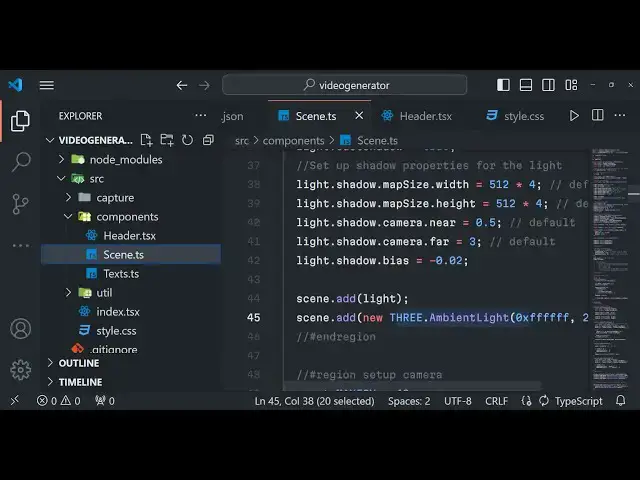
components that we use right here so you
13:09
can see we have used 3js these are all
13:12
webgl renter this is all part of 3GS
13:15
Library you can control the map size map
13:18
height camera near all these options are
13:21
there if you are actually a programmer
13:23
you will know all these properties in
13:25
3js so we have added this to the scene
13:28
putting light as well so this is 3js and
13:32
fmpg we have used in con conjunctions to
13:34
actually make this awesome application
13:37
so when you select your images you will
13:39
see
13:40
that it's a 3D flip book you can even
13:43
see your images right in the browser in
13:45
this manner as well if you don't want to
13:47
record video it's also very good way to
13:49
actually see the images as well right in
13:51
the form of a 3D flip book so it's a
13:55
nice application and then you can even
13:58
export them into a video file as well so
14:00
this makes it a really good application
14:03
to buy guys it works entirely in the
14:05
browser
14:07
and we have used 3GS fmpg if you are
14:10
interested the link is given you can
14:12
purchase it from proc Cod
14:14
store.com and thank you very much for
14:16
watching this video and I will be seeing
14:19
you guys in the next video Until then
14:23
thank you very much
#Fun & Trivia
#Flash-Based Entertainment
#Multimedia Software
#Online Goodies
#Clip Art & Animated GIFs
#Animated Films