live_tv
Livestream Starting Soon
00
Hours
:
00
Minutes
:
00
Seconds
Up next in 10

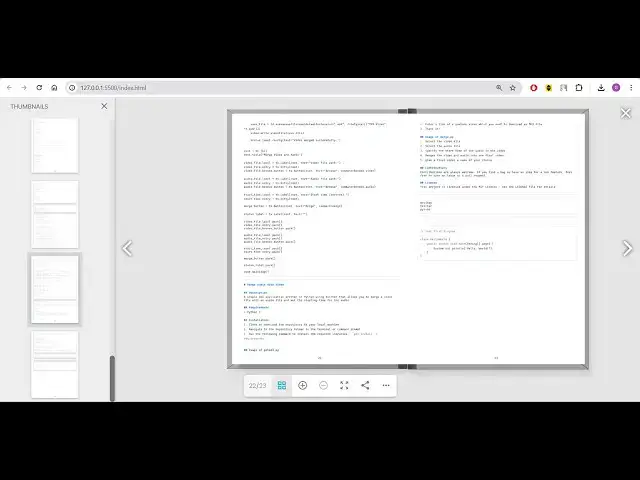
Build a 3D Flipbook PDF Renderer & Viewer in Browser Using jsPDF & PDF-LIB in Javascript
Jan 9, 2025

Buy the full source code of application here:
https://procodestore.com/index.php/product/build-a-3d-flipbook-pdf-renderer-viewer-in-browser-using-html5-css3-javascript/
Hi Join the official discord server to resolve doubts here:
https://discord.gg/cRnjhk6nzW
Visit my Online Free Media Tool Website
https://freemediatools.com/
Buy Premium Scripts and Apps Here:
https://procodestore.com/
Show More Show Less View Video Transcript
0:00
uh hello guys welcome to this video so
0:02
in this video I basically developed this
0:05
uh application which allows you to
0:08
actually view your PDF files uh in a
0:11
very Advanced PDF renderer and viewer
0:13
which is developed using JS PDF and PDF
0:16
lib Library it works in the browser and
0:19
when you open this application it will
0:20
look something like this where we have
0:22
this button right here there is two
0:24
options you can enable 3D mode so it's a
0:27
3D PDF viewer and renderer so so you
0:30
will be able to let me show you and also
0:33
there is a second option if you want to
0:36
enable right to left mode as well there
0:38
you can even do that also then you need
0:41
to select your PDF document whichever
0:43
PDF document you are selecting right
0:45
here so there is this 3D viewer right
0:48
here if I turn on the volume here you
0:50
will also get it sound as well whenever
0:52
you flip the page in the PDF document
0:55
you will get this nice little sound
0:57
right here if you basically navigate to
0:59
the next page in the PDF document so
1:01
it's it's kind of a book so whenever you
1:05
flick pages in the book there is a
1:07
slight sound which comes it also there
1:09
right in this PDF viewer as well if you
1:12
see right here if I navigate to the next
1:14
page you will get this nice little sound
1:16
right
1:17
here you can even see the pages as well
1:21
you'll see the total number of pages
1:22
which are present 23 pages on the left
1:24
hand side you can just toggle this to
1:27
actually see this live preview thumbnail
1:29
of the page
1:31
these controls are also there if you
1:34
want to go to the next page the previous
1:36
page next page all these controls there
1:38
is a cross button if you want to close
1:40
this
1:41
file so all these controls are there and
1:45
now if you want to zoom in there is you
1:46
can even just uh with your mouse you can
1:51
just
1:52
scroll in and out you can just do it if
1:55
you want to read the text in the PDF
1:59
document if you are not seeing it you
2:00
can zoom in right here by using the
2:02
mouse or you can even click this button
2:05
right here to zoom out and zoom in so
2:08
it's a 3D viewer you can just see you
2:10
can change the position of the document
2:12
right here and whenever you want to you
2:16
can even view it in full screen mode as
2:18
well you can toggle this full screen
2:20
mode and now this is a fully featured
2:23
PDF viewer and
2:25
Ender and you can see that
2:31
so you can basically read your PDF
2:34
documents in this way very nice little
2:37
way 3D flip book way so it's kind of a
2:41
book your PDF document if you want to
2:43
navigate to the next page there is a
2:45
nice sound which will come right here
2:48
you can just see
2:50
here if you come out to the toggle you
2:52
can can toggle this if you want to share
2:56
it there is a share button as well you
2:58
can basically copy this link and share
3:00
it Facebook Twitter it's built in
3:03
Futures if you deploy this application
3:05
on your website so you can directly copy
3:07
this link and share it on any social
3:10
media
3:11
Network and then there is more options
3:13
you can download this PDF file you can
3:16
turn this into a single page mode if you
3:18
turn this only a single page will be
3:21
visible at a time so you can see
3:25
that so this is a single page mode you
3:28
can go to any Page by clicking directly
3:31
right here and then there is go to first
3:34
page if you want to go to the first page
3:36
of the PDF document it will navigate to
3:38
the first page right here if you want to
3:41
go to the last page then it will go to
3:43
the last page right here you will see
3:44
that so there is a direct buttons are
3:47
available if you want to go to first
3:49
page last page if you want to turn this
3:52
sound that is appearing right here if I
3:54
this sound you can turn this sound off
3:57
so now there will be no sound available
3:59
you can see
4:00
that so if you want to turn on this
4:03
sound you can see that uh sound is so if
4:07
you need this full project guys the link
4:09
is given in the description you can
4:10
purchase the full source code from my
4:12
website Pro Cod store.com so after you
4:15
purchase it you will actually get the
4:16
zip file from Google Drive automatically
4:19
after you make the payment so this is
4:21
actually built in right in the browser
4:24
it is built inside HTML CSS and
4:27
JavaScript you will get this directory
4:29
structure after you extract the zip file
4:31
after you make the payment you will be
4:33
redirected to Google Drive and this is
4:35
HTML code CSS and JavaScript code right
4:38
here and it runs in the browser you just
4:41
need to right click open with live
4:43
server so it will open your application
4:45
in the browser then you can simply
4:47
select your PDF document and just see
4:51
right here it's a fully flesh PDF editor
4:55
and renderer and we have used JS PDF and
4:58
HTML to canvas library for building this
5:01
JS PDF it's a client side JavaScript PDF
5:04
generation Library it's also useful
5:07
for uh rendering your PDF document so we
5:10
have used this library and also we have
5:12
used HTML to Canvas Library which is
5:15
actually
5:17
a screenshot Library which allows you to
5:20
convert your HTML to actual image to
5:24
take screenshot so we have used these
5:26
two libraries alongside with the
5:30
PDF JS which is actually a
5:33
Mozilla open source library for
5:37
actually so we have used this pdf.js
5:40
library to actually it's a crossplatform
5:42
library open source which allows you to
5:46
uh render PDF in the browser and also we
5:48
have used PDF lib which is actually a
5:51
library in JavaScript to actually
5:54
construct PDF documents it can also be
5:56
used in nodejs and browser side as well
5:59
in JavaScript so all these four
6:01
libraries we have used in conjecture to
6:04
actually build out this awesome little
6:05
project which allows you to build to
6:08
render your PDF documents in 3D way you
6:11
can navigate to any page with this you
6:14
can zoom in you can go to any page
6:16
navigate to
6:19
it you can toggle full screen mode as
6:22
well you want
6:24
to you can switch to double page mode or
6:27
single page mode accordingly if you want
6:30
to download this PDF file simply click
6:32
download and this PDF file will be
6:34
downloaded so it's a fully fleshed
6:37
editor guys you will see that similar to
6:40
Adobe Acrobat which allows it's a paid
6:43
software but it works in the browser no
6:46
desktop software is there so you can
6:49
read your PDF documents in the browser
6:51
with this help of this software which I
6:53
developed you will see that you can zoom
6:56
in zoom out all these functionalities
6:58
are there or you can share this PDF
7:00
document by using the share widget if
7:02
you deploy this application on the
7:04
browser you will actually get a link and
7:07
all these go to the first page go to the
7:09
last
7:10
page can see that so it basically turns
7:13
into a 3D flip book kind of a renderer
7:19
and so you can basically read your PDF
7:22
documents as a 3D book in the browser
7:25
which
7:28
uh so coming back to the code basically
7:31
you will actually get this source code
7:33
CSS JavaScript HTML code all this code
7:36
is customizable once you basically
7:39
purchase it you will be having full
7:40
commercial right to actually
7:42
edit and redistribute this software if
7:46
you want
7:47
to can just customize
7:50
this and also see how I developed this
7:53
this is a great project if you are
7:56
wanting to develop PDF viewer in browser
8:03
so if you're interested guys the link is
8:05
given in the description you can
8:06
directly purchase it from my website Pro
8:08
Cod store.com and you will actually get
8:13
this PDF editor and
8:24
renderer so all these controls you will
8:26
see that zoom out zoom in
8:30
this is for go to last page go to first
8:35
page and single page mode double page
8:38
mode all these things are
8:42
there downloading PDF
8:45
document so if you're interested guys
8:47
the link is given in the description and
8:50
please hit that like button subscribe
8:52
the channel as well and I will be seeing
8:55
you in the next video
#Fun & Trivia
#Flash-Based Entertainment
#Clip Art & Animated GIFs