0:00
uh hello guys welcome to this video so
0:02
in this video I will show you a very
0:04
popular theme in vs code uh which is
0:08
atom atom is a IDE very open source IDE
0:13
similar to vs code so they have their
0:16
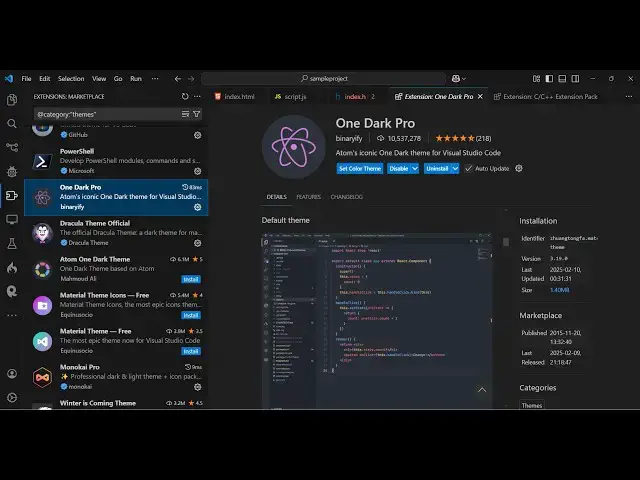
iconic theme which is atom one dark Pro
0:19
this is the name of the theme if you go
0:21
to extensions just type one dark Pro if
0:25
you just write this the very first theme
0:27
which comes right here you'll see it has
0:31
10.5 million installs so it's a very
0:34
popular theme it's having a great rating
0:37
here you'll see that it atoms iconic one
0:41
dark theme for vs code so you just need
0:44
to install it and activate this theme so
0:47
it comes with various flavors you will
0:49
see it has having five
0:51
themes so let me show you one by one
0:55
just apply this one so this is actually
0:57
the default theme of one dark Pro having
1:00
this nice little gray background color
1:03
atom and if you want to see the rest of
1:07
the themes so this is more darker
1:10
version one dark Pro darker this is less
1:13
darker this is more darker slightly
1:17
black and one dark Pro flat you'll see
1:20
the difference here that little bit
1:22
flacker this is mix one so now you can
1:26
see uh it is slightly having the black
1:29
black background color in the status bar
1:31
you will see and then we have the full
1:36
dark version which is one dark Pro night
1:38
flat so it works in the night so if
1:41
you're working in night then it works
1:43
quite good you'll see the highlighting
1:46
also is very good the it is using these
1:49
bright colors which is yellow green sky
1:52
blue similar to the atom IDE
1:56
version so if you don't know about atom
2:00
it's similar to vs code it's develop in
2:04
electron as a guia application in HTML
2:07
CSS and JavaScript it's also open source
2:11
if you don't want to use atom you can
2:13
use this extension to get the full look
2:17
and can use this extension it's very
2:21
popular one dark Pro it's having almost
2:24
10 billion installs and if you go to the
2:28
extensions tab they do offer some more
2:30
themes as well which is developed by
2:32
some more persons this one one dark Pro
2:38
theme this is you can check out over all
2:43
so this is slightly darker
2:48
here so this is so much popular that
2:51
people have developed some more themes
2:54
based upon that so this is the red
2:56
version of this theme
3:04
so so you can see that so this is the
3:08
red versions personally I don't like
3:10
this so I will uninstall this in this
3:13
way you can check out one by one just I
3:15
one dark Pro and quite a lot of
3:17
extensions will come right here so the
3:20
so the main one is this one which is
3:21
having 10 million installs so I showed
3:24
you so thank you very much for watching
3:27
this video and check out my weite as
3:30
well freem mediat tools.com which
3:32
contains thousands of tools regarding
3:34
audio video and image and I will be
3:36
seeing you in the next video