Up next in 10

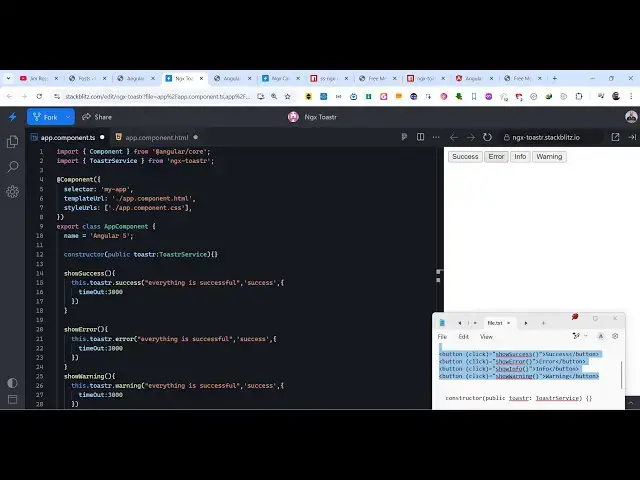
Angular ngx-toastr Example to Show Toast Notification Messages in Browser Using TypeScript
Jan 30, 2025

Get the full source code of application here:
https://codingshiksha.com/angular/angular-ngx-toastr-example-to-show-toast-notification-messages-in-browser-using-typescript/
Hi Join the official discord server to resolve doubts here:
https://discord.gg/cRnjhk6nzW
Visit my Online Free Media Tool Website
https://freemediatools.com/
Buy Premium Scripts and Apps Here:
https://procodestore.com/
Show More Show Less View Video Transcript
0:00
uh Hello friends welcome to this video
0:02
so in this video I will show you a
0:04
package inside angular which allows you
0:07
to show these nice little toast
0:09
notification messages which include
0:11
success error info warning so it has
0:14
various icons also appearing nice little
0:16
colors so inside your application
0:19
Whenever there is a need to display
0:21
these toast notification messages this
0:23
will be very much helpful package the
0:26
name of the package is ngx
0:28
toast so toaster so I have written a
0:32
some simple step by-step blog post on my
0:34
website the link is given in the
0:36
description to get all the source code
0:38
so if you just go to npmjs.com just
0:41
search for this package
0:43
ngx toaster this is actually the package
0:47
name and
0:50
uh the command is simple I've already
0:52
installed it it's almost having 374,000
0:56
weekly downloads and they do offer a
0:58
nice little documentation on their
1:00
official website and you can check
1:05
out all these positions are also
1:07
supported you can display bottom left
1:10
top
1:10
Center at any position you can display
1:13
now to get
1:14
started you first of all need to I will
1:19
simply delete everything and start from
1:25
scratch so first of all you need to edit
1:28
this app. mod module. TS
1:31
file and first of all we need to import
1:35
this module so we simply say
1:37
import toaster module and which will be
1:41
coming from this package ngx
1:45
toaster and then we
1:47
simply include
1:52
this inside the Imports aray so we
1:55
simply import this like this so now you
1:58
can close this file
2:00
and
2:04
uh just put
2:11
this just put a comma after this so now
2:15
we come to the template file and we just
2:17
Define four buttons here one by one I
2:20
will show you example so these four
2:23
buttons will be simply responsible for
2:27
Success error info warning so as soon as
2:29
I click the button that toast not
2:32
notification message will show so you
2:35
just binded these four buttons we have
2:38
put this on click listener to each of
2:40
the button we are having these method
2:42
sour access error info warning so now we
2:45
need to Define all these four methods
2:47
inside the app. component. typescript
2:49
file so now just open this file and
2:52
Define all these methods so now to use
2:55
this package we first of all need to
2:58
construct a Constructor and pass pass
3:01
this create a variable of this service
3:04
toast service this service will be
3:07
imported at the very top from this
3:09
package and now one by one I will show
3:12
you the method first of all the success
3:15
method and this service contains a
3:19
success call back and here you define
3:21
the message that you want to display
3:24
everything
3:26
is successful and here you provide
3:35
and then you also need to provide how
3:37
much second it appears for on the screen
3:39
so I will say 3,000 millisecond so this
3:42
means that it will appear for 3 seconds
3:44
so as soon as I click the button you
3:47
will see it will appear for 3 seconds
3:49
and then it will go
3:51
away and same I will do this for the
3:58
next this one for the show
4:12
error so here you need to
4:15
change the call back name here so this
4:19
is will be for error this will be for
4:24
warning and this will be
4:28
for in
4:31
four so you will see the icons will
4:34
display here this is you can see the
4:36
warning icon this is the info icon so
4:40
all these success notification messages
4:43
have pre-made icons available so as you
4:46
click the you will see this icon will
4:49
display alongside with the message so in
4:51
this way guys you can show these nice
4:53
little to notification messages using
4:55
this uh module inside
4:58
angular so
5:00
thank you very much for watching this
5:02
video and also check out my website as
5:04
well free mediat tools.com uh which
5:07
contains thousands of tools regarding
5:10
audio video and MH and I will be seeing
5:13
you guys in the next video
#Educational Software