Up next in 10

Angular ngx-emoji-picker Example to Embed Emoji Picker Form Input Field in Browser Using TypeScript
Jan 30, 2025

Get the full source code of application here:
https://codingshiksha.com/angular/angular-ngx-emoji-picker-example-to-embed-emoji-picker-form-input-field-in-browser-using-typescript/
Hi Join the official discord server to resolve doubts here:
https://discord.gg/cRnjhk6nzW
Visit my Online Free Media Tool Website
https://freemediatools.com/
Buy Premium Scripts and Apps Here:
https://procodestore.com/
Show More Show Less View Video Transcript
0:00
uh Hello friends welcome to this video
0:02
so in this video I will show you a
0:04
angular package which allows you to
0:06
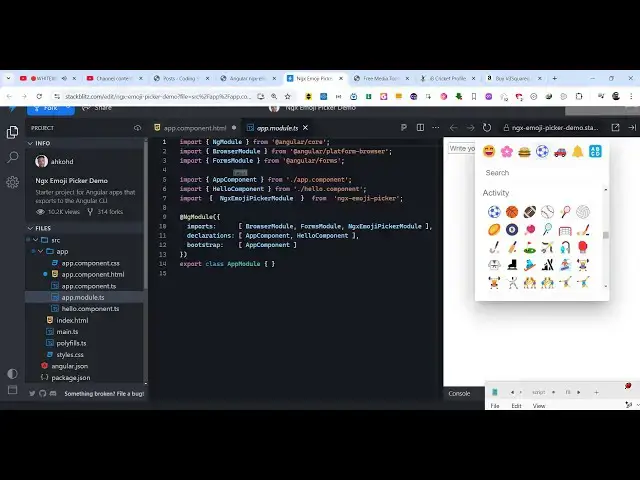
integrate this Emoji picker inside your
0:09
angular application so as you click this
0:11
button you will see this Emoji picker
0:13
appearing right here inside your
0:15
application site by side so here you can
0:17
select a series of emojis from this
0:20
Emoji picker so you can see a set of
0:23
emojis appearing you can select any type
0:25
of emoji and after you select it inside
0:28
this input field you can simply copy p8
0:30
or anything you can do it it also
0:33
changes and also print this inside the
0:35
console as soon as the input changes so
0:38
there is a package right here which
0:40
allows you to integrate this so if you
0:42
go to npmjs.com you just need to search
0:46
for this module
0:48
ngx Das Emoji so this is actually your
0:53
emoji picker for your angular
0:55
application the command is very simple
0:58
npmi NG GX
1:01
Emoji so I have written a stepbystep
1:04
detailed blog post on my website the
1:07
link is given in the description
1:09
alongside with the full source code as
1:11
well you can go to the description link
1:13
to get the full source code sorry ngx
1:17
Emoji picker this is actually the name
1:19
of the
1:21
module so it's this is actually the
1:25
command and it's almost having 420
1:28
weekly downloads so the very first thing
1:31
we need to do we need to go to this file
1:33
app. module. typescript file so here we
1:36
need to add this import statement to
1:39
configure this module so right here we
1:41
just write this import statement
1:44
ngx
1:46
Emoji picker module and it will be
1:50
coming from this package ngx
1:54
Emoji
1:56
picker so in this way you add this
1:59
import statement and then you come to
2:01
the import s and
2:04
directly import this module that's all
2:08
the configuration code now you can close
2:10
this file and now I will show you from
2:12
scratch so come to your app. component.
2:14
HTML file right here so wherever you
2:17
need to display but before that we need
2:21
to come to app. component. typescript
2:23
file and I need to declare some values
2:27
here so the first value here will be
2:30
toggled this will be a Boolean parameter
2:33
initial value will be
2:35
false and then the second one will be
2:38
the actual message that will be printed
2:41
out in the input field so we have these
2:43
two variables so now we come to the
2:46
template file and we Define a simple
2:49
input
2:53
field and we basically give it a NG
2:56
model directive
3:04
so
3:05
message and type here will be of
3:09
text and a placeholder
3:12
enter your
3:14
message and then I will
3:19
simply display the Emoji picker so we
3:22
will have this
3:27
icon so you will let attach some series
3:31
of options to it first of all the
3:33
class which is an attachment and we'll
3:36
bind an on click listener to this so
3:39
when we click on this icon so what
3:41
should
3:42
happen we will make this property toggle
3:45
to
3:46
true and then from this Emoji picker
3:51
there is a property here which is Emoji
3:54
picker if so this will be equal to the
3:59
toggled property it's a Boolean
4:01
parameter it takes so as soon as you
4:03
click this icon this toggle property
4:06
will evaluate to true and then we are
4:10
displaying the Emoji
4:14
picker so the icon will be simply like
4:18
this so now as soon as you click this
4:21
icon you will see the Emoji picker will
4:24
be
4:25
displayed and
4:28
uh as you select we need to bind this
4:31
into the input field for binding
4:36
this we just need to bind a on change
4:41
function so as soon as you select the
4:44
Emoji pick from the Emoji picker this
4:49
function will execute which is Emoji
4:52
picker select event so as soon as you
4:55
select any emoji from the Picker we will
4:58
execute this custom function
5:00
handle selection and we will pass this
5:03
event so now we just need to Define this
5:05
custom function handle selection come to
5:08
the typescript code and just Define this
5:11
function handle selection and right
5:14
inside this we pass this event object
5:17
and we console
5:20
log event. corrector and then
5:24
concatenating the this plus passage is
5:27
equal to event Dot corrector so now what
5:31
happens if you select any Emoji you will
5:33
see in the console also this Emoji will
5:36
display and inside the input field as
5:38
well so now you can directly copy this
5:40
as well so in this way you can integrate
5:43
this Emoji picker side by side inside
5:45
this input field inside your angular
5:47
application using this package so thank
5:51
you very much guys for watching this
5:52
video and also check out my website as
5:55
well free mediat tools.com uh which
5:58
contains thousands of tools regarding
6:00
audio video and image and I will be
6:03
seeing you guys in the next video